
Tree Testing: What a 12-Task Admin Navigation Audit Found

AI Art Direction: Six-Brief Visual Consistency Study
VMware Fusion Audit: What Windows 11 ARM Evidence Can Prove
Historical Windows guest evidence (October 26, 2026) and a separate host/configuration audit (November 9, 2026). Draft for editorial review — not yet published.
Decision Brief: A Working Windows Desktop Is Not a Compatibility Certificate
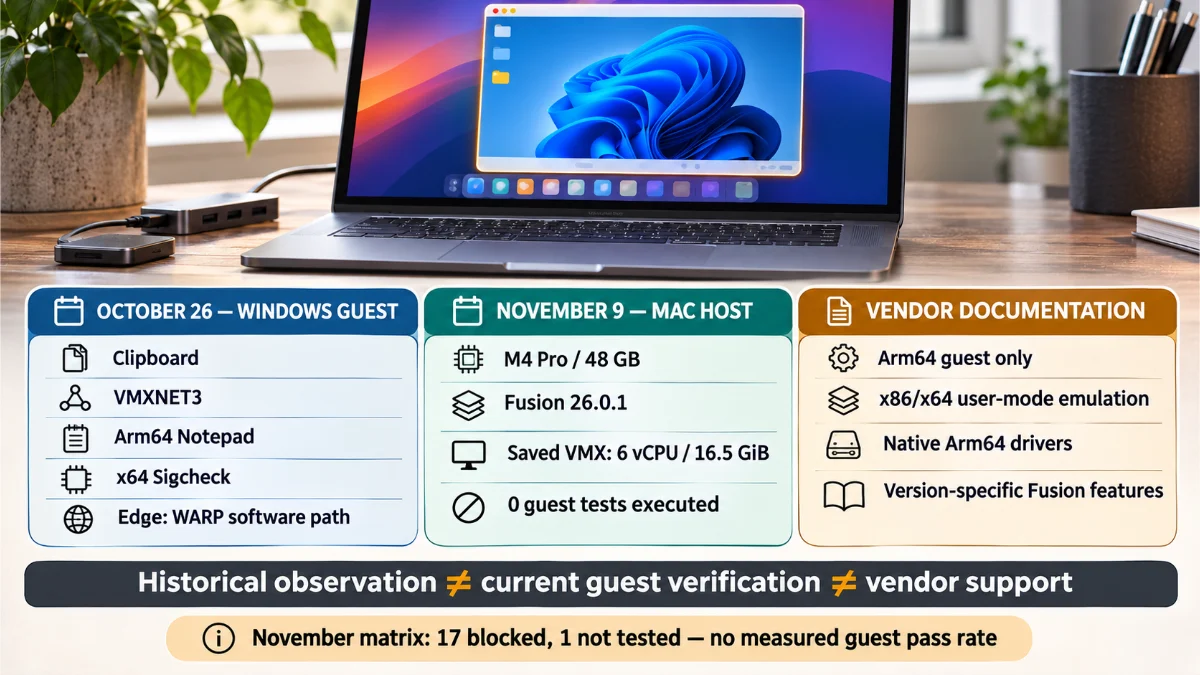
A Windows 11 ARM desktop running inside VMware Fusion on Apple Silicon can be useful and still fail a critical part of a professional workflow. In my October 2026 laboratory session, I could restart the guest, exchange clipboard contents with macOS, exercise basic networking, and run native Arm64 and x64 applications. Yet Microsoft Edge reported that its graphics paths were running through software rather than the accelerated virtual adapter that appeared in the device inventory. That contrast is the starting point for this VMware Fusion audit: compatibility belongs to a particular operation, application build, driver and virtual-device path, not to the fact that the operating system boots.
I returned to the system evidence on November 9, 2026. This time, a read-only inspection of the Apple Silicon host and the saved Windows VM configuration succeeded, but the VMware Fusion command-line interface failed before it could enumerate running guests. I had current host information and the earlier guest observations, but not a newly executed Windows test session. I will not combine them into a fictional continuous benchmark or claim that the earlier success proves that everything still works today. The contrast between what was observed, what was configured, and what the vendors document is the core of this VMware Fusion audit.
This is a complementary engineering study to my earlier Windows 11 ARM in VMware Fusion: Compatibility Lab. That report documents the October field experience. Here I concentrate on evidence provenance, the graphics rendering chain, the native-versus-emulated application boundary, the failed November access attempt, and a reproducible test contract for future revisions. The question is not whether this platform is good or bad in general; it is what a developer can responsibly authorize for a given task.
- Historical guest observations: October 26, 2026, Windows 11 ARM build 26300.9711; hands-on checks and a preserved Edge GPU report.
- Later host audit: November 9, 2026, Apple M4 Pro and VMware Fusion bundle inspection; no live Windows guest calls completed in that session.
- Independent documentation: Microsoft Windows on Arm architecture guidance and Broadcom’s version-specific VMware Fusion capability statements.
- Practical finding: a configured 3D option and a recognizable virtual adapter do not establish that a particular browser uses hardware acceleration.
The Research Question and Its Evidence Boundary
The research question behind this VMware Fusion audit is straightforward: Which Windows 11 ARM development and administration tasks have actually been demonstrated, which are supported in vendor documentation, and which remain unresolved for the inspected configuration? I separate a successful boot from application operation, application operation from native architecture, graphics API availability from active rendering, and saved settings from what Windows sees at runtime. Those separations matter because the same visible desktop can conceal materially different implementation paths.
For example, a native Arm64 text editor can open and save a file while an x64 utility is translated by Windows. Neither observation establishes that an x64 VPN filter, an anti-cheat kernel component, or a USB interface driver will load. Similarly, the virtual graphics adapter may expose a Direct3D capability while Edge routes the page through Microsoft Basic Render Driver and WARP. A decision about a browser-based design tool needs evidence from the browser rendering path; a decision about a signed network filter needs native-driver evidence. One global compatibility score would erase both.
Three Distinct Evidence Levels
| Evidence level | What I have | What it can establish | What it cannot establish |
|---|---|---|---|
| October 26 guest session | Historical terminal and interactive checks, plus an original Edge edge://gpu export | What selected actions and software reported on that dated Windows guest | November status, sustained performance, all peripherals or every application version |
| November 9 host audit | Read-only macOS inventory, VMware Fusion application metadata, registered VMX configuration and CLI errors | Host version, saved virtual hardware flags and the boundary of the available access route | Installed guest build, active Windows drivers, loaded Tools, current boot state or guest workflow success |
| Official platform sources | Broadcom and Microsoft documentation with version caveats | Vendor-stated support, design constraints and known incompatibility categories | Actual performance or successful operation in this particular virtual machine |
The October and November observations are different samples in time and visibility. Their intersection is useful: the earlier Windows report names a guest operating system and working features, while the later Mac inspection establishes a concrete VM configuration associated with the author’s lab. But a saved VMX file is not a time machine. This VMware Fusion audit does not assume that an installed Windows build, driver revision or guest tool state remained unchanged between those dates.
Methodology: Trace a Claim to the Layer That Produced It
I reviewed the original October Edge diagnostics as a preserved raw observation and treated the other October checks as historical test records from that session. For November, the research package saved an allowlisted host inventory rather than copying private VM paths, identifiers or full logs. Its Python-based matrix and script reviews recorded what could safely be inspected. The test registry was frozen with SHA-256 checksums and defined PASS, PARTIAL, FAIL, BLOCKED and NOT_TESTED before a result could be assigned. I can audit the arithmetic and the declared inputs; I cannot independently replay a Windows command that was not executed on November 9.
The documentary comparison follows the Broadcom Arm guest considerations, the Broadcom Windows 11 feature comparison, and Microsoft’s Windows on Arm emulation documentation. When the Broadcom sources describe different generations of VMware Fusion with different capabilities, I preserve the version difference rather than selecting the more convenient statement. When a release note or compatibility entry was inaccessible, I leave the exact support tuple unresolved.
Apple Silicon Virtualization: The Measured Host and the Historical Guest
The November inspection directly observed a MacBook Pro with an Apple M4 Pro, 48 GB physical memory, macOS 27.2 build 26B123, and a VMware Fusion application bundle reporting version 26.0.1, build 25689522. The earlier lab notes identify the product release as VMware Fusion Professional 26H1u1, which Broadcom recognizes as a release line; the available official u1 notes did not permit an independent cross-check of the exact label-to-build mapping. This distinction is small operationally but important for a reproducible VMware Fusion audit: a marketing version label, a bundle build, and a guest driver version are different identifiers.
The saved VM configuration contained an arm-windows11-64 template with six virtual CPUs, 16.5 GiB configured memory, virtual hardware version 22, an NVMe virtual disk attachment, a NAT-connected VMXNET3 adapter, EFI, Secure Boot and vTPM flags, an enabled 3D setting, xHCI and a time-synchronization flag. These are saved configuration values. They are not proof that Windows booted with the same settings, mounted the disk, initialized the video driver, had a functioning TPM, synchronized its clock or exposed a network link in November.
| Layer | Observed or recorded configuration | Evidence qualifier |
|---|---|---|
| Host hardware | MacBook Pro, Apple M4 Pro, 48 GB | Direct November host capture |
| Host operating system | macOS 27.2, build 26B123 | Direct November host capture |
| Hypervisor application | VMware Fusion 26.0.1, build 25689522 | Direct November bundle metadata |
| Saved guest allocation | 6 vCPUs; 16.5 GiB; NVMe; VMXNET3/NAT; vHW 22 | Direct November VMX inspection, not live devices |
| Saved security and graphics flags | EFI, Secure Boot, vTPM, 3D enabled | Configuration intent only |
| Historical Windows guest | Windows 11 Pro ARM64 26H2, build 26300.9711 | October 26 guest-session evidence, not newly measured in November |
| Guest Tools media | Bundled Windows Arm installer with PE machine value 0xAA64 | Installer file architecture, not installed Tools version |
ARM Virtualization Is Not x64 Windows Virtualization
VMware Fusion on Apple Silicon virtualizes ARM64 guest operating systems. It does not turn the Apple processor into an x86 host capable of running an x64 Windows kernel directly. Inside a Windows 11 ARM guest, however, Windows can emulate supported x86 and x64 user-mode applications. The layers are different: ARM64 guest virtualization is a host/hypervisor relationship, while x64 program emulation occurs within the guest operating system. That is why an x64 executable may work on an ARM64 Windows desktop without implying that an x64 Windows driver or another x64 guest operating system would work in the same virtual machine.
Microsoft describes Prism, introduced in Windows 11 24H2, as a newer user-mode emulation engine. That documentation explains the translation mechanism, but its optimizations are not all universal across processors and hardware features. The mere presence of a newer Windows build does not establish a quantified performance advantage for this Mac guest. In a serious VMware Fusion audit I would separate binary provenance, process architecture, functional output, and performance rather than labeling everything either native or slow.
VMware Tools and Guest Integration Are Feature-Level Questions
The October VMware Fusion session recorded a running VMware Tools service and successful clipboard, drag-and-drop, and resizing workflows. The November host bundle contained an Arm64 Windows Tools installer, but the researcher could not query the Windows service, installed version or device driver inventory at that time. The host VMX flag tools.syncTime=TRUE is therefore a configuration statement, not a verified clock-sync result. This is also why I separate drag-and-drop from Shared Folders. Successfully moving a small test file through an interactive mechanism does not prove that VMware HGFS shared folders were installed or supported for that Windows guest.
Broadcom’s older Arm guest article describes narrower Windows integration than its later comparison table. The later table covers versions through VMware Fusion 25H2 for the relevant Apple Silicon column and lists certain clipboard, drag-and-drop, auto-fit and DirectX 11 capabilities, while treating HGFS on Arm as a Linux guest feature. The 26H1u1-specific guest implementation still needs verification. My historical observations can show that some interactions worked in October; they do not rewrite the vendor’s exact version-support matrix.
Windows 11 ARM Compatibility: The October 26 Guest Checks
The most useful VMware Fusion historical evidence is a bounded set of real tasks rather than a blanket claim that Windows ARM compatibility has been solved. The October guest showed a working Windows session on build 26300.9711. The checks covered basic power transitions, host/guest interaction, a guest network adapter, desktop resizing, native software and an x64 utility. I keep these historical results in the context in which they were observed; the November script never repeated them.
| Area | Reported or captured observation | Meaningful boundary |
|---|---|---|
| Boot and recovery | Restart and cold boot completed without the previously watched black-screen or freeze symptoms; WinRE was enabled and identified version 10.0.26100.9711 | No destructive recovery exercise or unattended long-term reboot series |
| Networking | VMXNET3 was up, its displayed link speed was 10 Gbps, and selected DNS and TCP 443 checks succeeded | Virtual link speed is not measured file transfer throughput or a complete TLS workload |
| Desktop integration | Two-way clipboard and small file drag/drop, window auto-fit and full-screen transitions worked in the October session | No independent HGFS mounted-folder proof or all-feature compatibility claim |
| Graphics device | VMware SVGA 3D was visible; the earlier DxDiag summary reported Direct3D enabled, WDDM 2.0 and feature level 11_0 | Reported API capability does not identify each application’s active renderer |
| Native Arm64 application | Arm64 Notepad saved and reopened a test file | A scoped file-edit operation, not a complete native application ecosystem test |
| x64 user application | Sigcheck 2.93 x64 executed for architecture and signature checks | User-mode execution example; no x64 driver or all-app guarantee |
| Microsoft Edge | Edge 156.0.4314.42 exported a graphics report showing software rendering and WARP | Specific browser, build and session; not every graphics application |
These observations are useful evidence of day-to-day desktop functionality, but they are not a comprehensive application matrix. A command-line utility that starts successfully may still fail when interacting with a protected device or complex extension. Similarly, successful DNS resolution and a TCP connection to port 443 do not prove that every HTTPS service, proxy or developer deployment workflow works. My VMware Fusion audit retains each original acceptance boundary instead of borrowing the confidence of a broader claim.
Why I Keep the Recovery Result Narrow
During the earlier setup work, I reconstructed Windows Recovery storage and enabled WinRE using reagentc /enable. In the October diagnostic sequence, the recovery environment was reported as enabled. This matters because a virtual machine intended for development needs a recoverable operating-system design, not just a successful installation. But it does not show that I booted into WinRE and successfully recovered a deliberately broken installation. Configuration readiness, recovery boot, and proven restoration are different experiments. No data should collapse them into a single ‘recovery passed’ badge.
Virtual GPU Acceleration: The VMware SVGA 3D and Edge WARP Mismatch
The strongest specific VMware Fusion observation in this audit comes from the original edge://gpu export saved on October 26 at 14:00:31 UTC. It identifies Edge 156.0.4314.42 on Windows NT 10.0.26300.9711. The report lists a VMware SVGA 3D adapter with Microsoft driver 9.17.11.4, but it identifies Microsoft Basic Render Driver as the active adapter for the reported Edge pipeline. It also reports ANGLE_D3D11_WARP and an ANGLE renderer associated with Microsoft Basic Render Driver.
The Graphics Feature Status section describes Canvas, compositing, rasterization, video decoding and encoding, WebGL, WebGPU and WebNN as software-only or unavailable for hardware acceleration. OpenGL is marked disabled in that browser status section. The report also lists a non-supported D3D12 feature level and a blocked WebGPU backend. This is not a benchmark measuring frames per second or CPU utilization. It is a diagnosis of the selected browser’s active graphics path at that time. The distinction matters because a virtual device being listed is not equivalent to the application using the virtual device for accelerated rendering.
| Diagnostic field | Reported state | Interpretation |
|---|---|---|
| Present VMware adapter | VMware SVGA 3D; driver 9.17.11.4 | Device is enumerated; not sufficient to prove accelerated Edge rendering |
| Active Edge renderer | Microsoft Basic Render Driver; ANGLE_D3D11_WARP | Software-backed D3D11 translation path for this browser context |
| Compositing and rasterization | Software only | Browser does not report hardware acceleration for those paths |
| WebGL and WebGPU | Software only / unavailable hardware acceleration | No verified GPU acceleration for the browser workloads observed |
| OpenGL status | Disabled in Edge Graphics Feature Status | Not a blanket statement about every OpenGL program on Windows |
| D3D12 feature level | Not supported in the captured Edge diagnostic | Do not infer Windows runtime version or all virtual-adapter capabilities from this field alone |
What WARP Does and Does Not Tell Us
WARP is Microsoft’s software rasterizer for Direct3D workloads. In this report the graphics abstraction layer, ANGLE, is using a D3D11 WARP path. It can translate rendering calls into a functioning software implementation, allowing ordinary pages and interfaces to display even without active GPU acceleration in the browser. That is an important compatibility mechanism. It also means that a successful visual output and a smooth desktop are weak evidence for demanding WebGL, WebGPU, video processing or hardware-accelerated creation workflows.
I would not state that VMware Fusion’s entire graphics system is broken from this log. The diagnostic came from one browser process with its own preferences, driver blocks, application version and virtualization circumstances. The captured adapter list includes VMware SVGA 3D; the result demonstrates that Edge selected a software pathway. Another application or a later browser revision could select a different path. A reliable VMware Fusion audit needs a renderer-specific workload, its backend diagnostics, a verified driver, and a comparable retest before making a graphics-performance claim.
Why Vendor DirectX Support and Edge Behavior Can Both Be True
Broadcom advertises DirectX 11 capabilities for later generations of VMware Fusion on Apple Silicon. Microsoft Windows may report a DirectX runtime and the virtual adapter may expose feature levels. Neither statement forces Edge to use a hardware-backed path in this particular session. The full chain runs through VMware Fusion’s virtual device, the guest driver, the OS graphics subsystem, ANGLE or another browser backend, the application’s denylist and its runtime choices. Each layer has its own success criteria. A mismatch at the application layer cannot be resolved merely by increasing virtual CPUs or toggling a 3D checkbox.
For a professional graphics decision I would run separate checks for a named D3D11 application, browser WebGL and WebGPU, image/video decode, and any GPU compute requirement. The exact test must measure correct output and the backend actually selected. The October report covers the browser diagnosis; the November audit captured only mks.enable3d=TRUE in the saved configuration. Calling those two records a completed before-and-after acceleration test would misstate the evidence.
ARM64 Native Applications, x64 Emulation and Driver Dependencies
Windows 11 ARM compatibility is not a binary promise about software. Microsoft supports x86 and x64 user-mode emulation on Windows 11 ARM, while Windows kernel drivers and user-mode print drivers must be compiled for Arm64. That creates an asymmetric environment. An x64 application can open and do useful work, yet a feature that depends on an x64 kernel driver may remain impossible in that same installation. The correct evaluation object is the requested workflow, including helper programs, extensions, services and devices.
What the Two October Application Examples Establish
The October VMware Fusion Notepad exercise verified a scoped native Arm64 operation: opening, editing, saving and reopening a test file. The Sigcheck 2.93 exercise demonstrated that an x64 user-mode tool could launch and perform its selected signature and architecture checks in the guest. These examples establish different execution paths and useful functionality. They do not measure relative speed, validate every Notepad integration feature, prove that x64 installers work universally, or establish that an application’s dependencies are all Arm64-safe. This VMware Fusion audit treats the two examples as evidence points, not universal compatibility percentages.
Executable identity also requires care. The PE machine field, vendor package and runtime process architecture are complementary. Arm64EC and Arm64X can involve mixed native and x64 components, so a single filename or AMD64 header is not always enough to classify the complete application as purely emulated. Microsoft documents Arm64EC and IsWow64Process2 for investigating these boundaries. When I cannot establish a process and its required modules, the responsible classification is mixed or unknown.
Developer CLI Support Is a Dependency Graph, Not an Installer List
Current official distributions provide Windows Arm64 builds for tools such as Git, Node.js, Python, and Visual Studio Code. A Windows x64 PHP distribution may be a relevant emulation candidate. But a successful vendor download and a launch screen are not enough for my development workflow. Git needs repository operations; npm needs package scripts and native addons where used; Python needs required wheels; PHP needs the exact extensions and runtime dependencies; an editor needs a save/reopen and extension test.
The November package therefore defines disposable Git commit checks, deterministic Node and npm fixtures, Python and PHP CLI outputs, a localhost HTTP server, file-hash integrity, editor save/reopen, and post-restart persistence checks. Those Windows scripts were prepared but not executed in the November guest. Some analogous fixtures ran on the Mac host; a host-side Git success is not a Windows-on-Arm Git success. I will not turn availability in a distribution catalog into a fictional result row in the VMware Fusion audit.
Why Drivers Are a Separate Compatibility Gate
VPN clients, endpoint protection, USB audio tools, specialist printers, hardware debugging utilities and some gaming software can depend on native drivers or privileged services. The relevant question is not just whether the user interface starts. It is whether the required Arm64 driver is supplied, signed, installed, loaded and functional against the virtual or passed-through device. Windows emulation cannot be relied on to translate an x64 kernel driver. A basic class-compliant device could work through an inbox Arm64 driver even when a vendor-specific feature does not, so I would test each device class and function independently rather than condemn every peripheral category.
This also changes how I treat nested virtualization. Broadcom’s Apple Silicon VMware Fusion guidance excludes Windows features that require nesting another hypervisor in the Windows Arm guest. WSL 2, for example, uses a lightweight managed virtual machine; WSL 1 has a different architecture, and connecting a Windows CLI to a remote Linux host is a different deployment topology. Saying that nested hypervisor-dependent functions are unsupported under the documented policy is not the same as claiming that every Linux-related development workflow or Docker client command fails. No nested-virtualization command was run in this study.
VMXNET3 Networking, NVMe Storage and Restart Persistence
In the October VMware Fusion session the VMXNET3 adapter reported an active link, DNS resolution worked for the selected target, and a TCP connection on port 443 succeeded. That matters for ordinary administration, browser access and package retrieval. But the displayed 10 Gbps rate is the virtual network interface’s negotiated or advertised link speed. It is not a measured end-to-end application transfer rate, host uplink capacity or proof of a specific remote service’s TLS and authorization behavior. A meaningful network acceptance test would separate link status, DNS, HTTPS, proxy rules, guest loopback and host-to-guest traffic.
On November 9 the VMware Fusion saved VMX showed NAT and VMXNET3, while the Windows adapter status and address were unavailable. These records align at the configuration level, but only an actual guest query can show present driver binding and network reachability. Broadcom’s ARM guidance recommends VMXNET3 and virtual NVMe; following those recommendations reduces obvious compatibility risk but is not itself runtime measurement. I regard adapter selection as a hypothesis about a supported path, not an observed throughput figure.
Storage Integrity Is Different From Storage Performance
The November VMware Fusion VMX inspection found an NVMe disk attachment and a configured virtual disk file. It did not inspect the guest filesystem or perform a Windows read/write operation. The prepared guest fixture creates a small temporary file, computes a SHA-256 digest, copies it and checks the new digest. This is a correctness test for a narrow file operation. It cannot establish sustained I/O, SSD thermal behavior, queue latency, durability under power failure or virtual disk health. Those are separate experiments with different controls and a legitimate workload.
The distinction is useful when judging whether a VM is suitable for a coding task versus a storage-heavy production simulation. My other article, Virtualization Performance: Find the Real Bottleneck, explains why CPU allocation, memory pressure, I/O behavior and graphics backends must be investigated separately. This VMware Fusion audit evaluates compatibility evidence, not a comparative performance benchmark against native macOS, another hypervisor or a physical Windows PC.
A Restart Is a Bundle of Independent Checks
The historical October VMware Fusion notes record successful reboot and cold boot observations. The November plan called for a disposable persistent marker, an exact file hash, a clean Windows restart, a later boot timestamp, VMware Tools service inspection, network reconnection and an editor file check. None of these November guest operations occurred. The frozen run therefore has no new measured restart, persistence or recovery outcome. A valid future attempt should record each subcheck independently; a VM can reboot normally while failing to restore a network route, virtual display integration or a critical application state.
Why the November VMware Fusion Audit Has No Guest Pass Rate
During the November VMware Fusion attempt the read-only host and VMX commands completed, but both VMware Fusion vmrun -T fusion list entry points returned exit code 255 with a startup error. The alternative command interface also did not produce a usable result, and no active VM console was available through the exposed interface. There was no validated guest power state. The audit did not launch, stop, reset or alter the user’s existing virtual machine to force the experiment forward. It is not possible to infer from that CLI error alone whether the guest was powered off, whether VMware Fusion initialization was restricted in the research environment, or whether a specific host-side service was responsible.
The frozen test registry contained 18 Windows-oriented cases. Because there was no safe command path into the guest, 17 were classified BLOCKED and one USB peripheral case was intentionally NOT_TESTED. No case received PASS, PARTIAL or FAIL because none had a valid Windows guest attempt. The pass-rate denominator is zero, so an observed percentage would be mathematically undefined. This is the correct interpretation of the November result, even though the October session contains positive historical checks.
| Execution status | Count | Meaning |
|---|---|---|
| PASS | 0 | No valid new guest test completed successfully |
| PARTIAL | 0 | No valid guest test completed with a measured limitation |
| FAIL | 0 | No properly attempted Windows task demonstrated functional failure |
| BLOCKED | 17 | Unmet access prerequisite prevented guest execution |
| NOT_TESTED | 1 | USB peripheral check was deferred intentionally |
| Total actual Windows guest attempts | 0 | Pass rate not defined; documentary statuses are separate |
A separate VMware Fusion research host-side fixture suite exercised safe Git, Node, npm, Python, PHP and disk checks on Darwin. Six checks succeeded and a loopback server probe encountered an EPERM bind restriction. Those results validate portions of the test harness within the host’s constrained execution environment. They do not add six Windows passes or one Windows network failure to this VMware Fusion audit. Keeping test-environment errors out of the compatibility denominator is not bureaucratic caution; it prevents the publication of false evidence.
The Vendor Support Matrix Needs a Version, Not a Vague Product Name
Broadcom’s older Arm guest guidance says certain Windows guest integration and acceleration features are unavailable, while its later VMware Fusion Windows feature table identifies additional capabilities for newer release generations. The historical October test observed some of those newer integration behaviors in practice. A generic product page also describes DirectX support, but that statement does not answer whether a specific Windows guest running a specific Edge build will avoid WARP. I preserve the source dates and scopes rather than pretending the material is one consistent timeless specification.
The November research confirmed the VMware Fusion bundle version and virtual hardware number, but the accessible official compatibility records did not establish the entire macOS 27.2, VMware Fusion 26H1u1, Windows 11 ARM 26H2 tuple as a certified combination. Microsoft’s ARM64 ISO availability establishes that a Windows release exists, not that a saved guest has it installed or that Microsoft endorses every third-party Mac virtualization configuration. Vendor support, technical possibility, installed behavior and software licensing are four distinct questions.
A Reproducible VMware Fusion Audit Protocol for Developers
I would not repeat a VMware Fusion experiment by copying a few green check marks into a spreadsheet. The objective is to make a new session comparable with the historical evidence while remaining safe for an active development machine. My next VMware Fusion audit revision would follow a written test contract: record the environment, freeze executable versions and case identifiers, test known-safe operations, capture failures and separate the host from the guest. The prepared scripts are research instruments. They have not yet been validated by execution inside the inaccessible November Windows guest.
1. Identify All Four Versions Before Executing a Test
Capture host chip and macOS build, VMware Fusion bundle version/build, guest Windows edition and exact OS revision, and installed VMware Tools and driver versions. Include virtual hardware version, vCPUs, guest RAM, virtual NIC, storage controller and the active virtual display adapter. I would also note whether the guest was restarted from a known state and whether host applications or other VMs were running. A mismatch in one of these elements can change compatibility without changing the product names shown on the desktop.
2. Test the Complete App Task, Not Merely the Executable
In a VMware Fusion guest, for a native Arm64 editor, open a synthetic file, edit it, save it, close the process and reopen the same file. For x64 command-line software, verify the exact binary source and architecture, then run a deterministic command with a known expected output. For Git, create a temporary repository and confirm the commit and working-tree state. For Node and npm, run a minimal offline package script. For PHP and Python, execute a small task that proves the relevant interpreter can do useful work, then test needed extensions separately. No test should touch personal repositories or real customer data.
3. Inspect the Graphics Renderer That the Workload Actually Chose
Collect dxdiag fields for the virtual adapter and then use the specific application’s diagnostics: for Edge, the GPU feature status and active ANGLE backend; for a native D3D tool, its renderer and required feature level; for graphics creation, correct output and the relevant acceleration path. Do not confuse Windows’ DirectX runtime with an application’s feature-level requirement or the VM’s actual driver. A successful Canvas 2D paint might be software-rendered and is not a substitute for WebGPU or hardware decode evidence.
4. Separate Networking, File Exchange, and Persistence
Check guest interface status, an approved DNS lookup, a controlled HTTPS endpoint and a localhost service as separate cases. Use synthetic clipboard and file-transfer payloads, recording which exchange mechanism actually moved them. For storage, verify a disposable file digest before and after copying. For restart testing, record a known marker and service state before a clean Windows reboot and repeat the checks afterward. Each result needs the exact time, expected outcome, observed output and whether another environment dependency prevented the test.
5. Keep BLOCKED, FAIL and NOT_TESTED Separate
PASS means a scoped task completed with credible evidence. PARTIAL means it completed with a material restriction. FAIL means a valid attempt was made and the intended function did not work. BLOCKED means a prerequisite prevented a fair attempt. NOT_TESTED means the check was omitted deliberately or deferred. An accessible host shell does not convert a blocked guest into a passing guest, and the absence of a driver-dependent USB fixture does not prove the driver is incompatible. A VMware Fusion audit becomes trustworthy when the errors remain visible even if they complicate the narrative.
6. Freeze the Test Cases and Preserve Raw Evidence
The November package already includes a frozen 18-case registry, a workflow matrix, a host capture, script sources and a reproduction procedure. A later session should receive a new dated revision rather than modifying the original statuses. I would preserve sanitized command output, precise package versions, source URLs and cryptographic hashes, along with any deviations from the procedure. If a previously failed task succeeds after a driver update, report both observations and their environments. That is how a result becomes useful to someone who has to maintain the platform after publication.
Compatibility Decisions: Match the VM to the Actual Workload
The practical value of this VMware Fusion audit is not a one-size-fits-all platform recommendation. It is a way to decide which work can proceed now, what deserves a controlled retest, and what should use another execution path. The October session gives credible examples of basic desktop interaction, networking and user-mode software operation. The later audit identifies the present configuration but no new guest run. The vendor evidence identifies structural limits that must be considered independently of those demonstrations. A developer should make a decision at the level of the critical dependency, not the operating system logo.
| Workload | Current evidential position | Required next acceptance evidence | Conservative decision |
|---|---|---|---|
| Basic Windows desktop and administration | October guest boot, clipboard, display and network checks | New dated boot, Tools state and restart checks on the exact current VM | Historically demonstrated, current state needs reconfirmation |
| Native and emulated user-mode tools | October Arm64 Notepad and x64 Sigcheck examples; official distribution evidence for other tools | Actual project-representative tasks, architecture and dependency checks | Promising for bounded workflows, not a blanket app pass |
| Browser graphics or GPU-heavy creation | Edge WARP/software rendering observed in October; November saved 3D flag | Same-app renderer diagnostics, correct output and comparison under a documented driver/build | Do not claim hardware acceleration for the tested Edge path |
| Driver-dependent security and peripherals | Microsoft native Arm64 driver requirement; USB guest probe not attempted | Official driver package, signature, load state and approved device-function test | Confirm native driver support first; avoid assumptions based on GUI launch |
| Nested-virtualization-dependent workloads | Broadcom’s Apple Silicon Windows policy lists unsupported nested dependencies | Choose a different architecture if the function fundamentally requires nested support | Do not rely on the unsupported nested path |
| Throughput-sensitive builds and storage | No comparable guest benchmark, sustained I/O or timing study | Fixed workload, verified output, resource and timing logs | Performance suitability unestablished |
When a driver, GPU path or nested hypervisor is indispensable to a VMware Fusion workflow, a native macOS implementation, an isolated remote Windows or Linux host, or a dedicated compatible physical machine may be a better execution path. Those options trade away some convenience and add cost, network dependence or maintenance burden. I would not replace a working VM without naming the missing capability and testing an alternative. Conversely, I would not treat a pleasant desktop experience as a reason to run a critical unsupported function inside the guest.
Limitations, Counterevidence and Update Triggers
This VMware Fusion analysis is a bounded historical-plus-documentary study. The original Edge export is stronger evidence for one renderer state than a recollection of how the UI felt, but it cannot estimate average performance, driver stability or another browser’s backend. The October interactive tests have differing evidence granularity and do not include complete repeated-run distributions. The November inspection measured the host and the saved VM configuration, not a running Windows system. No complete 18-workflow Windows matrix, GPU workload, throughput benchmark, USB test or full recovery drill was executed in that later session. The vendor documents were checked against their named version scopes, and not every exact release combination could be certified.
Three plausible counterinterpretations deserve explicit mention. First, Edge’s software renderer could reflect a browser-specific compatibility rule, driver state or feature block rather than a hypervisor-wide lack of acceleration. Second, the November command-line failure could reflect a restricted tool environment instead of a broken VM. Third, an application catalog listing an Arm64 build could still hide native-module or installer dependencies that fail only under a real workflow. Each alternative suggests a narrower experiment rather than a convenient verdict.
I would revise this VMware Fusion audit when a new dated Windows guest inventory becomes available, a same-version browser graphics retest selects a different renderer, a verified Tools update changes file integration, or an application workflow produces a reproducible failure. An actual support-matrix entry for the exact host/VMware Fusion/guest combination would also narrow the documentary uncertainty. These triggers are useful because the result can change over time while the evidence trail remains intact.
Frequently Asked Questions About the VMware Fusion Audit
Can VMware Fusion on Apple Silicon run x64 Windows applications?
It can host a Windows 11 ARM guest that emulates supported x64 user-mode applications. The guest is still ARM64: VMware Fusion is not directly virtualizing an x64 Windows operating system on Apple Silicon. My October x64 Sigcheck example establishes one working utility operation, not that all x64 installers, browser extensions or applications requiring kernel drivers will work. Check the exact binary and its dependencies.
Why did Edge use WARP when 3D acceleration was enabled?
Enabling a VM graphics option and enumerating VMware SVGA 3D do not force a browser to choose a hardware-backed renderer. The preserved Edge GPU report listed Microsoft Basic Render Driver as active and ANGLE D3D11 WARP as the rendering path. This can be affected by the browser build, virtual driver, compatibility blocklist and runtime conditions. A repeated application-level diagnostic is required before generalizing to other graphics software.
Does DirectX 11 support mean WebGPU and video hardware decoding work?
No. A virtual adapter’s D3D capability, the system DirectX runtime, the browser’s ANGLE backend and a specific feature such as video decoding or WebGPU are separate. In the historical Edge report, multiple browser graphics paths were software-only despite the visible virtual graphics device. Check each feature with an appropriate workload rather than equating one API version with full GPU support.
Are VMware Tools and Shared Folders the same thing?
No. VMware Tools is a collection of guest drivers and integrations; shared-folder support is a specific component and feature. Clipboard, drag-and-drop, auto-fit and HGFS may have different version and guest-OS support. The October clipboard and file exchange successes do not establish an HGFS Windows Arm mount. The bundled installer found in November proves an Arm64 setup file exists, not which components were installed.
Does a 10 Gbps VMXNET3 connection prove a fast network?
No. The reported figure is the virtual interface link speed. It says nothing about the capacity of the host uplink, a remote server, proxy overhead, TLS throughput, sustained file transfers or contention. The October DNS and TCP 443 checks were basic reachability observations. A performance claim requires representative transfer data and defined endpoints.
Can I rely on WSL 2 or nested virtual machines inside Windows ARM in VMware Fusion?
Broadcom’s Apple Silicon Windows guidance excludes features that depend on nested virtualization. WSL 2 runs a managed virtual machine and belongs to that affected category under the documented policy. WSL 1 and using remote Linux resources are distinct workflows. This audit did not execute a nested-hypervisor test, so it cites the platform limitation rather than claiming a fresh empirical failure.
Why are 17 tests marked BLOCKED rather than FAIL?
The November researcher could not establish a safe connection to the live guest; therefore none of the 17 intended Windows workflows received a fair execution attempt. FAIL would falsely imply a task ran and produced an incompatible result. The eighteenth USB probe was deliberately deferred. Historical October successes remain in their own record and do not change the November execution counts.
What must I record to make this Windows ARM compatibility study reproducible?
At minimum, record the Mac and macOS build, VMware Fusion build, Windows guest edition and revision, virtual hardware and network/storage configuration, VMware Tools and relevant device drivers, exact application binary architecture and hash, a deterministic task and expected output, real raw results, and whether a clean restart changed the outcome. Preserve blocked tests and version mismatches. A VMware Fusion audit is reproducible only within the behavior and environment actually specified.
Conclusion: Compatibility Is a Verified Path, Not a Checkmark
The October VMware Fusion Windows session showed that a useful ARM64 guest and selected x64 software could perform practical operations inside VMware Fusion. It also produced a particularly instructive contradiction: Edge recognized a VMware graphics adapter but rendered through software. The November read-only host inspection established a concrete modern configuration and preserved the failure of the guest-access route. Those facts can coexist without being softened into a claim of universal success or exaggerated into universal failure.
My conclusion from this VMware Fusion audit is a method more than a product verdict. Identify the workload, locate every architecture and driver boundary it crosses, observe the active execution path, and retain the exact version and outcome. A known-safe desktop task and a driver-dependent graphics task should never share the same undifferentiated compatibility label. What I can prove now is narrower than a full support matrix, but that narrower result gives a developer a more dependable basis for the next test and the next platform decision.
Related Reading and Further Work
For the original field observations, read my Windows 11 ARM in VMware Fusion: Compatibility Lab. For a separate analysis of CPU, memory, storage and graphics bottlenecks rather than compatibility alone, continue with Virtualization Performance: Find the Real Bottleneck. I collect broader hardware and software research in the Technology & Hardware articles section, and my project portfolio provides context for the software and infrastructure decisions behind these experiments.
For platform details beyond my laboratory, consult Broadcom’s Arm guest guidance, its versioned feature comparison, Microsoft’s Windows on Arm FAQ, and the user-mode emulation explanation. They address different parts of the evidence contract and should be read with their product and release scopes intact.
Author’s Note and Follow the Work
I approach these experiments as a software and product professional trying to make technical choices that remain defensible after the first successful demo. A disappointing result, a software fallback or an inaccessible test environment is still useful when its limits are recorded. I would rather publish a bounded finding that can be checked than an attractive compatibility table assembled from assumptions. This article is an independent field and documentation analysis, not an endorsement, certification or official test report from VMware, Broadcom or Microsoft.
You can follow my ongoing development and research through GitHub, LinkedIn and X, or explore my professional background and other articles. I share methodology, practical constraints and the choices behind the work, including findings that require another round of verification.