

Accessibility Testing: Why Checklists Miss Real Users
If you only read one thing: A workstation is a production system, not a processor attached to a price tag. The meaningful comparison is the cost of completing the work across the machine’s useful life, including electricity, acoustic comfort, repair interruptions, software compatibility, migration, and what happens when a critical component fails.
The Purchase Price Is Only the Entry Fee
A workstation price is simple to quote. Workstation cost becomes important as soon as a project depends on more than a short benchmark. A defensible workstation cost is harder to calculate. The processor, graphics hardware, memory, and storage are visible at checkout; the consequences of running the system every day are usually invisible. Electricity arrives later on a utility bill. Noise becomes noticeable during a recording or a long concentration session. A proprietary toolchain becomes expensive when a project must move to another operating system. A failed part becomes an operational issue when there is no replacement or recovery plan.
I evaluate a workstation as an interconnected environment for delivering work. That includes software development, local AI experiments, creative production, virtual machines, and the less glamorous administrative work that surrounds them. The best purchase is not necessarily the fastest machine in a benchmark or the lowest-priced box. It is the configuration with the lowest justified cost per verified and deliverable unit of work, subject to the capabilities that cannot be compromised.
This article offers a decision method, not a product ranking. I have not measured competing machines or supplied personal electricity bills here. Numerical examples are illustrative and should be replaced with regional tariffs, measured power, actual software licenses, and realistic workload time before any purchase decision.
Define the Workstation Before Defining the Budget
Separate must-run software from nice-to-have performance
A workstation cost calculation starts with the work that has to run. A machine that completes a video export quickly but cannot run a required driver-dependent tool is not a substitute for the current system. Likewise, buying high-end graphics hardware for a CPU-bound workload may create heat and purchase cost without meaningful throughput improvement.
To make workstation cost comparable, I begin with a capability inventory: operating systems, native applications, plug-ins, drivers, codecs, virtualization features, GPU acceleration paths, local model memory requirements, peripheral support, and export or deployment destinations. I mark an item mandatory if its absence blocks work. I mark it replaceable only after identifying and testing the replacement, not because a vendor promises general compatibility.
Compare realistic operating modes
A computer is not at maximum power for every working hour. Power efficiency should be evaluated for the real duty cycle rather than a single maximum load. It can be off, asleep, idle, lightly active, or under sustained CPU and GPU load. ENERGY STAR’s computer program explicitly evaluates multiple operating modes and power-management behavior, including workstations; its current public product page points to Version 9.0. This is a useful methodological starting point, not a substitute for measuring your own use. See ENERGY STAR computer criteria.
A Total Cost of Ownership Model That Can Be Audited
Workstation cost should be traceable to the underlying evidence. The following model is a planning ledger, not a validated universal formula. An organization should decide which categories are decision-relevant, avoid double counting, and state assumptions before entering amounts.
| Cost domain | What to record | Evidence required | Common omission |
|---|---|---|---|
| Acquisition | Machine, memory, storage, peripherals, taxes | Actual quote and warranty | Essential adapters or storage |
| Energy | Mode-specific power, use hours, local tariff | Measured watts, dated rate | Idle and external displays |
| Environment | Cooling needs and acoustic treatment | Room and workflow observation | Noise during calls or recording |
| Software | Licenses, supported platforms, subscriptions | Vendor terms and compatibility test | Driver or plug-in exception |
| Maintenance | Service, spare units, replaceable parts | Support terms and repair plan | Time until a fix is usable |
| Continuity | Backup, restore, project portability | Successful recovery exercise | Unrecoverable active project |
| Transition | Training, export, conversion, migration | Scoped migration rehearsal | Work that cannot be moved |
My preferred workstation cost expression is acquisition + measured operating expense + maintenance + transition and continuity expense, over a stated evaluation horizon. Workstation cost comparisons only hold when assumptions match. When comparing two machines, apply the same horizon, task mix, currency, treatment of taxes, and expected service conditions. Do not add an arbitrary hourly penalty for annoyance and then present it as an observed invoice. Where time matters, identify the task, who is delayed, and how the rate was estimated.
Electricity: Measure the Duty Cycle, Not the Nameplate
For a workstation cost estimate, a PSU rating is a capacity limit for the supply, not a statement that the computer continually draws that amount from the wall. CPU or GPU thermal specifications are also not a utility meter. For energy estimates, use an external wall-power meter suited to the device or trustworthy whole-system power measurements, and record the monitor and external devices separately when relevant.
For a workstation cost calculation involving electricity, record representative modes. For a mode with average power P watts, use h hours, and electricity tariff r per kWh, the modeled energy cost is (P / 1000) × h × r. Sum operating modes to model a day or month. The U.S. Department of Energy explains that electricity use is measured in kilowatt-hours and that costs can vary by time and tariff structure; see its utility-rate guidance.
An illustrative monthly comparison, not a hardware test
Suppose system A averages 85 W over 150 working hours, and system B averages 230 W over the same hours. At a deliberately hypothetical tariff of $0.20/kWh, A’s modeled computer-only energy is 12.75 kWh and $2.55, while B’s is 34.50 kWh and $6.90. The difference is $4.35 for that modeled month, before displays, external devices, alternate operating modes, demand charges, or temperature control. These are arithmetic examples, not measurements of particular computers and not a claim about local prices.
If the faster system saves significant paid work time, its additional energy expense could be justified. If it mostly waits at idle, a low idle draw and sensible sleep policy may dominate the annual result. Treat the electricity line as one input to workstation cost, never the entire decision.
Heat Is a Room-Level Operating Constraint
Electricity consumed by a computer largely becomes heat in the working environment. That does not imply a fixed air-conditioning expense: climate, ventilation, insulation, cooling equipment, season, and whether the room needs heating all change the net effect. A workstation under sustained rendering or model inference can alter desk comfort and room temperature, but a power label alone does not tell us the user’s thermal experience.
Thermal management is part of operating cost, not a decorative cooling specification. I consider three different thermal questions. Component temperature asks whether the hardware can operate within its design limits. Sustained performance asks whether cooling can support the actual workload over time. Human comfort asks whether the room remains tolerable and the airflow is distracting. A single synthetic benchmark usually answers none of these comprehensively. Record ambient temperature, duration, fan behavior, and representative workloads during a real evaluation.
Noise: The Cost Nobody Puts on a Benchmark Chart
Why two decibel numbers may not be comparable
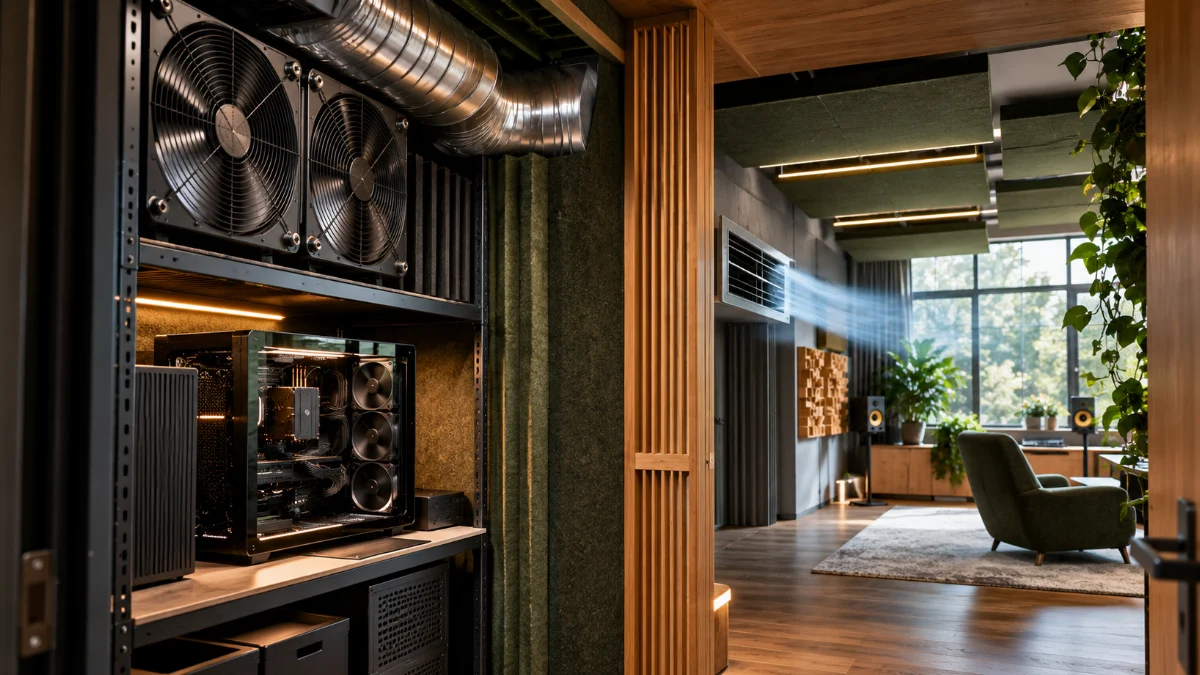
Workstation cost includes context-specific acoustic constraints. A workstation can be acoustically acceptable in a server room and unpleasant at the desk. Published acoustic measurements may use sound power rather than sound pressure, and a quoted noise level without test distance or operating state can mislead, and sound-pressure results depend on distance, room, background noise, and measurement method. It is therefore risky to declare a quieter winner from two unqualified decibel numbers.
Beyond headline level, subjective annoyance depends on pitch, tonal fan whine, abrupt ramping, mechanical resonance, and when the noise occurs. Someone editing speech, teaching remotely, recording video, or working through long focus sessions may value a stable, low-noise system more than a small speed gain. These are workflow considerations, not invented clinical or ergonomic thresholds.
Design an acoustic test around the job
Put the system in its intended location; run an ordinary meeting, a sustained export, and a quiet editing task. Note whether a microphone captures the fan, whether headphones are required more often, and whether the machine causes a change in workspace layout. If making quantitative comparisons, use the same calibrated instrument, position, room, background level, and load. If that controlled method is unavailable, describe the finding qualitatively rather than claiming an exact acoustic improvement.
Reliability and Repair Have Different Meanings
Reliability is the probability of continued function under stated conditions; maintainability is the effort needed to restore service after failure. Repairability describes which repairs are feasible under real warranty, tools and parts constraints. A machine might rarely fail yet be difficult to repair quickly. Another might permit inexpensive part swaps but require more routine maintenance. Neither attribute can be inferred from purchase price or enclosure material alone.
When assessing workstation cost, a meaningful maintenance cost ledger identifies warranty coverage, service location, spare-part lead time, replaceability, external-device dependencies, and who can diagnose the failure. Ask whether the machine can be repaired without losing an encryption key, a local project, or a day of required work. If the repair plan depends on an unknown courier turnaround, label it an uncertainty instead of assigning an invented average.
Platform Lock-In Is a Compatibility Inventory
Workstation cost can reflect both the benefit and the exit price of integration. Platform lock-in can be beneficial when integration reduces friction; it becomes costly when important projects depend on a tool, driver, proprietary format, or virtualization behavior with no verified exit. I do not automatically classify a closed ecosystem as worse, or an open system as portable. The correct question is whether the actual work and its data can move when the decision changes.
On Windows on Arm, Microsoft’s current documentation explains that x86 and x64 user-mode apps can run through emulation, while kernel-mode drivers require Arm64 support. That distinction matters when a specialized device driver is mandatory; see Microsoft’s Arm emulation guidance. Compatibility should be checked for the exact application version, plug-in, driver, and workflow rather than generalized from a processor architecture.
| Dependency | Test before purchase | Failure consequence | Exit evidence |
|---|---|---|---|
| Required application | Real project opens and exports | Blocked delivery | Working native or replacement app |
| Specialized driver | Device and feature operate | Hardware unusable | Supported alternative driver or host |
| Virtual machine | Guest boots, persists, and recovers | Lab interruption | Exportable VM image and tested restore |
| Creative file format | Round-trip complex project | Lost edits or metadata | Verified interchange path |
| Local AI toolchain | Models, runtimes, accelerators work | Rework or incompatibility | Documented fallback configuration |
Portability Means More Than Carrying the Hardware
Workstation cost for mobile work includes hidden peripherals. A portable computer can still be operationally dependent on a specific dock, external SSD, monitor setup, network, or licensing service. A large workstation may remain the better choice for a fixed high-throughput workload. The workstation cost question is about where the work happens and what happens when the environment changes.
Workstation cost includes the portability of the actual job. A useful portability scenario is a full working day away from the primary desk: can you authenticate, open the necessary assets, build the software, use the required tools, and deliver an export? Include battery condition, external storage, display needs, encryption, connectivity, and backup. Do not confuse laptop mass with end-to-end operational mobility.
Local AI Changes the Memory and Power Trade-Off
Workstation cost for local AI depends on the actual model and runtime. AI-assisted work introduces workloads that are not well represented by general desktop benchmarks. A model may be constrained by memory capacity and bandwidth rather than peak compute throughput. Another task may depend on software backends, quantization support, GPU compatibility, or sustained heat removal. When comparing systems, list the exact models and runtime versions and measure real latency and throughput only if an actual controlled test occurs.
An effective workstation cost analysis asks whether a local model genuinely replaces a cloud expense, whether privacy requirements justify local processing, and whether memory constraints cause frequent context reduction or model switching. Do not present an imaginary tokens-per-second number as evidence. If no controlled test exists, report the workload assumptions and a future benchmark protocol.
Virtual Machines Make Recovery a First-Class Requirement
Workstation cost for a virtual-machine lab includes recovery. A VM that boots successfully once is not automatically a dependable lab environment. I would verify disk image portability, snapshot behavior, adequate storage, backup consistency, and restoration to a usable state. External drives introduce connection, filesystem, sleep, and accidental disconnection risks, which deserve their own tests.
For this reason, workstation cost also includes a realistic recovery path for development artifacts and experiments. For workstation cost and continuity, a snapshot is useful for a local rollback but is not a substitute for an independent backup. When moving platforms, confirm licensing and guest compatibility separately; neither can be inferred from a successful export dialog.
The Cost of Downtime Must Be Explicit and Defensible
Workstation cost can include an interruption with identifiable economic consequences. An interrupted render, failed build, or broken development environment can delay delivery. But a downtime cost is not necessarily the user’s full hourly billing rate multiplied by any interruption. Some delayed time can be recovered, some work can run in parallel, and some deadlines have nonlinear consequences. State the counterfactual.
In workstation cost accounting, I distinguish lost productive time, recovery labor, replacement equipment, and business consequences. Calculate only categories with support. If the actual consequences cannot be estimated, use qualitative risk bands and list the missing evidence. This produces a better workstation cost model than a highly precise total built on guessed downtime.
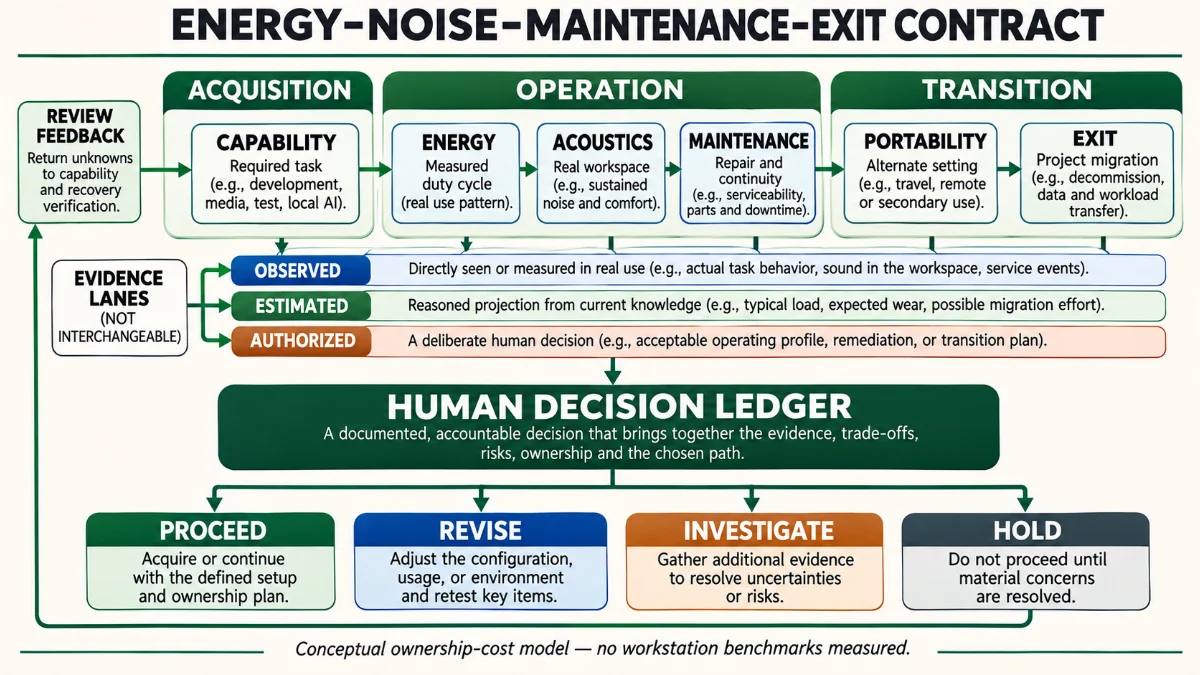
The Energy–Noise–Maintenance–Exit Contract
Workstation cost cannot be reduced to one performance score. The following four-column ledger is a conceptual decision tool. Its domains are independent review prompts, not a scoring algorithm. Passing one domain does not compensate for a mandatory application failing in another.
| Review domain | Question | Evidence to collect | Decision boundary |
|---|---|---|---|
| CAPABILITY | Can required work run? | Representative project and driver tests | Hold if a nonreplaceable function fails |
| ENERGY | What does typical operation consume? | Wall power across real duty cycle | Compare modeled operating expense |
| ACOUSTICS | Is the working space usable? | Same-room task-based assessment | Revise location or cooling if distracting |
| MAINTENANCE | Can service be restored? | Warranty, spares, tested backup | Investigate unsupported recovery |
| PORTABILITY | Can work move when necessary? | Full-day alternate-location rehearsal | Scope additional dependencies |
| EXIT | Can data and tools migrate? | Project export and compatibility checks | Avoid irreversible commitments without plan |
The contract asks for human review of both financial and nonfinancial constraints. It is not a consumer recommendation or a product certification. Exact interior infographic position: immediately after this table, before the next paragraph.
For me, the decisive property is not that each domain receives a favorable score. It is that a purchase decision can be reconstructed: which workloads were required, which trade-offs were accepted, which assumptions were measured, and what would trigger a review.
Three Clearly Hypothetical Workstation Choices
Scenario A: the quiet hybrid creator
Illustrative scenario, not personal measurement. An editor records voiceovers, writes software, and sometimes performs short local model experiments. A very powerful tower offers a faster export, but produces noticeable fan sound near the microphone. A quieter system with an external rendering option might produce a better overall workflow. The decision needs export-time evidence and a recording test, not a generic performance ranking.
Scenario B: the fixed high-throughput developer
Illustrative scenario. A developer runs many parallel builds and long simulations every day. The performance gains of a larger workstation may exceed its energy and cooling expense, provided the toolchain and repair plan are viable. Energy efficiency per completed task might matter more than watts at idle.
Scenario C: the multi-platform lab
Illustrative scenario. A professional needs both a tightly integrated main environment and a separate compatibility lab. One universal workstation might require compromises in drivers, architecture, or licensing. Two deliberately scoped systems could reduce risk, though they increase capital and maintenance. Test the cross-platform transfer before selecting either approach.
A Practical Evaluation Protocol Before Spending
For workstation cost comparisons, I would begin by writing a workload inventory and defining three real tasks: an ordinary workday, a peak-performance task, and a recovery or migration task. Then I would establish mandatory requirements, collect comparable quotes, measure energy and noise with consistent methods, and record the capabilities that cannot be confirmed. A decision review should identify the person who owns each assumption and the date on which pricing or compatibility must be reconsidered.
For workstation performance, compare completion time only under like-for-like conditions. For workstation cost, distinguish one-time capital expense from ongoing costs, and keep opportunity cost separate from invoices. For continuity, complete a recovery rehearsal rather than accepting the presence of a backup file as proof of restore capability.
What This Method Does Not Establish
This article does not establish a winner between specific hardware brands, benchmark the user’s existing devices, measure real utility invoices, or predict future repair rates. It also does not treat an ENERGY STAR label as proof that a particular workload will be cheaper. Supplier specifications, energy tariffs, software support, and available parts can change.
The framework is useful because it identifies those uncertainties before a purchase locks them in. What would overturn my recommendation? A required tool fails, a replacement platform proves unable to recover a project, a representative workload changes, or measured acoustic and thermal behavior contradicts the assumptions.
Compare Cost per Completed Task with Care
A workstation cost model becomes more useful when it relates expenses to work the user can actually finish. Suppose one computer costs more but reduces the time needed for a genuinely repeated export. That gain matters if the freed time can be used productively, improves delivery reliability, or reduces a real bottleneck. It is less meaningful if export runs unattended and cannot affect the schedule. A raw speedup percentage does not automatically equal an equivalent labor saving.
I would record a small portfolio of work: one interactive development task, one sustained compute task, one creative export, and one recovery task. For each, identify whether the workstation is the critical path. Then compare cost per completed acceptable output, with quality and compatibility held constant. If the outputs differ in quality, the price comparison is incomplete; if a task cannot be run at all, the options are not functionally equivalent. This adds discipline without pretending that all work can be reduced to one productivity score.
Opportunity Cost and Resale Value Are Uncertain
A workstation cost projection may include an estimated end-of-life sale or trade-in value. Such estimates depend on market conditions, physical condition, hardware support, and whether the system can be securely wiped and resold. I would run a conservative scenario with no resale proceeds rather than making an optimistic residual value the reason a purchase appears affordable. Data erasure, transfer of licenses, and disposal also need explicit responsibility.
Opportunity cost can matter when buying a high-end system prevents investment in software, backup capacity, training, or other tools. But it must be treated as a competing use of budget, not an additional invoice magically added to every machine’s total. When the comparison involves financing, discount rates and cash-flow timing should be stated and applied consistently, rather than comparing a cash purchase to an installment price without adjusting for terms.
Decide What Evidence Would Reverse the Purchase
I consider an effective workstation cost decision falsifiable. If a required tool does not run, if peak tasks throttle dramatically, if a vendor changes licensing, or if the measured idle power is much higher than expected, the original decision should be revisited. This is why a short pilot or return-window validation may be worth more than a long speculative hardware comparison.
The pre-purchase review should therefore name its unknowns. Who will test the most demanding project? Which software supplier must confirm support? How will a failed storage device be recovered? Is the work area acoustically acceptable? What budget ceiling or operating expense would change the option? Those questions create a review path for changing circumstances rather than a static shopping recommendation.
Evidence and Methodology
The workstation cost model combines publicly documented energy-efficiency approaches, official application-compatibility guidance, and explicit engineering and operations reasoning. ENERGY STAR supports comparison across operating modes; DOE utility guidance supports tariff-aware energy accounting; Microsoft supports the specific software-emulation boundary. The framework itself has not been experimentally validated here. All monetary examples are illustrative assumptions, not empirical findings.
Related Reading
If the primary question is whether more graphics hardware is justified by an actual workload, the related GPU upgrade decision analysis explores that narrower choice. This article extends the scope to operating and migration economics.
Frequently Asked Questions
Is the cheapest workstation the most economical?
Not necessarily. The lowest purchase price may be offset by unavailable software, power, noise, repairs, or migration work. Evaluate the cost and feasibility of completed tasks over a defined period.
Does a larger power supply mean a higher electricity bill?
No. Its rated capacity is not a continuous draw measurement. Record whole-system consumption in actual operating modes, with the display and external peripherals accounted for where relevant.
Is a fanless machine automatically better for creative work?
No. It may be quieter but can have different sustained performance and service trade-offs. Test representative tasks in the intended workspace.
Should platform lock-in always be avoided?
No. Integration can provide value. The important questions are whether a mandatory dependency is understood, whether it has an exit path, and what migration would cost.
Can I estimate workstation electricity use without a wall meter?
You can construct a rough planning range from credible mode-specific specifications, but you should label the result an estimate and avoid claiming measured energy consumption.
Should downtime have a fixed hourly price?
Only if the specific business consequences justify that assumption. Separate labor, recoverable delay, replacement, and irrecoverable loss to avoid double counting.
Are benchmarks enough for a workstation purchase?
They are useful for comparable workloads, but not substitutes for compatibility, acoustics, sustained operation, and recovery testing.
How often should the decision be reviewed?
When workload, power tariff, software support, warranty conditions, or migration requirements materially change. An annual review may be a planning convention, not a universal technical rule.
Key Terms
Duty cycle: the distribution of time across operating states. Total cost of ownership: the defined capital and operating expenses during a chosen horizon. Platform lock-in: dependence that changes the cost or feasibility of moving workloads. Recovery rehearsal: a demonstrated ability to restore an important working state. Sustained load: representative work continued long enough to reveal heat or performance changes.
Author’s Note
I prefer to buy engineering capability rather than impressive specifications. Workstation cost should follow the job, not a specification sheet. The right workstation cost calculation asks what the system will let me finish, what it may interrupt, and how much control I retain when the work changes. An honest inventory of unknowns is more useful than a precise-looking total that was never measured.