


AI Coding Speed vs. Engineering Quality: Where Work Moves

Workstation Cost: Energy, Noise, Maintenance, and Lock-In

A Passing Audit Does Not Finish the User’s Task
A product team runs an accessibility scanner, resolves the reported errors, and presents a clean result at the release meeting. Then a keyboard user reaches a dialog that cannot be dismissed without a mouse, or a screen-reader user submits a form but never hears the error that prevents completion. Nothing about the green automated result guarantees these failures cannot happen. The finding is not that automation is useless. The failure is treating one useful form of evidence as the final definition of an accessible product.
My view is that accessibility testing belongs inside product decision-making, not at the far end of a visual design checklist. A web experience has to support the work someone came to do. That work may include finding a record, authorizing a transaction, correcting an error, proving identity, or recovering access. If a user cannot complete a consequential task independently under conditions the product should support, a low automated error count is an incomplete statement about the experience.
This article separates WCAG conformance from task experience without setting them against each other. It explains what automated tools can and cannot establish, how to evaluate keyboard and assistive technology behavior, how the latest WCAG Evaluation Methodology changes the conversation about complete processes, and who should own unresolved barriers. I propose a Standards–Tasks–Assistive Technology–Ownership Contract to make the decision explicit. The framework is conceptual; no participants were recruited and no product outcomes were measured for this article.
Decision Brief: What Does a Clean Accessibility Report Actually Mean?
An automated accessibility testing report describes the checks performed by a particular tool against content available under specified conditions. It may identify highly actionable violations, and a clean report is better than an ignored one. It is not a certificate that every WCAG 2.2 success criterion was evaluated, that all interaction states were visited, or that affected users can complete the product’s essential tasks. The W3C guidance on evaluation tools is explicit that human judgment remains necessary.
For a practical product decision I would distinguish four dispositions. Proceed when the relevant standards checks, complete tasks, assistive technology checks, and remaining risk evidence support the specific release. Revise when a known barrier has a clear correction path. Investigate when the effect is uncertain or the test omitted a significant user context. Hold a consequential release or claim when a material exclusion remains unresolved and cannot be responsibly contained. These are proposed review choices, not universal legal rules or an automated risk score.
The Wrong Question Is “Did We Pass?”
The better question for accessibility testing is: which users can achieve which essential outcomes, by which supported interaction methods, in which states, with what evidence and limitations? I would record the evaluated browser, assistive technology, viewport, task state, and type of evidence. A single scanner screenshot does not answer these questions, even if the scanner runs every day.
Standards and Experience Are Complementary, Not Substitutes
In accessibility testing, meeting WCAG success criteria matters because the criteria define testable accessibility requirements. However, an independently usable experience can still depend on task comprehension, clear language, consistent workflow, and recovery choices that deserve UX investigation beyond a narrow technical check. Conversely, favorable feedback from a small group of users cannot replace a thorough conformance evaluation. In accessibility testing, an individual user may succeed through a workaround while the implementation still fails an applicable WCAG criterion.
What WCAG 2.2 Actually Requires
The Web Content Accessibility Guidelines 2.2 provide normative success criteria at different conformance levels. WCAG 2.2 extends earlier WCAG 2 guidance; an organization should select and document its target version and level, and independently establish which legal or contractual requirements apply. In this article, the technical discussion emphasizes WCAG 2.2 Level AA as a widely used target, not a declaration that every organization is legally bound to it.
Keyboard Focus Is More Than an Outline
WCAG 2.4.11 Focus Not Obscured (Minimum), Level AA, requires that the component receiving keyboard focus is not entirely hidden behind author-created content. It does not demand that the entire component remain visible: the stricter enhanced criterion is Level AAA. A sticky footer might leave a focused button partly visible and satisfy 2.4.11, yet users may still struggle to identify the action or its relationship to the form. Strong accessibility testing examines both the criterion’s precise requirement and the practical effect of the interaction.
The visual focus indicator itself is also subject to other relevant criteria, including 2.4.7 Focus Visible. Removing a browser outline without a usable replacement can create a barrier. The W3C explanation of 2.4.11 is worth reading because it separates the normative threshold from the better experience the team should try to deliver.
Targets, Dragging, Repeated Entry, and Authentication
WCAG 2.2 added Level AA criteria for dragging movements (2.5.7), minimum target size (2.5.8), and accessible authentication (3.3.8), as well as Level A requirements for consistent help (3.2.6) and redundant entry (3.3.7). These criteria have specific exceptions and conditions. Accessibility testing should inspect those conditions rather than replace each criterion with a simplistic statement such as “every control must be 24 pixels” or “all password steps are banned.”
In product terms, the concerns are concrete. Can a person complete an essential action without dragging? Can they activate a small control without repeated misfires? Can they authenticate without being forced through an inaccessible cognitive task when a compliant alternative should be offered? Is information already supplied in a process unnecessarily requested again? The exact success criteria determine conformance; task investigation shows the user consequences.
Conformance Applies to Complete Processes
One of the most consequential concepts for accessibility testing is that WCAG conformance considers complete processes. The conformance requirements do not allow a team to claim conformance for a sequence while ignoring an inaccessible step required to complete that sequence. If an accessible landing page leads to an unusable identity challenge or confirmation state, testing only the landing page misses what the service requires people to do. Accessibility testing must follow the process through to its legitimate outcome.
The July 2026 WCAG-EM 2.0 Update
On July 23, 2026, W3C published WCAG Evaluation Methodology (WCAG-EM) 2.0 as a Group Note. It provides a structured method for defining the evaluation scope, exploring the digital product, selecting representative samples, evaluating them, and reporting the findings. It is guidance for evaluating WCAG conformance, not a new WCAG conformance level or an amendment to the success criteria. That distinction matters when product teams translate standards into release policy.
Sample the Product, Not Just the Convenient Screens
WCAG-EM 2.0 calls for a sample reflecting common views, essential functionality, technologies used, and other relevant states. Where sampled pages belong to a complete process, the method includes the views needed to evaluate that process. Accessibility testing that checks only the homepage, generic landing template, or a design-system showcase can overlook the most important barrier in a confirmation, error, or recovery step.
For accessibility testing, the methodology also compares structured samples with additional samples to see whether important content types or failures were missed. For a small product, evaluating the entire product can be more appropriate than sampling. A representative accessibility testing sample means a justified evaluation design, not an arbitrary count of URLs.
Evaluate Interactions, States, and Preferences
In accessibility testing, a representative view should be evaluated in the relevant states. Forms, dialogs, notifications, errors, settings, authentication, and responsive layouts are not optional just because the initial page looks correct. In accessibility testing, an input error may change the DOM, an asynchronous update may move focus, and a confirmation may replace the content the user expected. The state transition is often where the access barrier begins.
I would also document what was not tested: for example, a particular mobile screen reader, a language variant, a voice-control workflow, or a high-magnification condition. The methodology helps define conformance evidence; it does not authorize universal claims from an incomplete sample.
Why Automated Accessibility Testing Is Necessary but Incomplete
Automated checks detect repeatable patterns: missing programmatic names, certain contrast problems, absent form labels, empty buttons, and many structural violations. They are efficient regression controls and should be integrated into design and development, not reserved for a final presentation. But they see the parts of a product they can analyze and the rules they can implement. They cannot infer whether every meaningful task can be completed, whether a label conveys the right intent, or whether an unfamiliar user understands an unexpected state.
The WebAIM Million 2026 report provides a useful caution. Its February 2026 automated analysis found detectable WCAG failures on 95.9% of one million sampled homepages, averaging 56.1 detected errors per homepage. Those are homepages, not complete product audits; the dataset describes automatically detectable problems, not every possible barrier. The study explicitly warns that no detected errors does not mean a page is accessible or conformant. I would never turn that percentage into a claim about my own site, a client’s product, or the outcomes of manual testing.
Compare Methods by the Evidence They Produce
| Method | Strong evidence for | Cannot establish alone | Responsible use |
|---|---|---|---|
| Automated scan | Detectable code-level failures in scanned states | Full WCAG conformance or successful task completion | Continuous regression and issue discovery |
| Manual WCAG review | Criteria requiring human interpretation, stateful interaction and process coverage | Universal ease of use for all people | Structured conformance assessment |
| Keyboard-only walkthrough | Reachability, order, focus, operation and recovery without a pointer | Every screen-reader or voice-control outcome | Complete essential task paths |
| Screen reader and other assistive technology checks | Announcements, semantics, state changes and assistive operation in specified configurations | Every user’s experience or the whole assistive technology ecosystem | Reproducible compatibility checks |
| Research with disabled users | Lived friction, workarounds, comprehension, task consequences | Formal conformance on its own or population prevalence from a tiny sample | Informed product iteration with ethical recruitment |
The table is an evidence distinction, not a ranking. One method cannot compensate for omitted work in another. Good accessibility testing combines methods in proportion to the consequence of the feature and records their actual coverage.
A Low Error Count Is Not a Quality Score
An automated accessibility testing score is often attractive because it appears easy to track. It can help identify regressions within a consistent test setup, but the denominator may shift with page complexity, routes visited, scripts loaded, and tool versions. A clean result on an unvisited error state tells us little about that state. A team should not declare that its users are 100% supported because a scanner displayed 100.
Manual Keyboard Checks Must Follow the Task
The W3C Easy Checks recommends exploring keyboard access, visible focus, logical order, form labels, and errors. I treat this as the foundation of manual accessibility testing, not a substitute for a complete evaluation. For accessibility testing, I would translate those checks into a realistic task instead of mechanically tabbing through a static page. Begin with a clean browser state, remove the mouse, navigate to the goal, perform the action, make and correct a mistake, and reach a clear final outcome.
Focus Order, Visibility, and Traps
For meaningful accessibility testing, a user should be able to move through controls in a meaningful sequence, understand which control has focus, activate it with expected keys, and leave it without being trapped. For a dialog, I would check opening focus, interaction within the dialog, appropriate dismissal, and where focus returns. A control that becomes visible on hover but not on keyboard focus deserves attention. A sticky header that obscures focus needs inspection in actual responsive states.
Successful accessibility testing should record more than “Tab works.” It should include what happened when focus moved, how state changes were conveyed, and whether a user could reverse or correct the action. A focus indicator can exist while the mental route through the task remains confusing.
Forms and Error Recovery
In accessibility testing, submit a form with required fields empty. Enter an invalid value, correct it, and resubmit. The error should be discoverable, understandable, related to the correct field, and available through supported interaction methods. Check whether previously entered non-sensitive data survives the error and whether the correction pathway is reachable without restarting the entire task. This is where WCAG compliance requirements and broader UX expectations reinforce one another.
If a notification is inserted asynchronously, determine whether the change is announced appropriately. Do not indiscriminately add assertive live regions: excessive announcements can be distracting and conceal the information the user needs. Accessibility testing should evaluate the message’s actual timing, relevance, and effect in context.
Assistive Technology Is Not a Checkbox
During accessibility testing, a screen reader can reveal that an apparently obvious icon has no accessible name, that an expanded control does not announce its state, or that a form error never enters the user’s navigation context. Yet one quick screen-reader pass on one browser is not comprehensive accessibility testing. It is a valuable observation under defined conditions. The product must support a documented set of expected configurations and monitor changes over time.
Describe Configuration and Task State
For each reproducible check, record the operating system, browser, assistive technology and version, input method, viewport or zoom setting, language, task and outcome. Do not invent a compatibility matrix for devices never tested. Accessibility testing gains credibility when another qualified evaluator can repeat a failure and determine whether the observed result persists in the release build.
Screen Readers, Magnification, Speech, and Switch Input
In accessibility testing, different access methods stress different aspects of an interface. A screen reader depends on semantics and meaningful announcements; high magnification changes the visible context and can make fixed overlays intrusive; speech input may depend on names that match visible labels; switch input makes focus order and repeated navigation costly. No single tool stands in for these different constraints. Select scenarios based on the product, target users, and consequence of failure.
Real Users Add Different Evidence
W3C’s guidance on involving users explains that evaluations with disabled people and older people can reveal issues conformance testing alone does not. Accessibility testing with users should be intentionally recruited, respectfully compensated where appropriate, and designed around realistic tasks with accessible participation and consent. It must not ask one participant to represent everyone with the same impairment.
The goal is not to use a user’s time as a ceremonial sign-off. It is to understand the task, record barriers and workarounds, examine counterexamples, and use the evidence to improve the product. If the decision requires population prevalence or a rate threshold, that requires a different research design. My small-sample UX research analysis covers that inference boundary in more detail.
Three Illustrative Barriers a Green Report Can Miss
The following are hypothetical product scenarios for explaining the methodology. They are not claims about a client, a live public service, my own software, or a completed participant study. They also do not establish that any specific scanner necessarily misses the described issue; tool capabilities vary by version and context.
Scenario A: A Dialog Ends the Task for Keyboard Users
A user opens a file-export dialog and successfully enters a filename. A confirmation overlay appears, but focus moves behind it to a hidden link. The user cannot reach the confirmation control through the expected sequence or return to the prior state. An automated scan of the initial page may report no errors because the relevant dialog state was not opened or because the failure requires interaction to interpret. Accessibility testing should reproduce the precise sequence, examine keyboard behavior and relevant WCAG criteria, fix focus management, and rerun the complete task.
The product consequence matters in accessibility testing: if exports are essential for an audit or legal request, the severity of the barrier is not proportional to how many automated rules fired. A product owner must record what was blocked and whether a safe alternative exists while remediation is completed.
Scenario B: A Successful Submission Is Not Announced
A support request form posts successfully, but the success message appears only as a fleeting visual change in a region that screen-reader focus never reaches. A blind user reasonably retries and risks duplicate requests. Code-level accessibility testing might detect some related announcement problems depending on implementation, but it cannot by itself establish whether the whole process communicates success in a helpful way. Manual assistive technology checks and task research reveal the practical consequence.
In accessibility testing, an appropriate correction might include a persistent confirmation state, a clear heading, a programmatically conveyed status, and a path to verify or edit the submission. I would test the final implementation rather than assume a particular ARIA attribute is enough.
Scenario C: Accessible Controls, Inaccessible Recovery
A sign-in screen has labeled fields, visible focus, and sufficient contrast. The account recovery path then requires repeated transcription of a temporary code under a short deadline, without clear alternatives or feedback. Some parts of that experience may implicate WCAG 2.2 Accessible Authentication; other aspects may require task and usability investigation. The accessibility testing plan must include login failure and recovery, not only successful sign-in on the first try.
The right decision may involve changing the recovery mechanism, supporting another authentication path, or adding an accountable escalation route. Product security remains essential; accessibility and security should not be framed as a choice where one cancels the other.
The Standards–Tasks–Assistive Technology–Ownership Contract
I propose a Standards–Tasks–Assistive Technology–Ownership Contract for release decisions. Its purpose is to keep different sources of evidence visible and require a named decision owner when a barrier persists. It is a conceptual product governance framework, not a recognized certification method, a new WCAG standard, or a validated scoring algorithm. It should complement, never replace, WCAG-EM and qualified accessibility evaluation.
| Domain | Decision question | Evidence required | Failure to avoid |
|---|---|---|---|
| STANDARDS | Which WCAG version, level and requirements apply? | Documented conformance scope and criterion results | Calling a partial scan full conformance |
| TASKS | Can the essential user journey be completed? | Start-to-finish task records and error recovery | Testing only the landing screen |
| KEYBOARD | Can the journey operate without a pointer? | Focus order, visible focus, activation and escape | Mistaking Tab movement for task success |
| ASSISTIVE TECHNOLOGY | How does the journey work with supported access methods? | Specified configurations and stateful observations | Generalizing from one tool session |
| USER EVIDENCE | What do affected users actually experience? | Ethical task research, context and limitations | Treating one participant as universal |
| OWNERSHIP | Who fixes, accepts or escalates the barrier? | Named remediation owner and accountable authority | Assigning responsibility to a checklist |
| REVIEW | What causes reassessment? | Retest trigger, release criterion and recovery plan | Treating an old pass as permanent assurance |
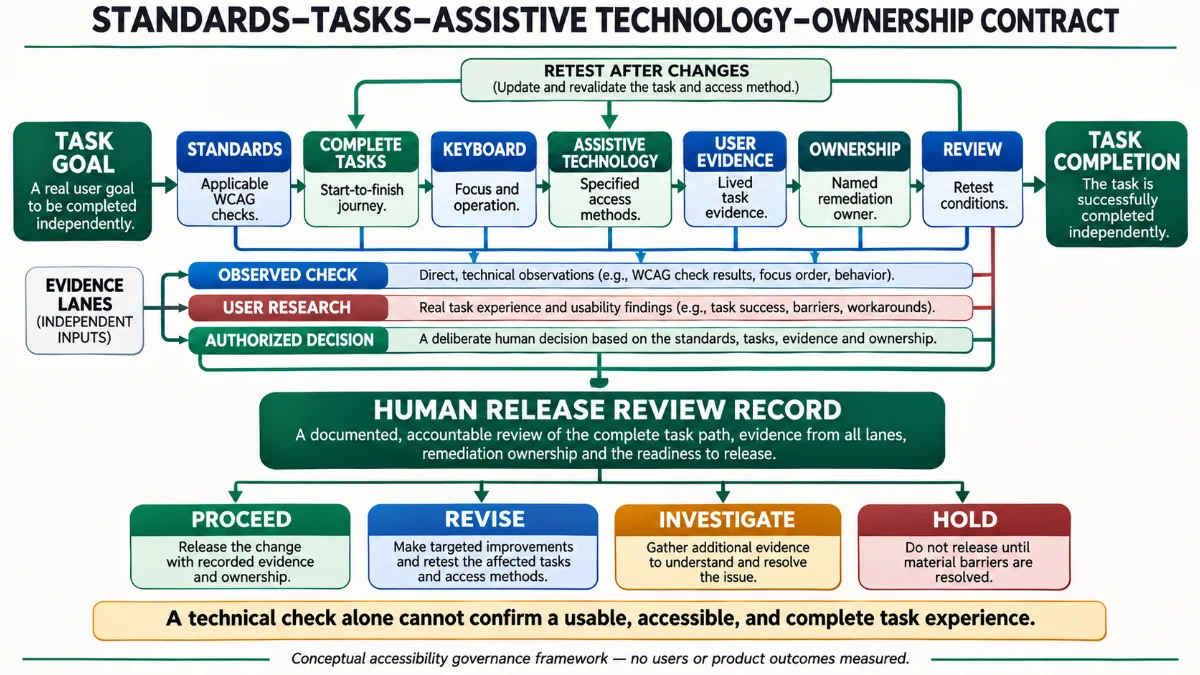
The contract deliberately keeps accessibility testing evidence separate from permission to ship. A positive automation result does not overrule an observed blocking task failure. A successful task observation does not automatically prove conformance. A business deadline is a constraint to manage, not evidence that a user barrier has disappeared. The human decision record should make these differences traceable.
Four Decisions, No Synthetic Score
PROCEED means the particular release has adequate evidence within its documented scope and no unresolved material barrier that blocks authorization. REVISE means a known defect can be repaired and retested. INVESTIGATE means the mechanism, coverage or severity needs more work. HOLD means essential access or a high-consequence claim cannot be responsibly supported yet. These are alternatives, not a universal legal hierarchy. Accessibility testing should make the reason for the disposition explicit.
A Responsible Override Is Still Recorded
A responsible accessibility testing program recognizes that sometimes a team cannot fix every issue at once. That does not justify erasing the issue from the report. I would record affected tasks, available mitigations, severity, ownership, timeline, specialist input and the reason for any release decision. Some legal and contractual duties may rule out an override; those require qualified assessment rather than a product manager’s personal judgment. An honest record is better than a misleading declaration of universal accessibility.
Build an End-to-End Manual Test Protocol
For each critical journey, I would write a short accessibility testing protocol that another evaluator can follow without guessing what “good” means. The protocol starts by specifying the legitimate user goal and ends when the outcome is confirmed or a documented barrier prevents it. It includes the default path, common mistakes, alternate input methods, responsive state and recovery. This is a test design, not a report of an executed test.
A Reproducible Task Record
Record the goal; starting URL or view; relevant role or permissions; environment and assistive technology; screen and zoom settings; required actions; expected announcements and state changes; observed behavior; implicated WCAG criteria where justified; impact; and exact reproduction steps. Attach sanitized screenshots or recordings only where privacy and consent allow. Avoid retaining sensitive user data in test artifacts. The objective is to let a reviewer reproduce and prioritize the problem.
Prioritize by Consequence and Exposure
A trapped focus loop in a required transaction, inaccessible authentication, or a missing path to undo destructive work can have substantial user consequences. A minor confusing but recoverable label may require a different disposition. The severity assessment should consider task criticality, availability of an equivalent alternative, affected conditions, reversibility and the evidence of harm. Accessibility testing should neither trivialize low-frequency barriers nor fabricate population-level exposure estimates from small observations.
An Example Release Review Matrix
| Journey | Minimum evidence to collect | Who reviews | What blocks the decision |
|---|---|---|---|
| Sign in and recover access | WCAG criteria, keyboard flow, authentication alternatives, error handling | Product, engineering, accessibility specialist | Unresolved access exclusion with no adequate alternative |
| Submit and correct a form | Names, instructions, announcements, correction and confirmation states | Engineering and UX | Inability to recover from a required-field error |
| Navigate and complete a primary task | Structure, focus, magnification, representative assistive technology | UX and accessibility evaluator | Task-critical state hidden or inaccessible |
| Change or cancel a consequential action | Confirmation, reversibility, state communication and recovery | Product owner and relevant specialist | Uncontrolled irreversible error or blocked correction |
The matrix is an illustrative minimum evidence plan. It is not a substitute for a proper WCAG conformance evaluation, and it must be adapted to the product’s actual legal obligations, users and technology. A mature accessibility testing process treats these rows as starting questions rather than an excuse to skip other relevant criteria.
Design Systems Help, but Do Not Guarantee Accessible Products
Inclusive design needs more than reusable components, but accessible components are valuable because they make tested patterns reusable. A correctly implemented dialog, form field or menu can prevent repeated low-level mistakes. But a design system cannot determine whether its components are combined into a coherent task, whether permissions hide a necessary recovery step, or whether content is understandable. Accessibility testing needs both the component and the assembled journey.
Ownership Must Cross Product, Design and Engineering
I would make product ownership explicit: engineering is responsible for implementation and regression tests, design for interaction patterns and meaningful focus journeys, content for instructions and error language, and product leadership for prioritization, unresolved risk and release policy. Specialists and disabled users should inform these decisions, not be assigned sole accountability for fixing the system. The exact operating model varies by organization; what matters is that the important decisions have owners.
Treat Third-Party Components as Product Risk
In accessibility testing, a third-party login, payment, search, consent manager, or embedded viewer can create an access barrier in a process the product still requires. Accessibility testing should include the real end-to-end journey instead of excluding vendor-owned steps from the user outcome. The team may need a vendor remediation commitment, an equivalent supported route, or a decision not to use that dependency. Contract boundaries do not make the user’s access problem disappear.
Automation Should Protect Known Behaviors Between Audits
Once accessibility testing has identified an issue and it has been corrected, it deserves a regression test wherever technically feasible. Automated checks can protect accessible names, structural roles and some focus expectations across builds. Visual and interaction regression work can protect states not captured by the basic scan. But automated regression tests only protect the assertions the team wrote. Accessibility testing should periodically revisit critical paths with manual and user-centered methods, especially after interaction redesigns or dependency updates.
What I Would Track Without Inventing a Compliance Score
I would track the proportion of essential journeys with a current evaluation record, unresolved blocking barriers by task, the age of high-severity accessibility defects, retest completion after a fix, and how many critical interaction changes received manual review. These are proposed management indicators, not a validated index of human accessibility. They should never be aggregated into a number that permits an inaccessible login to be excused by a good contrast score elsewhere.
Keep the Decision Open to Counterevidence
An accessibility testing process should reopen when a real user reports a problem, an assistive technology update changes behavior, a new workflow appears, an audit finds a missing criterion, or a correction creates a regression. Evidence is time- and scope-bound. A signed release decision is an accountability record, not a claim that the interface can never fail.
Evidence and Methodology
This is an evidence-based design and governance analysis, not the report of a new accessibility audit. The primary normative source is WCAG 2.2. The evaluation process source is W3C’s July 2026 WCAG-EM 2.0 Group Note. W3C resources on tooling, keyboard checks and user involvement support the distinctions between automated findings, human judgment and lived experience. The 2026 WebAIM Million study provides population-level context about detectable homepage errors, with its original scope and limitations preserved.
No live product was scanned or certified for this article. No assistive technology session or user research was conducted for publication here. The scenarios, matrices and contract are explicitly conceptual. If implemented, they require qualified evaluators, real task evidence, appropriate participant recruitment, and review under the laws and policies that actually apply.
Why an Alternative Position Is Worth Considering
One reasonable objection is that the first priority should be fast automation because it catches many defects cheaply. I agree with that priority as a starting point. Rejecting it would remove a scalable safety net. The problem is stopping there. A second objection is that an extensive manual audit of every possible state is unaffordable. That is also real: the answer is a documented, risk-sensitive scope, representative sample, complete critical processes and explicit limits, not pretending that a partial sample was exhaustive. WCAG-EM 2.0 provides a disciplined basis for that tradeoff.
Frequently Asked Questions About Accessibility Testing
Does a perfect automated accessibility score mean my website is WCAG compliant?
No. A tool can report that it found no issues within the checks and states it evaluated. It cannot automatically evaluate all WCAG requirements or every user process. Conformance requires evaluating the applicable criteria and conformance requirements at the stated scope. Include manual and stateful assessment, document coverage, and avoid turning a tool result into a certificate.
Is WCAG 2.2 Level AA legally required everywhere?
No universal legal answer follows from the technical standard alone. The requirements vary by jurisdiction, sector, contract, and type of service. WCAG 2.2 is a recommended technical target and Level AA is commonly used, but accessibility testing and legal compliance claims should be based on the actual obligations that apply, with appropriate expert review.
Why test keyboard navigation if the automated scan passes?
A scanner may not examine all interaction states or determine whether a complete journey can be operated in a logical sequence. Manual keyboard accessibility testing checks whether focus reaches controls, stays visible, permits expected actions, avoids traps and returns appropriately after dialogs. It also exposes task-level failures that a static report does not describe.
Can I use a screen reader myself instead of involving disabled users?
Self-directed screen-reader checks are valuable for technical verification and regression discovery, but they are not equivalent to the experience of people who depend on that tool in daily use. Research with appropriately recruited users can uncover comprehension, strategy and recovery issues beyond formal checks. Both have value, and neither replaces complete WCAG conformance evaluation.
Does one blocked user justify delaying a release?
One observed barrier can be enough to reveal a serious, reproducible access risk, particularly on an essential or irreversible task. Whether it requires a hold depends on impact, alternatives, applicable obligations and specialist assessment. Accessibility testing does not need a population prevalence estimate to justify investigating an exclusion, but it should avoid inventing its frequency.
Should I test only the main page template?
No. WCAG-EM 2.0 includes representative views and complete processes where those processes are part of the sample. An accessible homepage can lead to an inaccessible checkout, form error, sign-in recovery or confirmation state. Task-oriented accessibility testing follows the journey rather than stopping at a template boundary.
Are accessible design-system components enough for product accessibility?
They provide important reusable foundations, but combinations, content, business logic, permissions and third-party integrations can introduce new barriers. Test critical flows and dynamic states after assembly. Assign ownership across design, content, engineering and product decisions instead of treating components as a blanket guarantee.
How often should accessibility testing be repeated?
Run automated checks frequently during development, review changed interactions and high-risk paths before release, and reassess after significant design, dependency or assistive technology changes. The exact cadence depends on product risk and obligations. Preserve the evaluation scope and last-tested conditions so a historical pass is not mistaken for current evidence.
The Product Decision Behind an Accessible Experience
Accessibility testing creates a stronger product when its findings change decisions. A tool result is evidence about a tool’s checks. A manual evaluation is evidence about defined conditions and tasks. A participant’s experience is evidence about what happened for that person under those conditions. A conformance assessment is a structured judgment against standards within a documented scope. None should be silently promoted into a universal promise.
I would rather see an accountable team say, “We found a barrier in account recovery, we know who owns it, this is the supported interim route, and here is the retest condition,” than see a perfect-looking badge with no evidence that the service’s essential journey was evaluated. The first statement exposes unfinished work. The second can conceal it.
The principle I want to carry into every product review is straightforward: standards protect essential requirements, real tasks reveal consequences, assistive technology exposes interaction boundaries, and named owners turn findings into corrections. Accessibility testing is not the last item on the release checklist. It is part of the decision about whether the product works for the people it is meant to serve.