


Owned Media Strategy: Building a Durable Publication

Outcome-Driven Roadmaps: Beyond Feature Theater

A product can appear to work perfectly in a release review and still feel unreliable to the people who depend on it. A navigation item eventually opens. A search returns the right result. A form submits successfully. None of those outcomes tells us whether the user spent the intervening seconds wondering if the click registered, whether the interface was frozen, or whether the operation had failed. When performance is described only as a technical optimization opportunity, those moments fall between product requirements, interface design, and engineering ownership.
My argument is that web performance requirements should begin with the user’s intended action and the feedback they reasonably expect, then translate that experience into measurable obligations across the browser, network, and application stack. A fast API does not automatically produce a responsive interface. A low Interaction to Next Paint (INP) value does not prove that a network operation finished quickly. A successful page-load audit cannot tell us what happened when someone edited a large record after leaving the tab open for an hour. Each measurement has a useful boundary, and product teams need to understand it before promising a performance outcome.
This article develops what I call the User-Perceived Performance Budget Framework: a way to connect critical user journeys with field evidence, controlled diagnosis, ownership, and release decisions. It uses published browser-performance guidance and clearly labeled illustrative scenarios rather than claiming that I have measured an unnamed production system. The framework is intended for engineering leaders, frontend architects, product managers, and anyone responsible for whether an experience feels dependable under real conditions.
Decision Brief: Turn Perceived Delay Into an Engineering Contract
Decision: Treat performance as an explicit product quality requirement for important journeys, not as an optional score improvement after functionality ships.
Evidence: Use real user monitoring to understand distributions and affected segments, laboratory runs to reproduce causes, and server-side telemetry to explain processing delays. These sources answer different questions and should not be averaged into one synthetic notion of speed.
Operating model: Give each critical interaction a user-visible outcome, an observable metric or proxy, a target, an owner, a measurement method, and a response when the target is missed.
Limit: The budgets and timing values later in this article are illustrative engineering proposals. They are not measurements of this website, a client product, or the Codvia project. A real team must set and revise targets from its own product evidence, user populations, and acceptable risk.
Why Performance Is a Product Requirement, Not a Dashboard Score
Feature requirements usually say what must happen: a customer can save a configuration, a reader can navigate to an article, or an operator can approve a request. They often omit how the experience should behave while the result is being produced. If the application acknowledges the action only after a delayed response, users may repeat it. If a control appears enabled while its underlying state is unavailable, they may make decisions based on stale information. That is why web performance requirements influence comprehension, confidence, and sometimes the correctness of the workflow itself.
I prefer to write web performance requirements around observable user promises. For a save operation, the promise might be that the interface promptly acknowledges the attempt, prevents an accidental duplicate where necessary, clearly indicates the pending state, and eventually communicates success or failure. That is different from requiring the backend endpoint to complete in an arbitrary number of milliseconds. Endpoint time matters, but it is one contributor to an experience whose feedback and completion can occur at different moments.
Consider two implementations. In the first, a click handler performs expensive synchronous work, sends a request, and updates the screen after the response. In the second, the interface immediately communicates that the save has started, yields the main thread, then reports the authoritative result when it arrives. Both may have identical server processing time. Their perceived responsiveness can differ substantially, while the second still needs honest status communication and error handling. The objective is not to make a slow operation look complete. It is to make its actual state understandable.
A Definition of Done That Includes Responsiveness
For a critical feature, I would attach four questions to its acceptance criteria. Can the user tell that the input registered? Can the operation reach a correct result within the agreed service expectations? Can the interface remain responsive while work continues? And can the team measure these conditions in an environment that represents intended users? This changes performance from an individual developer’s optimization preference into a shared release decision.
Not every interaction needs the same threshold. Opening a local menu, rendering a chart after loading a dataset, completing an export, and processing a payment are different contracts. The first can often produce immediate visual feedback; the others may require meaningful progress information, cancellation, or resumability. The underlying rule for web performance requirements is consistent: latency expectations should match user intent and consequence, not a universal stopwatch.
What a Green Score Cannot Prove
A good aggregate Core Web Vitals report is valuable, but it does not automatically validate every business-critical workflow. Not all visitors reach the same screen, interact with the same control, use the same network, or remain in the application for the same amount of time. A high-volume landing page can dominate origin-level reporting while a lower-volume authenticated workflow continues to frustrate its users.
Conversely, a poor lab score can expose a serious problem even when aggregate field metrics look acceptable. The field distribution may underrepresent users on constrained devices, or users may abandon an experience before reaching the problematic step. The question for web performance requirements is therefore not whether we should trust a score. It is whether the score represents the user action and population that our product decision concerns.
INP, TTFB, and Backend Latency Measure Different Boundaries
Several timing values appear together in developer tools and performance reports, which makes them tempting to compare directly. They are not interchangeable. Understanding where each clock begins and ends is a prerequisite for defensible web performance requirements. The same visible delay can involve input scheduling, JavaScript execution, rendering, network transfers, server processing, or a sequence of dependent requests; web performance requirements must identify which boundary matters.
Interaction to Next Paint: The Feedback Boundary
Interaction to Next Paint describes responsiveness to qualifying user interactions such as clicks, taps, and keyboard input across a page’s lifetime. Its interaction latency includes the input delay before event processing, the execution of event callbacks, and the rendering delay until the next frame can be presented. A low INP indicates that the browser can generally produce visual feedback promptly after qualifying inputs; it does not guarantee that an asynchronous operation has finished.
According to the web.dev INP reference, a good field result is 200 milliseconds or less at the 75th percentile of page loads, assessed separately for mobile and desktop. Values above 200 and up to 500 milliseconds need improvement; values above 500 milliseconds are poor. For web performance requirements, these are published Core Web Vitals thresholds, not numerical findings from this article’s hypothetical examples.
One nuance matters when teams discuss individual incidents: INP is a page-level summary of observed qualifying interactions, with outlier handling for pages containing many interactions. It is not an average of every click. Nor does scrolling itself count as a qualifying INP interaction. A team that samples only the initial page-load path may never exercise the complex editing control responsible for its worst real-world interaction.
Time to First Byte: The Navigation Boundary
Time to First Byte measures when a navigation starts until the first response byte begins to arrive, using the relevant navigation timing definitions. It can include redirects, service worker initialization, DNS lookup, connection setup, TLS negotiation, request travel, and time before the server begins its response. That broader scope is explained in web.dev’s TTFB guide. A high navigation TTFB is not proof that application code or a database query was slow.
A content delivery network may serve cached HTML from a nearby edge, changing the observed path. A cold connection may spend time in DNS and TLS before an application is involved. An extra redirect can increase the user’s total wait despite a fast origin. TTFB is useful in web performance requirements because it includes these user-facing costs; it becomes misleading only when someone labels the entire number “backend execution time.”
API Duration and Backend Processing: Different Clocks Again
An API request can be timed from the browser, at a reverse proxy, within an application service, or around a database call. Each observation encloses different work. Browser-observed request duration can include network, queuing, and transfer. Proxy duration may include upstream connections or retries, depending on configuration. An application handler’s timer may omit work performed by a gateway. Database timing records only the portion instrumented around the query or transaction.
When I discuss backend latency, I therefore want the observation point identified explicitly. A request trace should say whether it measures server ingress to response completion, only application handler work, or the duration of a dependency call. Otherwise, teams can appear to disagree about the same request while simply measuring different intervals, undermining their web performance requirements.
| Measurement | What it observes | What it cannot establish alone |
|---|---|---|
| INP | Interaction to next visual paint on the page | Completion time of an asynchronous API operation |
| Navigation TTFB | Navigation start to initial response arrival | Application-only processing duration |
| Browser API duration | Client-observed request/response interval under available timing visibility | Which internal service or query consumed the time |
| Server processing duration | Instrumented processing at a specified server boundary | Input delay, browser paint time, or the whole user journey |
| End-to-end task completion | Time from a defined user action to a defined task outcome | Root cause without supporting traces and browser diagnostics |
The table is intentionally about boundaries rather than “which metric is best.” The right metric in web performance requirements depends on the promise at stake. A slow menu is primarily a browser responsiveness investigation. A delayed document fetch may involve network and server timing. A workflow that requires several dependent requests needs end-to-end instrumentation even when every individual API looks reasonable.
Field Data vs Lab Data: The Evidence Hierarchy
The distinction between field data vs lab data is not a contest in which one source defeats the other. Field measurements show what consenting, observable users experienced under diverse devices, connections, and behavior. Laboratory tests offer repeatable conditions for reproducing a suspected problem and measuring the effect of a specific change. The web.dev explanation of field and lab differences makes clear that apparent disagreements between these reports are expected, not necessarily evidence that one is broken.
Real User Monitoring: Distributions Before Averages
Real user monitoring for web performance requirements should help a team answer who experienced a delay, which journey they were on, and how often the experience crossed an agreed threshold. It is tempting to report one average latency for an entire application. That number can hide precisely the tail of the distribution where users encounter repeated frustration.
I would begin with distributions and meaningful segments: mobile versus desktop, page or route type, critical interaction category, deployment version, geographic region when appropriate, and network or device characteristics if collected lawfully and reliably. A checkout confirmation, admin bulk-edit operation, and article reading session should not be forced into a single ranking if their behavior and business consequences are different.
A 75th percentile value means roughly three quarters of the observed experiences are at or below the reported value. It does not imply every user receives that performance. p75 latency helps summarize typical tail exposure while retaining a degree of robustness; a service might additionally track p95 or p99 for operational risk, especially where rare slow requests cause disproportionate harm. These percentiles describe different questions and must be calculated over well-defined populations.
CrUX Is a Rolling Public Dataset, Not a Live Trace Console
The Chrome UX Report API documentation describes a 28-day rolling aggregation of eligible Chrome user experiences. That makes the dataset valuable for seeing broad field trends, while also imposing important limits. It is not a live stream of every customer interaction, a full-fidelity trace of a particular failure, or proof of what changed five minutes after a deployment.
Eligibility, sample thresholds, page grouping, available metrics, and form-factor aggregation influence how reports should be read. Some pages do not have sufficient eligible data for page-specific reporting. Origin-level statistics can combine journeys with different performance characteristics. When the public dataset is unavailable or too coarse, appropriately governed first-party field telemetry can help explain the interaction or route that needs attention. The absence of a CrUX record is not evidence of good or bad performance and cannot validate web performance requirements.
A Lab Run Should Reproduce a Question, Not Produce a Trophy
In a controlled test, I would record the browser version, device or emulation settings, network conditions, cache state, authentication state, data size, concurrent workloads, and exact interaction steps. If a dashboard is slow only after loading thousands of records, testing an empty dashboard is not a meaningful reproduction. If performance degrades after several edits, a fresh page load will miss the condition.
Lab tools also have different strengths. Lighthouse and related navigation audits help investigate loading behavior and main-thread work in reproducible conditions. Chrome DevTools performance recordings can reveal long tasks and rendering work during an exercised interaction. Neither automatically reproduces the distribution of user behavior in the field. In particular, a laboratory Total Blocking Time result is not the same thing as a measured field INP.
For web performance requirements, the sensible workflow is iterative: use field evidence to identify the affected experience, build a reproducible lab scenario, diagnose the cause, implement a change, verify the local result, and then monitor field data long enough to judge whether the intended population improved. Fast local tests are useful for engineering decisions, but they do not authorize claims about population-wide outcomes that have not yet been observed.
The Missing Users Problem
Real-world telemetry also has selection effects. Some visitors refuse analytics collection, block scripts, use browsers with different API support, lose their connection before measurements can be sent, or leave before completing an interaction. An internal tool might monitor only authenticated sessions while overlooking the first-run experience. When interpreting a performance improvement, I would ask not just whether the metric moved, but whether the observed population or instrumentation changed at the same time.
Privacy matters here. Capturing performance does not justify recording form contents, credentials, full identifiers, sensitive URL parameters, or unnecessary personal details. A useful trace can often be formed from route templates, timestamps, coarse device categories, operation names, status codes, and safely generated correlation identifiers. For high-risk workflows, sampling and retention controls should be part of the measurement plan rather than an afterthought.
The User-Perceived Performance Budget Framework
The framework I propose has five connected layers: Journey, Perceptible Contract, Measurement Boundary, Engineering Ownership, and Review Trigger. It turns web performance requirements into a testable conversation across product, frontend, infrastructure, and backend teams. Unlike a generic site-speed target, the framework begins with a specific action and makes the timing evidence responsible for that action explicit.
This is an editorial decision model, not an established industry standard or a validated scoring system. Its value is in the questions it forces the team to answer before a release. A threshold without a user journey is ambiguous. A metric without a collection method cannot be audited. A target without ownership cannot reliably influence product decisions.
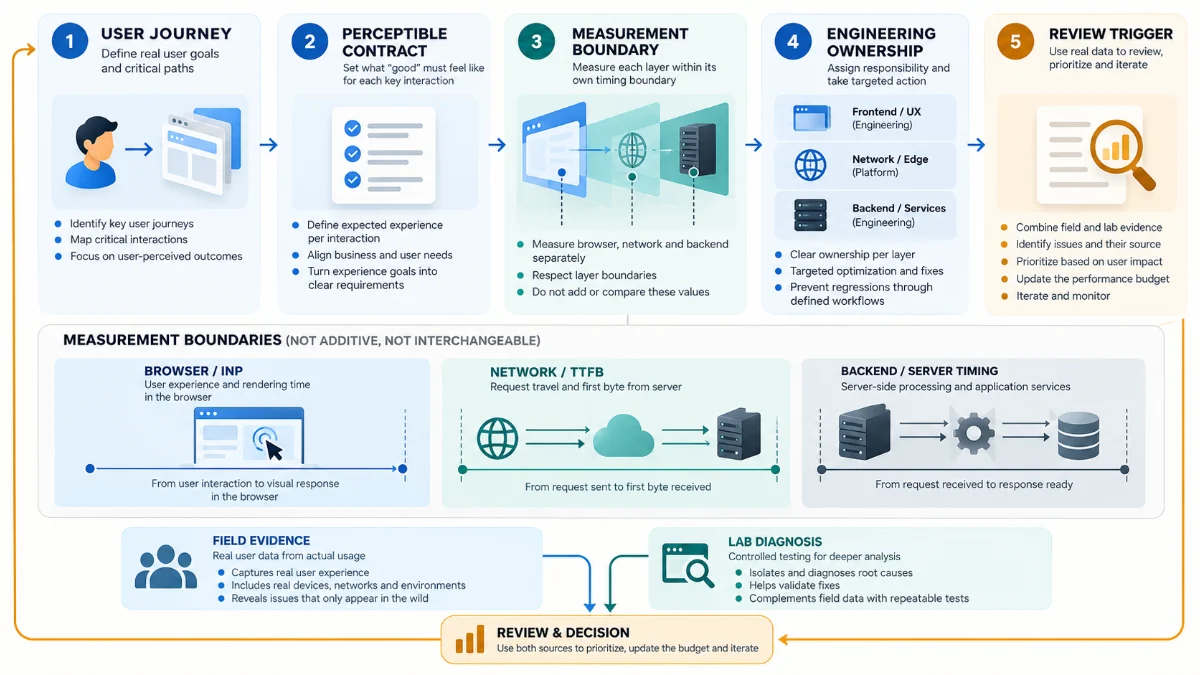
Layer One: Define the Journey and Consequence
To establish useful web performance requirements, choose a task that someone actually needs to complete, then describe what failure or delay would mean. “The page should be fast” gives engineering little guidance. “A user opening the account switcher must see acknowledgement of the input and be able to choose an account without blocking the interface” describes both an interaction and a product consequence.
For a professional publication, the journey might be opening a category page, following a reference link, or using in-article navigation. For an enterprise platform, the critical task may be searching a large dataset, editing a record, or confirming a permission change. These cases belong in different budgets because they have different interaction characteristics and different consequences when the system slows down.
Layer Two: Separate Immediate Feedback From Authoritative Completion
In web performance requirements, a user action can have several observable milestones: input acknowledged, progress state visible, server work accepted, authoritative result delivered, and final interface state reconciled. Not all actions require every milestone. But for a remote operation, treating acknowledgement and completion as the same event often produces misleading performance targets.
I would state whether the interface is allowed to respond optimistically, what happens if the operation fails, whether duplicate actions are safe, and whether the user can continue other work while waiting. A fast spinner may improve feedback while doing nothing to solve a slow backend. A fast backend may still leave the page unresponsive if the browser performs expensive synchronous work before rendering. Both problems belong in the contract.
Layer Three: Assign a Metric to Each Observable Boundary
Use INP for relevant responsiveness observations, navigation metrics where loading is at issue, browser request timing for client-observed networking, and instrumented server timings for processing stages. If the outcome requires several actions or services, define an end-to-end task completion metric whose start and stop events match the product promise.
Record the metric unit, percentile, population, device or workflow segmentation, observation window, and inclusion rules. A p75 figure for mobile article views cannot simply be substituted for a p95 figure for authenticated administrative saves. Both can be useful, but they are distinct requirements. The measurement plan should also state what happens when there is insufficient data.
Layer Four: Name the Owner Without Hiding Cross-Layer Dependencies
The team responsible for the user journey should own the overall outcome even when several technical groups must contribute. Frontend engineers may own main-thread responsiveness; a platform team may own routing and edge behavior; backend engineers may own service execution and query efficiency. Product leadership should decide whether the remaining delay is acceptable for the task and whether the necessary engineering investment should compete with other roadmap work.
I would avoid assigning blame solely from whichever metric first turned red. A slow request can be caused by an overloaded downstream service, a retry cascade, or an unnecessary dependency introduced by the product workflow. A delay in the browser can originate from excessive rendering triggered by legitimate data. Ownership within web performance requirements should establish responsibility to investigate and resolve, not presume the diagnosis.
Layer Five: Define the Review and Release Trigger
The requirement should say what a regression changes. Some thresholds warrant an automatic gate in a controlled test. Others require human review because the field population or measurement quality is uncertain. A serious delay on an essential transaction may justify pausing a rollout, while a small fluctuation in an advisory percentile may justify investigation without blocking an unrelated security fix.
This is where performance becomes product governance. A missed budget should produce a recorded decision: improve now, release with an explicit exception and mitigation, narrow the feature, or accept the trade-off with a review date. Silent acceptance turns a measurable requirement back into an optional dashboard number.
A Worked Performance Budget: One Journey, Several Clocks
The following scenario illustrates web performance requirements and is hypothetical. Imagine an authenticated workspace in which a user opens a record, changes a value, and saves. The product team wants the interface to acknowledge the click promptly, communicate a pending operation honestly, and complete the save without excessive delay. No values in the table are results from a live product or benchmarks obtained from a particular deployment.
To illustrate the structure, suppose the team proposes a local interaction target aligned with the published INP good threshold and separately proposes an end-to-end save target based on its product expectations. The latter must be justified using the actual user journey and data when the system exists. Performance budgets are commitments chosen for the product; the illustrative numbers below should not be copied into an SLA without empirical evaluation.
| User or system boundary | Proposed target | Evidence and collection method | Primary review owner |
|---|---|---|---|
| Click-to-feedback responsiveness | Field INP p75 at or below 200 ms for the relevant route population | Eligible user interactions, segmented and paired with diagnostic interaction attribution | Frontend with product |
| Save-state acknowledgement | Immediate visible pending state during a representative controlled test | Manual interaction test and browser performance recording | Frontend and UX |
| Browser-observed save request | Provisional p95 target of 1,200 ms, subject to field baseline | Redacted client request timing, operation and status grouping | Application team |
| Instrumented application processing | Provisional p95 target of 500 ms at a defined ingress boundary | Traced server spans and histogram measurements | Backend team |
| End-to-end confirmed save | Provisional p95 target of 1,500 ms from action to confirmed outcome | End-to-end task instrumentation, with errors and timeouts reported separately | Journey owner across teams |
The example is deliberately not an additive equation. A 500 ms server target and a 1,200 ms browser request target do not guarantee a 1,500 ms completed task. Requests may overlap or execute sequentially; serialization, rendering, retries, and additional dependencies may change the timeline. Percentiles of different distributions also cannot be added to create a statistically valid end-to-end percentile.
I would record the start and end semantics for each proposed metric before implementing it. Does “save completed” mean the server accepted a command, that a durable transaction committed, or that the UI has displayed a confirmed value? If the system uses asynchronous processing, those can be separate milestones. A budget that leaves completion undefined is vulnerable to being satisfied by changing the measurement instead of improving the product.
Two Attractive Shortcuts That Fail Under Inspection
The first shortcut is to assign a universal threshold to every API. It is administratively simple and can surface outliers, but it treats a lightweight lookup and a complex report generation as equivalent. A more defensible policy uses service-level baselines as guardrails and journey-specific contracts for important user outcomes. A single number can still be useful as an initial alert, provided nobody mistakes it for a complete product requirement.
The second shortcut is to focus exclusively on a single Core Web Vital. This improves comparability and may simplify reporting, but it leaves critical business operations outside that metric’s scope. Strong INP does not imply that a save succeeded, and fast TTFB does not imply that an article’s most important content became visible promptly. I would keep those metrics, but connect them to actual tasks instead of asking them to substitute for the whole experience.
From a Slow Click to a Defensible Root-Cause Investigation
Suppose the field report shows that one editing workflow feels delayed. The first question is whether the delay occurs before the browser can paint feedback or after feedback appears while a remote operation is pending. That observation separates two investigations that might otherwise become a long argument between frontend and backend teams.
If Feedback Is Late, Inspect the Browser’s Critical Path
For a genuinely slow interaction, review the event’s input delay, handler processing, and presentation delay. The web.dev optimization guide for INP discusses these components and the roles of JavaScript, layout, and rendering. A heavily occupied main thread can postpone the start of event processing. Long synchronous handlers can delay updates. Expensive style calculation or layout can prevent the next frame from being presented promptly.
A practical diagnosis might examine expensive filtering performed inside a click handler, large framework updates, synchronous storage operations, unnecessary layout reads, or third-party scripts that monopolize execution. The remedy depends on the cause: defer nonessential work, break long tasks where appropriate, virtualize costly views, reduce DOM churn, move suitable computation off the main thread, or avoid layout thrashing. None of these should be selected merely because they are fashionable optimizations.
The guidance on long tasks explains how yielding can help the browser process important work sooner. But yielding is not a blanket instruction to fragment all code. Work with correctness constraints must still preserve state consistency and required sequencing. For an authorization or financial action, premature “success” feedback may be a worse product defect than a visible wait.
If Feedback Is Prompt but Completion Is Late, Follow the Request
When the interface acknowledges input promptly but the operation remains pending, I would inspect the browser’s request waterfall and the related service traces. Look for redirects, unnecessary serial requests, connection establishment, large payloads, queuing, retries, cache misses, and dependency latency. An apparently simple action may wait on several services that were never visible in the original feature specification.
At the server boundary, instrument meaningful spans rather than a single stopwatch around the entire application. An end-to-end trace can help show whether time was spent waiting on a database, calling another service, processing a queue, or performing application logic. The value of distributed tracing is not a colorful waterfall screenshot; it is the ability to follow the critical path of a request while preserving the meaning and ownership of each duration.
Server-Timing Can Expose Specific Backend Stages
The MDN documentation for the Server-Timing response header describes how servers can communicate selected timing metrics to developer tools and browser APIs. For example, a response might annotate cache work or application processing for a request. This can make diagnosis easier when browser timing alone cannot explain where server work occurred.
Server-Timing is not a substitute for complete traces and may not cover all internal dependencies. Its exposure also has privacy and security implications: do not publish sensitive infrastructure detail, request identifiers, private queries, or internal topology simply to aid public browser debugging. The W3C Server Timing specification was a Working Draft as of April 2026, so I treat its evolving standardization status appropriately rather than describing that document as a finalized Recommendation.
Correlation Is Not a Root Cause
Imagine that slow interactions and slow backend requests increased in the same period. They might be causally connected, but that correlation does not prove the server caused the INP regression. A frontend bundle change could produce late feedback independently of an unrelated API slowdown. A new logging configuration could increase observed server duration while changing sampling or instrumentation cost. A shared traffic surge could affect several components at once.
My preferred diagnostic record has a small number of explicit elements: observed symptom, affected population, timestamp and release version, competing hypotheses, evidence against each hypothesis, attempted changes, and the remaining uncertainty. That structure keeps performance investigations from becoming a search for whichever team can produce the most persuasive chart.
Connect Engineering Ownership to Product Decisions
Performance discussions can fail even when the measurements are correct because the organization never decides who may trade time, quality, and scope against one another. The frontend team can reduce unnecessary rendering yet remain blocked by expensive API composition. Backend teams can reduce query duration while product design keeps adding sequential dependent actions. Platform teams can improve caching while a feature’s correctness requirements limit what may be cached. Without explicit governance, each team can meet its local target while the journey remains slow.
For meaningful web performance requirements, I separate diagnostic ownership from journey accountability. Diagnostic ownership belongs with the engineers who can explain and change a given subsystem. Journey accountability belongs with the product and engineering leaders responsible for the experience users must complete. The latter role makes trade-offs visible and prevents technical metrics from becoming disconnected departmental scorecards.
| Decision or work | Responsible role | Evidence required |
|---|---|---|
| Define critical user task | Product and UX | Task importance, expected feedback, consequence of delay |
| Instrument and explain browser responsiveness | Frontend engineering | Interaction attribution and reproducible traces |
| Explain network, routing, and edge behavior | Platform engineering | Request path, connection and cache evidence |
| Explain service and dependency delay | Backend engineering | Documented timing boundaries and sampled traces |
| Accept an exception or defer release | Named product and engineering decision owners | Impact, options, residual risk, review trigger |
This map is a model, not a recommendation to create five formal departments. A solo developer may perform every technical task. A larger organization may distribute them among multiple teams. The important part is that the work remains logically separate even when one person does it: measuring a symptom, diagnosing a cause, changing the system, and accepting residual risk are different decisions.
Performance Changes Can Create Correctness and Accessibility Regressions
An optimization that removes a loading state may improve a timing graph while confusing users. Debouncing a control might reduce network load but impair keyboard behavior. Caching a personalized response without appropriate boundaries could expose another user’s information. Aggressive deferred rendering can hide content needed for screen readers or cause unexpected focus movement. A performance budget should therefore sit alongside functional correctness, security, and accessibility requirements rather than outrank them automatically.
I would review substantial performance changes with the same care as other architectural decisions. The existing article on architecture decision records that survive change offers a complementary way to document trade-offs and reconsideration triggers. For performance specifically, a decision record can preserve why the team selected a cache strategy, loading sequence, or latency threshold and when new evidence should cause that decision to be reopened.
Architecture Trade-Offs: Faster Is Not Always Simpler
Several popular techniques can reduce observed latency, but each changes the system’s behavior and operational responsibilities. Edge caching can shorten network distance and avoid origin processing, yet content freshness, personalization, invalidation, and authentication boundaries may limit its use. An optimistic interface can respond immediately, yet the team must design rollback and conflict handling. Background processing can keep the browser responsive, yet it may transform an immediate transaction into a workflow with eventual completion and new failure states.
Caching Requires an Explicit Correctness Boundary
A cached public article and a cached permission-sensitive workspace response are not equivalent. The first may be safe to serve broadly with appropriate cache behavior; the second may require strict isolation or no shared caching at all. When performance work involves caches, I want the product and engineering teams to specify acceptable staleness, invalidation triggers, error behavior, and what content may be shared across users.
Reduced TTFB from a warm edge response can be a genuine win for readers. It should not be credited to backend query optimization if the origin was bypassed. Likewise, a cold-path request must remain observable; good cache-hit averages cannot excuse a disastrous miss path where a business-critical task depends on fresh information.
Progress Indicators Must Tell the Truth
A loading indicator creates a useful acknowledgement only when it represents actual state. For quick tasks, artificial delay or elaborate animation can add unnecessary friction. For long tasks, a progress indicator that remains at an arbitrary percentage can weaken trust. If the application cannot estimate completion accurately, an honest indeterminate state and a clear cancellation or retry path may be better.
When backend processing takes longer than the browser can reasonably wait, the right product requirement may be an asynchronous job with status persistence rather than a heroic attempt to make one HTTP request complete inside a rigid timeout. That is a product architecture decision. It changes how the user leaves, returns, receives failures, and understands whether work is complete.
Throughput and Tail Latency Need Separate Attention
A system can process many requests per second and still provide poor responsiveness for a subset of users. Under load, queues and lock contention can push some requests far beyond the mean. Increasing worker concurrency may improve throughput until a shared database, memory pool, or external dependency becomes saturated. At that point, the same change can increase tail latency or error rates.
This is why web performance requirements should identify load conditions, request mix, and error handling when the product depends on concurrency. Measuring only a quiet staging environment makes it easy to choose an architecture that fails under a different operating condition. Equally, a stress test outside the application’s realistic usage pattern may produce alarming numbers with limited product relevance. The test design must match the decision.
Applying the Framework to a Content-Heavy Publication
Consider a hypothetical professional publication with article pages, category archives, internal links, a site search, and reading tools. The highest-volume experience may be arriving from search and beginning to read. Yet the most frustrating interaction might be opening search while a large page is doing background work. If I were establishing its web performance requirements, I would distinguish the content-loading journey from the in-session interaction journey and measure both.
For the arrival path, the team could inspect navigation TTFB, Largest Contentful Paint, and layout stability using field and controlled data. For interaction paths, it could investigate opening navigation, searching, using an in-page table of contents, or changing a reading preference. These paths have different correctness requirements. Faster initial HTML delivery does not mean every later user action is responsive.
The Articles publication hub offers a relevant example of a content structure, while the Software Development collection provides a category-level navigation pattern. I am not reporting measured metrics for those live pages here. The purpose of referring to them is to show how route types and content journeys can be grouped for a measurement plan without implying that all pages share identical performance characteristics.
An Illustrative Before-and-After Decision, Not a Claimed Result
Before, hypothetical: The team monitors only the homepage’s laboratory loading score. A developer adds a large interactive search panel, and the score changes little. Users of the article archive report delayed typing and a slow first search result, but there is no route-specific interaction attribution or browser-to-server correlation.
After, proposed: The team defines search as a critical journey, records an acknowledgement milestone and result-completion event, segments field data by the search route, traces relevant backend calls, and reproduces the problem with realistic result counts. It creates distinct frontend responsiveness and server processing budgets, then reviews the release against both.
This before-and-after describes a change in decision method, not a measured gain in milliseconds, search ranking, conversion, or user satisfaction. No deployment experiment is asserted. The example illustrates how a product team can replace one undifferentiated page score with evidence linked to a task and its actual engineering boundaries.
Connecting Runtime Insight to a Product-Level Decision
My Codvia software performance analysis project is conceptually relevant because it examines runtime behavior, request flows, query timing, caching, and the technical friction that users may experience. In this article, I use that publicly described project as context for a broader argument: diagnosing the software’s internal behavior becomes more useful when it is connected to an explicit user outcome.
That connection does not mean Codvia performed the hypothetical tests or produced the sample targets above. I am not attributing synthetic performance gains or undisclosed production observations to it. The distinction matters because a well-designed analytical capability and verified results from a particular product are different forms of evidence.
A Practical Measurement and Review Playbook
To make the framework operational, I would begin with a small set of consequential journeys rather than attempting to instrument every screen equally. The aim is to make performance decisions explainable, reproducible, and maintainable. The following sequence is a proposed implementation method, not a claim that it has already been rolled out on a live customer platform.
1. Select Tasks by Frequency, Consequence, and Friction
Start with evidence from support reports, product research, incident records, and observable usage patterns where available. A task can be important because many people perform it or because a delay has a serious consequence for a smaller group. Avoid choosing only the journey with the highest traffic. Critical low-frequency tasks deserve investigation when the impact of failure is large.
2. Write the User-Visible Start and Stop Events
For each task, specify which action starts the clock and what outcome stops it. If the operation has an acknowledgement stage and a separate completion stage, define both. For example, a file upload may acknowledge selection promptly, then show transfer progress, then confirm processing. Measuring “upload time” without identifying the boundary invites confusion.
3. Gather a Baseline Without Hiding the Distribution
Collect enough observations for a responsible comparison, respecting consent and data-minimization requirements. Record the observation window, count, population, device segmentation, and deployment conditions. Use percentiles and distributions instead of relying exclusively on averages. Where the sample is small, avoid treating percentile changes as stable or meaningful without uncertainty analysis.
4. Reproduce One Failure Class in a Controlled Environment
Take one observable symptom and construct a scenario that can exercise it repeatedly. Fix the necessary variables while recording them, but do not remove the data volume, authentication state, or interaction history that causes the problem. A reproducible scenario helps compare candidate fixes while the field measurement remains the authority for user impact.
5. Instrument the Relevant Timing Path
Collect the smallest useful set of browser and service measurements needed to distinguish hypotheses. The question may call for interaction attribution, a navigation waterfall, sampled spans, database histograms, or a cache-hit breakdown. Be careful with cross-origin timing visibility and avoid collecting private payloads or detailed identifiers that are unnecessary for diagnosis.
6. Choose a Fix by Product Consequence
Compare possible changes on user impact, correctness risk, implementation effort, and operational burden. An optimization that reduces server CPU but makes the user wait longer for feedback may not be the preferred choice. A feature simplification or removal of a redundant network dependency may outperform a complex infrastructure migration while producing fewer new failure modes.
7. Confirm the Lab Effect, Then Watch the Field
Verify that the controlled scenario improved without breaking functionality, keyboard interaction, accessibility, or error handling. Then observe the affected population over an appropriate interval. Be cautious when the post-change data uses a different sampling method, traffic mix, cache state, or time window. The claim should match the evidence: a local reproduction demonstrates a local improvement, not automatic population-level success.
8. Review and Update the Budget When Reality Changes
Targets should remain stable enough to constrain decisions but open to deliberate revision when product scope, user populations, or dependencies change. A budget revision should record what changed and why. Quietly loosening the threshold after an uncomfortable release defeats the purpose of having a contract. Equally, preserving an obsolete threshold without evaluating new constraints can create unnecessary engineering work.
Common Measurement Failures and Their Consequences
Most problems with performance reporting are not failures to generate numbers. They arise from ambiguous boundaries, unrepresentative populations, changing instrumentation, or incentives that reward a local metric without improving the user’s task. Before approving a performance claim, I would test it against the following failure modes.
| Failure mode | Why it misleads | Better check |
|---|---|---|
| One score for every route | High-volume easy pages conceal slower critical workflows | Segment by journey and page type |
| TTFB treated as application execution time | Redirects, connections and network time are misattributed | Compare browser phases and defined server timers |
| Lab TBT called a field INP measurement | Controlled blocking time does not reproduce real interaction timing | Use field interaction attribution and lab reproduction separately |
| Average without tails | Small or important slow populations disappear | Review percentiles, distributions and sample counts |
| Percentiles added across components | The resulting sum is not a valid end-to-end percentile | Measure complete journeys directly |
| Faster feedback described as faster completion | Pending or failed work is disguised as success | Measure acknowledgement and final result independently |
| Instrumentation changes between releases | Numbers move without equivalent underlying behavior | Version metrics and compare collection rules |
There is no single universal solution to all of these risks. A team with little traffic may need structured manual tests and cautious interpretation rather than elaborate percentile dashboards. A highly trafficked product may need detailed segmentation and observability to find costly regressions hidden in broad aggregates. The requirement is to remain honest about what the available evidence can support.
Frequently Asked Questions
Does a good INP mean an entire web application is fast?
No. A good INP indicates that qualifying interactions generally receive a prompt next paint under the metric’s definition and sampled population. It does not establish page-loading quality, asynchronous task completion speed, reliability, or correctness. Treat it as a valuable responsiveness signal within broader web performance requirements.
Is TTFB the same as backend processing time?
No. Navigation TTFB can include redirects, service worker behavior, DNS, connection establishment, network travel, and server delay. To identify application processing, measure it at a documented server boundary and interpret it alongside browser and network timings.
Why is p75 used for Core Web Vitals?
The published Core Web Vitals methodology uses the 75th percentile of page-load experiences, commonly segmented by mobile and desktop, as a practical summary. It does not guarantee every visitor falls below the threshold. Teams can supplement it with other percentiles and journey-specific measures when operational consequences justify them.
What if the product has too little field data?
Mark the evidence as insufficient rather than inventing a reliable percentile. Use carefully described controlled scenarios, operational traces, qualitative feedback, and error records to guide improvements. Revisit field targets as enough representative observations become available.
Who owns a performance requirement that crosses frontend and backend systems?
A named journey owner should be accountable for the user outcome, while technical owners diagnose and improve the components they control. The product organization must participate when the remaining delay involves scope, sequencing, reliability, or the acceptability of an unfinished state.
Can caching solve poor INP?
Caching may reduce network or application latency, but it does not automatically eliminate input delay, expensive handlers, or slow rendering. Diagnose the phase responsible for the observed symptom before choosing the optimization. Cache correctness and privacy boundaries must also be preserved.
Evidence, Methodology, and Limits
This article synthesizes official browser-performance documentation, a public web performance standardization draft, and a proposed product-engineering decision framework. It is an analytical reference, not an experiment. I did not run a controlled before-and-after study, measure user visits on the referenced website, or collect production traces for the hypothetical record-save case. The illustrative budget therefore has no confidence interval or claimed performance gain.
The central measurement references are the INP definition and thresholds, TTFB measurement explanation, field-versus-lab methodology, CrUX API documentation, and Server-Timing technical reference. Exact instrumentation details, aggregation behavior, and browser support should be reconfirmed when implementing a real measurement plan, especially if a platform changes its APIs.
There are additional limitations. A performance metric may not capture subjective uncertainty, trust, or the impact of poor information architecture. Product outcomes such as retention or task success require their own evidence; they must not be inferred from an improved latency value alone. International audiences, assistive technologies, less capable devices, and low-bandwidth environments also create conditions that a narrow lab test may overlook.
The Standard I Would Hold a Performance Claim To
When someone tells me a product is faster, I want to know what action became faster, for whom, under which conditions, and according to which measurement boundary. I also want to know whether the change preserved correctness and whether it improved what the person was actually trying to accomplish. Without those answers, a faster metric may be useful engineering information but is not yet a defensible product outcome.
Strong web performance requirements join three things that organizations too often separate: the experience promised to a user, the evidence needed to evaluate that promise, and the engineering decisions required to honor it. The browser, network, and server each offer important observations. None should be mistaken for the whole journey. That distinction is what turns an isolated optimization into a durable product requirement.
Related Reading and Projects
For the documentation and change-governance side of engineering, see Architecture Decision Records That Survive Change. Explore the Codvia software performance analysis project for the relationship between runtime behavior and architectural insight, or visit the Software Development Articles collection and the broader Articles hub for related technical essays.
Connect and Explore My Work
I share engineering analysis, product decisions, and creative work across different channels. You can find professional updates on LinkedIn, technical perspectives on X, ongoing discussions on Threads, code and technical work on GitHub, and design projects on Behance.