

UX Research Methods: Choose by Decision Risk, Not Habit

Visual Language Across Formats: A Flexible Design System
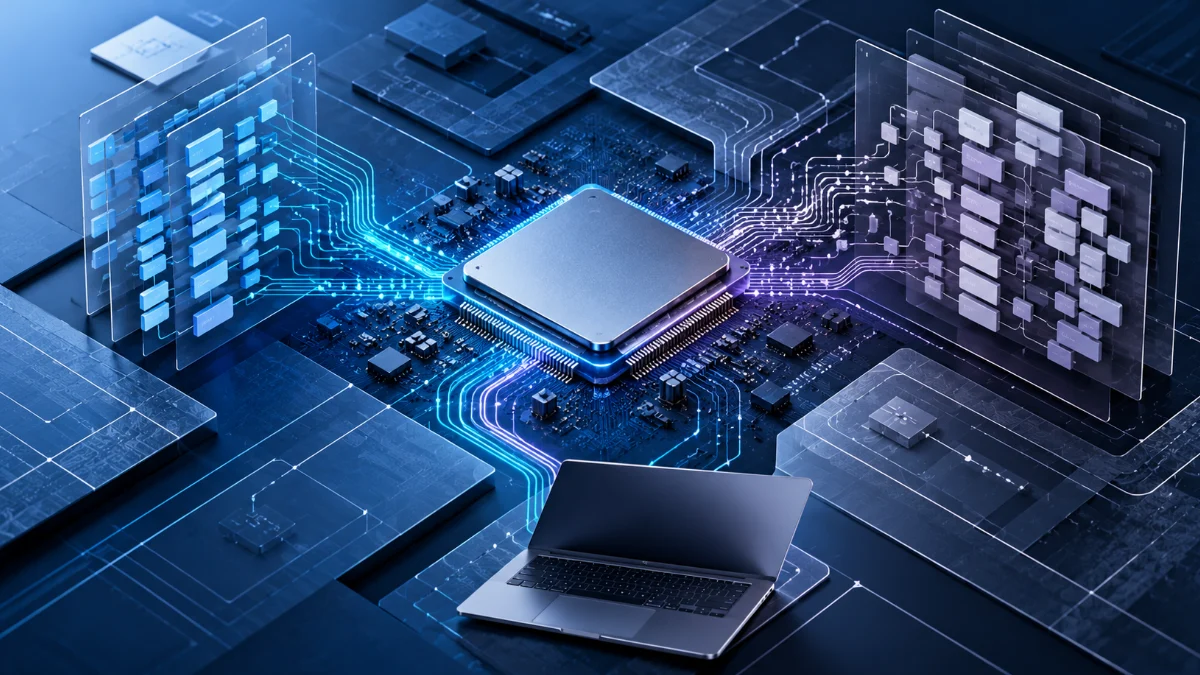
Moving a professional workflow from an Intel-based computer to an Apple Silicon Mac often looks like a straightforward hardware decision. The new system may offer attractive performance, efficiency, and portability, and many familiar applications may be available immediately. Yet the real compatibility question rarely ends with whether an application launches. A professional workflow may depend on a specific operating system, processor architecture, plug-in, device driver, graphics feature, virtual machine, or development tool that behaves differently across platforms.
This is why I believe Apple Silicon compatibility should be evaluated as a complete workload rather than a simple list of supported applications. A program can open successfully while an essential extension fails. A Windows application can run through x86 emulation while the driver required by its hardware does not. A Linux development environment can operate natively on ARM64 while one of its dependencies remains available only for x86_64. These differences matter because technical compatibility and operational suitability are not the same thing.
The transition to Apple Silicon has also made several concepts easier to confuse. ARM and x86 describe processor instruction-set families. Rosetta translates supported Intel application code for execution on Apple Silicon. Windows 11 on Arm provides its own x86 and x64 application emulation. Virtualization allows a compatible guest operating system to run within a virtual machine, while full-system emulation can reproduce a different processor architecture through software. Each mechanism solves a different problem, and each introduces different limitations.
My central argument is that professional computing decisions should separate six layers: hardware architecture, operating system, application binary, dependencies and drivers, execution technology, and workload requirements. Evaluating these layers together makes it easier to determine whether a system is suitable for everyday use, temporary migration, development, testing, or long-term deployment.
This article develops those distinctions into a practical Workload Compatibility Envelope. It uses current documentation from Apple, Microsoft, VMware, and other primary technical sources to examine native execution, translation, virtualization, and emulation. The examples are illustrative decision scenarios, not benchmark results or claims that every named configuration has been personally tested.
Decision Brief: What Determines Apple Silicon Compatibility?
The problem: Software compatibility is often reduced to processor architecture or whether an application launches, overlooking dependencies, drivers, graphics capabilities, operating system requirements, and future support.
The recommended approach: Evaluate the complete workload through six compatibility layers and identify which requirements are essential, which can be translated or emulated, and which require a different execution environment.
The expected value: Developers, IT professionals, and creative teams can distinguish a workable migration from a partially functional setup before committing time, hardware, or operational resources.
The limitation: A compatibility model cannot guarantee that an individual application will work. Final conclusions depend on specific software releases, guest operating systems, drivers, virtualization products, configurations, and representative testing.
Apple Silicon, ARM, and x86: Understanding the Architecture Difference
Apple Silicon is Apple’s family of system-on-chip processors used in modern Mac computers. These processors use the ARM64 instruction-set architecture, also commonly described as AArch64. Intel and AMD desktop processors generally use the x86-64 instruction-set architecture, also called AMD64 or x64.
An instruction-set architecture defines the machine-level instructions that software can execute, along with important aspects of the programming model. Software compiled into machine code for one architecture cannot generally be executed directly by a processor implementing a different architecture.
That does not mean the same application concept cannot exist on both platforms. Source code can often be compiled separately for ARM64 and x86_64. A cross-platform framework may provide native builds for multiple operating systems. A runtime environment may supply architecture-specific implementations while application code remains largely portable.
The important distinction is between a software product, its source code, and the executable binary distributed to users. Two applications can provide the same functionality while containing different machine instructions and using different platform dependencies.
ARM vs x86 Is an Instruction-Set Difference, Not an Application Category
It is common to describe ARM as mobile technology and x86 as desktop technology. That historical shorthand is increasingly misleading. Both instruction-set families support complex operating systems, professional development environments, high-performance computing workloads, and demanding software applications.
ARM vs x86 comparisons should therefore begin with the software and operating environment rather than assuming that one architecture is inherently appropriate for a particular class of professional work.
Performance characteristics can differ substantially between individual processors, but those differences depend on microarchitecture, memory systems, thermal design, software optimization, and workload behavior. Instruction-set compatibility alone does not establish which computer will be faster or more efficient.
For Apple Silicon compatibility, the immediate architectural question is whether the software stack provides executable code and necessary platform components that can run on an ARM64 Mac.
Why ARM64 and AArch64 Appear in Compatibility Documentation
ARM64 and AArch64 are closely related terms referring to the 64-bit ARM architecture. Documentation for Linux distributions, development tools, container images, and virtual machines may use either term.
The x86_64, x64, and AMD64 labels similarly refer to the widely used 64-bit x86 architecture. The naming conventions differ across operating systems and development ecosystems, but they are often describing the same general instruction-set target.
This matters when downloading software. A package labeled Windows ARM64 is not necessarily equivalent to a macOS ARM64 package. The processor architecture may match, but the operating system, executable format, system libraries, and application interfaces can still be incompatible.
Architecture compatibility is necessary for native execution, but it is not sufficient for complete software compatibility.
Native Execution, Binary Translation, Virtualization, and Emulation
The words virtualization and emulation are often used interchangeably in casual discussions, even though they describe different technical mechanisms. The distinction becomes essential when evaluating ARM and x86 software across macOS, Windows, and Linux.
I would separate the principal execution paths before selecting any specific tool.
| Execution path | What happens | Primary limitation |
|---|---|---|
| Native execution | Software compiled for the supported processor and operating system runs directly in its intended environment. | Requires compatible builds, dependencies, and platform capabilities. |
| Application binary translation | Machine code intended for another architecture is translated so a supported application can execute. | Translation support is platform-specific and does not automatically include drivers or every instruction and subsystem. |
| Operating system compatibility layer | Software originally written for another operating system uses an implementation or translation of selected application interfaces. | API behavior, dependencies, graphics support, and compatibility vary by application. |
| Hardware-assisted virtualization | A compatible guest operating system runs in an isolated virtual machine using host virtualization capabilities. | The guest CPU architecture must be supported by the virtualization product and host. |
| Full-system emulation | Software emulates the hardware platform needed by another operating system or machine architecture. | Execution overhead and incomplete hardware emulation can limit performance and compatibility. |
| Remote execution | The workload runs on a different computer or cloud environment with the required architecture. | Requires connectivity, suitable remote access, licensing, and acceptable data-handling arrangements. |
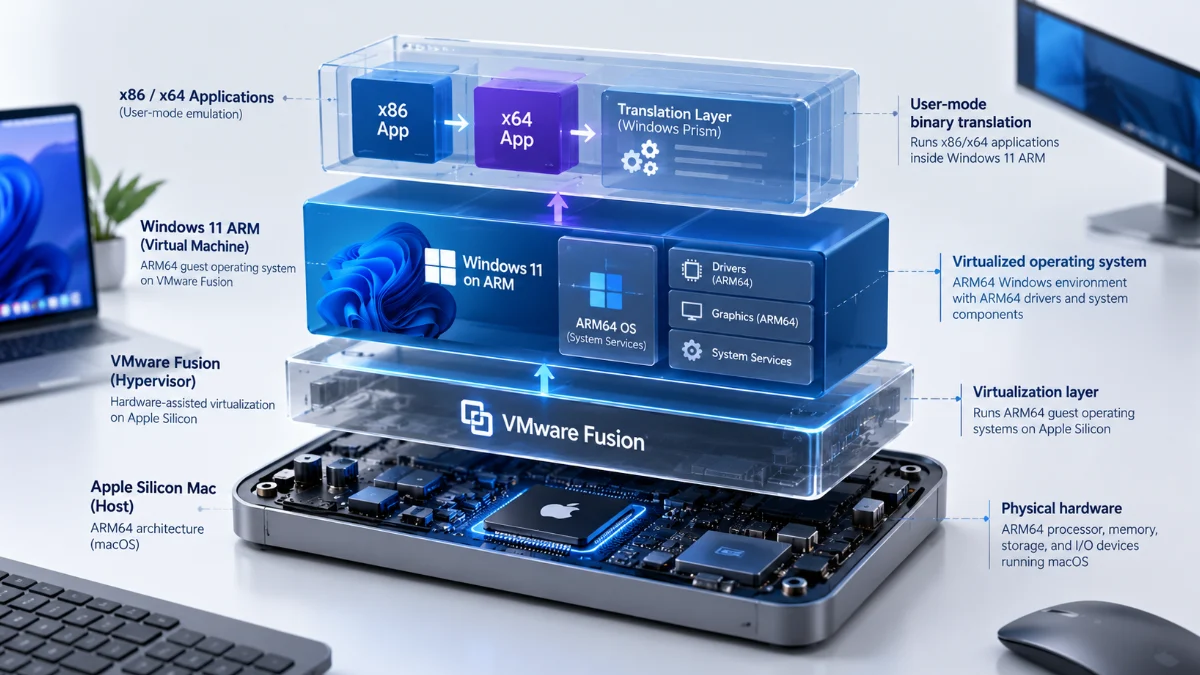
These mechanisms can also be combined. An Apple Silicon Mac can host an ARM64 virtual machine running Windows 11 on Arm, and that guest operating system can translate certain x86 applications. The resulting workflow involves virtualization at one layer and application emulation at another.
Calling the whole arrangement simply an x86 virtual machine hides the most important architectural detail: the guest operating system itself remains ARM64.
Native Applications Are the Preferred Starting Point
For long-term professional workflows, I generally prefer a supported native application when it satisfies the necessary requirements. Native execution avoids dependence on a separate architecture-translation mechanism and allows developers to target the platform’s capabilities directly.
That preference does not mean translated applications are always slow or unsuitable. A translated application may perform adequately for a particular task. The question is whether its dependencies and ongoing support are reliable enough for the role it serves.
Apple’s guidance on porting macOS applications to Apple Silicon explains how universal binaries can contain separate ARM64 and x86_64 executable code. The operating system selects the appropriate implementation for the computer on which the application runs.
A universal binary is useful because it can support both processor families without requiring users to install completely separate applications. However, the application’s associated libraries, extensions, plug-ins, and other executable components must also be compatible with the selected execution architecture.
Rosetta 2 and Intel Application Compatibility on Apple Silicon
Rosetta was introduced to support the transition from Intel-based Macs to Apple Silicon. It allows supported Intel macOS applications containing x86_64 instructions to execute on ARM-based Mac computers through binary translation.
Apple’s Rosetta translation documentation explains that translation operates at the process level. It also documents important exclusions, including kernel extensions and virtual machine applications that attempt to virtualize an x86_64 computer platform.
In practical terms, Rosetta can help an Intel Mac application run on Apple Silicon. It cannot simply turn an ARM Mac into a complete Intel Mac capable of running every Intel operating system, driver, or hardware-dependent workload.
Why Rosetta Does Not Make Every Plug-in Compatible
A professional application may load plug-ins, native libraries, automation components, or other executable extensions into its own process. Those components must be compatible with the architecture under which that process executes.
Apple documents that ARM64 and x86_64 code cannot be mixed within the same process. An application running natively as ARM64 cannot directly load an Intel-only in-process plug-in as though the processor architectures were interchangeable.
For certain universal applications, opening the application through Rosetta can allow the application and compatible Intel-only plug-ins to execute together in a translated process. But this is not a universal solution, and developers may need architecture-specific services or updated extensions.
This limitation is particularly relevant to professional creative applications, older plug-in ecosystems, specialized development environments, and software that depends on native system components.
I would therefore assess not only whether the main application supports Apple Silicon, but whether the exact plug-ins and extensions required by the workflow support the same execution mode.
The Rosetta Support Transition in macOS 27 and macOS 28
Apple announced on September 1, 2026, that macOS 27 would be the final major macOS release supporting Rosetta as a general-purpose translation mechanism for Intel macOS applications.
According to Apple’s official developer announcement, macOS 26.4 and later can notify users that Intel-only application support is approaching its end. Apple also states that a limited subset of Rosetta functionality will remain for certain older, unmaintained games that depend on Intel-based frameworks.
The broader transition means that ordinary Intel-only macOS applications should not be assumed to remain supported under macOS 28 and subsequent major versions.
This creates an important time dimension for Apple Silicon compatibility. A workflow that runs through Rosetta today may not represent a sustainable configuration for future macOS releases. The appropriate long-term response is to identify a supported native or universal application, an updated plug-in, or an alternative workflow before translation support becomes unavailable.
I would treat a critical dependence on Rosetta as a migration concern rather than a permanent compatibility strategy. That is especially important when an organization relies on software whose original developer no longer maintains it.
Intel Linux Binary Translation Is a Separate Case
Apple also documents the ability to run supported x86_64 Linux binaries within ARM Linux virtual machines using the macOS Virtualization framework.
The Apple Virtualization documentation distinguishes this capability from booting an entire x86 operating system. In macOS 27, Intel Linux binary translation is integrated into the operating system without requiring the same separate Rosetta installation process used in earlier releases.
The important architectural boundary remains unchanged: an ARM Linux virtual machine can, under supported conditions, execute translated Intel Linux user-space binaries. That does not mean the Virtualization framework can directly boot an Intel Linux distribution as a hardware-virtualized ARM guest.
Application binary compatibility, guest operating system architecture, and full-machine emulation must remain separate concepts.
Windows 11 ARM: Why x86 Apps Can Run Without an x86 Operating System
Windows 11 on Arm is a version of Windows designed to operate on ARM64 hardware. It provides native support for ARM-compatible Windows applications and includes emulation technology for many existing x86 and x64 applications.
Microsoft’s documentation on Windows on Arm emulation explains that Windows 11 supports both x86 and x64 user-mode application emulation. The Prism emulator introduced with Windows 11 version 24H2 includes optimizations intended to improve translated application execution.
This is different from running an x86 version of Windows. The operating system remains ARM64 while supported applications containing x86 instructions execute through the compatibility technology provided by Windows.
The distinction is particularly important when using Windows 11 ARM in a virtual machine on an Apple Silicon Mac.
What Prism Changes for Windows on ARM
Prism translates supported x86 instructions into instructions executable on the ARM64 platform. It also uses techniques intended to reduce the cost of repeated translation.
However, Microsoft notes that some Prism optimizations depend on hardware capabilities of particular Snapdragon processors. Those optimizations should not automatically be assumed to behave identically inside every ARM virtual machine or on every ARM-based computer.
For software compatibility planning, I would treat Prism as an execution mechanism that expands the range of potentially usable applications, not as evidence that all x86 programs will behave identically to their native execution on Intel or AMD hardware.
Real application suitability depends on the required instructions, libraries, operating system interfaces, graphics behavior, and external dependencies.
Why Windows x86 Emulation Does Not Include x86 Drivers
One of the most consequential limitations is driver compatibility. Windows on Arm can execute supported x86 and x64 user-mode applications through emulation, but kernel-mode drivers must be compatible with ARM64.
Microsoft’s Windows on Arm troubleshooting documentation explains that driver components need architecture-compatible builds. An application may launch correctly while a device, security component, or extension that depends on an incompatible driver remains unavailable.
For example, a specialized USB measurement device may include a Windows application and a hardware driver. The application might execute through emulation, but the complete workflow can still fail if the manufacturer provides only an x86 driver.
The same principle can affect certain security products, printer utilities, virtualization software, low-level debugging tools, and hardware-dependent professional applications.
This is why the phrase “Windows software works on ARM” is too broad to support a professional purchasing or migration decision.
Graphics and Hardware Features Remain Separate Compatibility Questions
Applications that depend on particular graphics APIs, accelerated rendering paths, external devices, or specialized system interfaces may encounter limitations independent of their CPU instructions.
Microsoft’s Windows on Arm FAQ identifies hardware driver requirements and compatibility problems involving certain games and software that uses unsupported anti-cheat drivers.
Inside a virtual machine, the available graphics capabilities also depend on the virtualization product’s virtual GPU implementation and guest drivers.
An application that opens successfully but cannot use a required graphics feature is not fully compatible for a workflow that depends on that feature. I would therefore verify rendering behavior, hardware acceleration, external devices, and required graphics APIs independently of application launch.
VMware Fusion on Apple Silicon: The Difference Between ARM Guests and x86 Applications
VMware Fusion provides a virtualization environment for macOS, including Apple Silicon systems. But the supported guest architecture is a fundamental constraint.
Broadcom’s official compatibility documentation for VMware Fusion on Apple Silicon states that ARM64 guest operating systems are supported and that x86 operating systems cannot be run as virtualized guests on these hosts.
This means an Apple Silicon Mac can use a supported Windows 11 ARM virtual machine. It does not mean VMware Fusion can directly virtualize a conventional x86_64 Windows installation on the same hardware.
How Windows x86 Applications Fit Inside an ARM Virtual Machine
Consider an Apple Silicon Mac running VMware Fusion with Windows 11 ARM as its guest operating system. The host hardware uses ARM64. The virtualized operating system also uses ARM64. Within Windows, supported x86 and x64 applications may execute through Microsoft’s emulation technology.
The execution chain is therefore:
Apple Silicon hardware → VMware Fusion → Windows 11 ARM → Windows x86/x64 application emulation.
This architecture does not eliminate the normal application compatibility requirements. The application must work under Windows on Arm, its necessary drivers must be supported, and the virtual machine must expose the hardware and graphics capabilities required by the workflow.
I would avoid describing this as native Windows x86 execution. It is an ARM64 Windows environment with an additional application compatibility mechanism.
VMware Tools and Guest Integration Are Not Universal Guarantees
Virtual machine usability is influenced by more than whether the guest operating system starts. Display behavior, graphics acceleration, shared folders, clipboard integration, networking, USB devices, and host–guest interaction can determine whether a virtual machine is appropriate for daily work.
Broadcom’s Fusion compatibility documentation describes version-specific limitations affecting Windows ARM guest integration, including virtual display capabilities and VMware Tools functionality.
That is why I would verify the exact Fusion version, guest operating system release, VMware Tools version, and required integration features rather than assuming that capabilities available in an Intel-hosted Windows VM also exist on Apple Silicon.
Some vendor documents may describe fixes or features for specific releases that do not apply to every supported configuration. Version-specific behavior should take precedence over broad claims about virtualization support.
Virtualization Support and Application Compatibility Are Different Claims
Three separate questions must be answered. First, does the virtualization platform support the selected guest operating system? Second, can the guest run the target application? Third, does the complete application workflow function with the virtual hardware, drivers, and integrations available?
A positive answer to the first question does not establish the second or third.
For professional Apple Silicon compatibility planning, this layered analysis is especially useful when the workload involves Windows-only software, development tools, specialist peripherals, or applications with nonstandard graphics requirements.
ARM Linux, Containers, and x86 Development Dependencies
Linux development can be well suited to Apple Silicon, particularly when the required distributions, programming languages, databases, and build tools provide ARM64 support. Nevertheless, professional development workflows frequently include a mixture of native and architecture-specific dependencies.
A development environment may use an ARM64 Linux virtual machine while depending on an x86_64 command-line executable, binary-only library, container image, or build artifact. The main development tools can work while a smaller dependency prevents the workflow from completing.
For this reason, Apple Silicon compatibility audits should inspect the full dependency chain rather than considering the IDE or primary programming language alone.
A Container Image Does Not Remove CPU Architecture Requirements
Containers share important operating system facilities with their host or virtualized Linux environment. A container image contains architecture-specific executables and dependencies. Running a container does not inherently translate every instruction-set architecture into another.
On Apple Silicon, container environments can support ARM64 images natively within their Linux execution environment. Some configurations also provide x86_64 emulation or translation.
Docker’s Desktop settings documentation describes Rosetta-related options for accelerating certain x86_64/AMD64 workloads with the Apple Virtualization framework.
I would first look for a maintained multi-platform image or ARM64 build. If the required image exists only for AMD64, the next step is to verify the supported emulation path, application behavior, and performance requirements.
It is also important to recognize that compatibility settings can depend on which virtualization backend the container platform uses. A capability described for one backend should not automatically be assumed to work with another.
Build Architecture and Deployment Architecture Must Be Distinguished
A developer can use an ARM64 workstation while producing software intended to run on x86_64 servers or cloud environments. Cross-compilation, multi-platform container builds, and remote build systems make this possible in many toolchains.
However, producing an artifact is not the same as verifying that it works. A successful cross-build does not prove that all native dependencies were packaged correctly or that the software behaves as intended on the target platform.
I would define the target architecture explicitly in build pipelines and test the resulting artifacts in an environment that meaningfully represents production.
For software distributed across multiple platforms, release pipelines should preserve the architecture of each binary, container image, and dependency. That reduces the risk of silently publishing the wrong executable or relying on emulation where native operation was intended.
When Full-System Emulation Is Necessary
Sometimes the required workload depends on an entire x86 operating environment rather than an individual application. It may involve an old operating system, a specific hardware abstraction, a legacy application stack, or components unavailable for ARM64.
In such situations, application translation or ordinary ARM virtualization may not be sufficient. Full-system emulation is a separate option.
The QEMU documentation describes its Tiny Code Generator as a mechanism capable of emulating several processor architectures, including x86, on supported host platforms.
This means x86 system emulation is technically possible under appropriate configurations. It should not be confused with the hardware-assisted virtualization provided by VMware Fusion for ARM64 guest systems.
Compatibility Comes With Different Performance and Hardware Trade-offs
Emulating an entire processor architecture introduces additional work compared with executing native instructions or virtualizing a compatible guest. The practical impact depends on the emulator, host system, guest operating system, workload, and available device emulation.
Some low-demand legacy applications may be usable through software emulation. Other workloads may perform poorly or encounter unsupported hardware features.
I would not provide a universal performance penalty percentage because the available evidence does not justify one. Performance comparisons should use the same workload under clearly described conditions.
The correct decision may also involve retaining an existing x86 workstation or using a remote x86 environment instead of forcing every application to operate locally on Apple Silicon.
Remote x86 Execution Can Be a Better Architectural Decision
If a professional workflow requires a specific Windows x86 environment, it may be more practical to run that workload on compatible physical hardware or a properly configured remote system.
Remote execution introduces its own requirements: network reliability, user access, licensing, data security, peripheral support, and interaction latency. But it can preserve compatibility with components that cannot operate within an ARM64 guest.
I would evaluate remote access as an architectural option rather than treating it as evidence that the Apple Silicon computer has failed. A workstation can still serve as the primary development and creative environment while selected incompatible tasks run elsewhere.
The relevant outcome is whether the complete workflow is dependable, maintainable, and economically reasonable, not whether every executable runs on one local processor.
The Workload Compatibility Envelope: A Six-Layer Decision Model
I propose the Workload Compatibility Envelope as a practical framework for evaluating whether a professional workflow can be supported on a particular computing platform.
The framework treats compatibility as an intersection of requirements rather than a simple yes-or-no property attached to an application. It is my analytical synthesis of documented platform constraints and software architecture reasoning, not an established vendor standard or a framework validated through controlled research.
Its six layers are hardware architecture, operating system, application execution, dependencies and drivers, integration capabilities, and operational suitability.
Layer 1: Hardware and Instruction-Set Architecture
Identify the host processor architecture and the instruction-set requirements of any software that must execute directly or through translation.
For an Apple Silicon Mac, the host architecture is ARM64. A required x86_64 binary must therefore have an appropriate translation or emulation path unless a native replacement exists.
The relevant question is not whether the system is generally powerful enough. It is whether its supported execution technologies match the architecture requirements of the software.
Layer 2: Operating System Requirements
Identify the operating system, edition, version, and platform APIs required by each component. A binary targeting Windows ARM64 is not directly interchangeable with a macOS ARM64 binary.
For virtualized environments, confirm that the hypervisor supports the intended guest operating system release and architecture.
This layer also includes long-term operating system support. A workload that depends on a translation feature scheduled for removal may be usable today without being suitable as a permanent solution.
Layer 3: Application Binary and Execution Method
Determine whether the application has a native ARM64 build, universal binary, supported translated version, compatibility-layer path, or full-system emulation requirement.
A maintained native build is generally the preferred starting point for long-term use. A translated application can be reasonable when its limitations and support lifecycle are acceptable.
The decision should record the specific execution method rather than using the vague statement that the application is compatible.
Layer 4: Plug-ins, Libraries, Drivers, and Binary Dependencies
Identify components that the main application requires to complete its actual tasks. These may include native libraries, extensions, device drivers, development toolchains, supporting services, and container images.
This layer often determines whether a successful application launch becomes a usable workflow. One incompatible driver or extension can prevent an otherwise functional application from performing its essential job.
I would distinguish optional features from critical dependencies and identify whether maintained alternatives exist.
Layer 5: Graphics, Devices, and System Integration
Check the requirements for graphics APIs, hardware acceleration, external devices, networking, display behavior, file sharing, clipboard access, and host–guest integration.
In virtual machines, these functions depend on the specific virtualization platform and guest drivers. They should be verified independently from CPU and application compatibility.
If an application requires a particular graphics feature or physical device, an environment that supports only its basic interface may not satisfy the workflow.
Layer 6: Performance, Reliability, Maintenance, and Support
Finally, evaluate whether the workload operates acceptably over time. This includes responsiveness, stability, recovery behavior, software updates, security support, maintenance complexity, and the availability of a sustainable replacement path.
A translated legacy application may work today but depend on a feature approaching retirement. A remote workstation may solve an architectural limitation while introducing network dependencies. A virtual machine may run the required software but lack a crucial integration feature.
These are operational trade-offs rather than contradictions. The correct decision depends on which requirements are essential and which limitations the organization can reasonably accept.
| Layer | Compatibility question | Evidence required |
|---|---|---|
| Hardware architecture | Can the required instructions execute natively or through a supported mechanism? | Host architecture, binary architecture, execution technology documentation. |
| Operating system | Does the software require a supported host or guest operating system? | Vendor OS requirements, guest support matrices, version information. |
| Application execution | Is there a maintained native, universal, translated, or emulated execution path? | Application build information, vendor support statements, representative launch and task checks. |
| Dependencies | Are all critical libraries, plug-ins, drivers, and supporting components compatible? | Dependency inventory, architecture-specific builds, device documentation. |
| Integration | Do graphics, peripherals, networking, and host–guest features satisfy the workflow? | Hypervisor documentation, guest driver capabilities, functional tests. |
| Operations | Can the workflow remain reliable, maintainable, and supported? | Workload tests, update policies, vendor roadmaps, recovery and migration plans. |
The Workload Compatibility Envelope is not intended to create another numerical compatibility score. Some requirements are essential gates. Others are performance or convenience trade-offs.
A missing driver required for a critical device cannot be compensated for by fast CPU performance. A deprecated translation mechanism cannot become a sustainable long-term dependency merely because its current performance is satisfactory.
I would therefore distinguish hard blockers, conditional compatibility, and acceptable limitations before making a workstation or platform decision.
Apple Silicon Compatibility Matrix for Professional Workflows
A useful compatibility matrix should describe execution paths without pretending to establish the outcome of every application. The following table summarizes documented architecture relationships and the main conditions that require verification.
| Workload | Execution path | General assessment | Critical condition |
|---|---|---|---|
| Native ARM64 macOS application | Native macOS execution. | Architecturally supported. | Application and dependencies must support the installed macOS release. |
| Universal macOS application | Native ARM64 binary selected on Apple Silicon. | Architecturally supported. | Required extensions and libraries must match the execution architecture. |
| Intel-only macOS application | Rosetta translation while general-purpose support remains available. | Time-limited compatibility path. | macOS version, unsupported components, and announced Rosetta retirement. |
| Windows 11 ARM guest | ARM64 virtualization through a compatible hypervisor. | Supported in suitable configurations. | Hypervisor release, guest OS support, virtual devices, and guest tools. |
| Windows x64 user application in ARM Windows | Windows on Arm application emulation. | Conditional application compatibility. | Drivers, graphics features, application dependencies, and Windows behavior. |
| Windows x86 kernel driver | No general x86 kernel-driver emulation path in Windows on Arm. | Requires compatible driver or alternative environment. | Native ARM64 driver availability. |
| ARM64 Linux VM | Supported ARM virtualization. | Supported in suitable configurations. | Guest distribution, hypervisor support, device integration. |
| x86_64 Linux application inside ARM Linux | Supported binary translation or emulation configuration. | Conditional compatibility. | Translation availability, required libraries, and environment configuration. |
| Full x86 operating system | Cross-architecture system emulation or external x86 hardware. | Not an ARM hardware-virtualization workload. | Emulator capability, performance, hardware support, and licensing. |
| Windows application requiring advanced GPU features | Potentially ARM Windows or another environment. | Must be checked individually. | Graphics APIs, virtual GPU, drivers, and product-specific requirements. |
The matrix is useful for narrowing the search space, but it is not a substitute for a specific application audit. Compatibility can change when a software publisher introduces a native build, updates a driver, removes an operating system dependency, or modifies an application feature.
A professional compatibility assessment should record versions and tested conditions rather than treating compatibility as a permanent property.
A Hypothetical Mac-Based Professional Workflow Audit
Consider a professional who uses a Mac as the primary workstation for software development, product design, documentation, and occasional Windows-only tools. The objective is to consolidate daily work without losing access to essential applications.
The hypothetical inventory includes a native development environment, a Windows desktop application, a specialized USB device with a manufacturer driver, and an older x86_64 Linux tool used in a development pipeline.
This is a scenario for illustrating the compatibility model. It does not claim that I conducted the tests or that the specific applications have passed in a production environment.
Scenario A: A Native Development Toolchain
The first question is whether the required development tools, runtime versions, native packages, and build targets support ARM64 macOS.
Even when the IDE itself is native, the workflow may depend on compiled language extensions, package-manager dependencies, architecture-specific utilities, or container images.
I would inventory those dependencies and verify that the final build pipeline can produce and test the intended deployment artifacts. Successful IDE launch is only one part of the acceptance criteria.
Scenario B: A Windows-Only Desktop Application
A supported Windows 11 ARM guest in VMware Fusion may provide an execution environment for the application. If the application is x64, Windows may execute it through Prism or another supported compatibility component.
However, the decision cannot be completed before checking whether the application requires unsupported drivers, graphics capabilities, shell extensions, or other Windows components.
For a workflow dominated by conventional user-mode operations, the approach may be viable. For an application that depends on incompatible drivers or specialized virtual hardware, the same arrangement may be unsuitable.
Scenario C: A Specialized USB Peripheral
The USB device represents a separate compatibility risk. Even if the virtualization product can expose the device to the guest, the Windows software may still require an ARM64-compatible driver.
I would identify the device model, driver version, vendor support status, and the specific operations the workflow needs.
If the required driver exists only for x86 Windows and no compatible alternative is available, running the user application through emulation does not solve the hardware dependency.
A dedicated or remote x86 Windows environment may be the more defensible choice.
Scenario D: An Older x86_64 Linux Development Utility
The application may be usable through supported Intel binary translation in an ARM Linux environment, depending on its required libraries and execution conditions.
I would first check whether a maintained ARM64 build exists. If not, I would investigate the supported translation environment, required dynamic libraries, and expected workload behavior.
If the utility must build or test an entire x86 operating system image, that is a different requirement from running one x86_64 Linux executable. The team may need full-system emulation or native x86 execution elsewhere.
A Defensible Compatibility Decision
The outcome should not be a universal statement that Apple Silicon is compatible or incompatible with professional work. It should identify which tasks are supported natively, which use translation, which require conditional testing, and which have architectural blockers.
A practical decision might retain the Mac for native development and creative work, use a Windows ARM virtual machine for suitable applications, and reserve a compatible x86 environment for a small number of nonportable tasks.
That is a legitimate technology architecture. The objective is to support the complete workflow, not to force every dependency onto one machine.
How to Test Software Compatibility Before Migrating a Workflow
Compatibility testing should focus on real tasks rather than installation success alone. I would begin with the critical operations that determine whether the application is professionally useful.
For a creative application, that may include opening representative projects, loading essential extensions, exporting in the required format, and validating output integrity. For a development environment, it may include installing dependencies, building the application, running tests, using debugging tools, and producing deployable artifacts.
For a Windows-only tool, it may involve device access, file exchange, network communication, graphics behavior, and correct recovery from errors.
A Reproducible Compatibility Test Protocol
- Define the workload: Record the exact tasks the application must perform.
- Identify the environment: Document hardware, host operating system, guest operating system, and virtualization or translation software.
- Record software versions: Include the application, plug-ins, runtime dependencies, drivers, and required tools.
- Verify the execution architecture: Determine whether each critical component runs natively, through translation, or through emulation.
- Test critical functions: Use representative input files, workflows, and expected outputs.
- Check integration: Evaluate networking, file access, external devices, graphics, and host–guest features where required.
- Record limitations: Distinguish working functions from partial support and hard blockers.
- Test repeatability: Repeat important operations and record failures or unstable behavior.
- Assess future support: Check relevant vendor roadmaps and expected operating system changes.
- Choose the execution path: Select native operation, a supported compatibility mechanism, remote execution, or a different platform.
The test record should distinguish observed behavior from vendor claims and from assumptions that have not been verified.
A vendor support statement may justify expecting a particular configuration to work. It does not establish that a complex professional workflow has been tested under the user’s exact conditions.
Classify Results as Pass, Partial, Fail, or Not Tested
I prefer four transparent result categories. Pass means the defined acceptance conditions were observed to succeed. Partial means some required functions work while meaningful limitations remain. Fail means an essential requirement was not satisfied. Not Tested means sufficient evidence is unavailable.
These labels should always be tied to a test environment and explicit acceptance criteria.
Without that context, the word compatible is too vague. An application may pass a basic launch test but fail the export task that makes it useful to a particular professional.
Measure Performance Only After Functionality Is Established
Performance comparison is valuable when multiple execution paths satisfy the necessary functional requirements.
I would first confirm that the workflow produces correct results and that its required features operate as expected. Only then would I compare task completion time, responsiveness, resource use, stability, or energy requirements.
A faster setup that cannot perform the required work is not a better solution.
Measurements should document workload characteristics, device configuration, software versions, and relevant operating conditions. A short synthetic benchmark may not reflect sustained compilation, rendering, virtual machine, or creative production behavior.
Common Mistakes in Apple Silicon Compatibility Decisions
Assuming a Native Application Means Native Dependencies
The main application may support ARM64 while a required extension or binary library does not. The entire workflow depends on the architecture compatibility of its critical components.
Treating Rosetta as Permanent x86 Support
Rosetta was designed as a transition mechanism. Apple’s announced support changes make it inappropriate to assume that Intel-only macOS applications will remain a long-term option without native replacements.
Confusing Windows ARM Virtualization With x86 Windows Virtualization
A Windows 11 ARM virtual machine can execute supported x86 user-mode applications, but the guest operating system remains ARM64. It does not become an x86 Windows installation merely because one application is translated.
Ignoring Drivers and Hardware Requirements
Some compatibility problems are not caused by the main executable. Specialized device drivers, graphics requirements, and system extensions may determine whether the workload succeeds.
Assuming Containers Eliminate Architecture Differences
Container images contain executable code that targets particular architectures. Cross-architecture support depends on native builds, emulation, or platform-specific translation mechanisms.
Using Benchmark Results as Proof of Compatibility
Processor performance does not establish that a particular application supports the intended operating system, required drivers, or professional workflow. Compatibility is a functional requirement before it becomes a performance comparison.
Ignoring Software Versions and Support Lifecycles
Compatibility changes across operating system releases, application updates, virtualization products, and translation mechanisms. A result observed under one configuration should not automatically be generalized to future releases.
Evidence and Methodology: What This Analysis Establishes
This article is a research-backed technical analysis built from primary platform documentation. Its established foundations include Apple’s developer documentation for ARM64 applications and Rosetta, Apple’s September 2026 Rosetta transition announcement, Microsoft’s Windows on Arm documentation, Broadcom’s VMware Fusion compatibility guidance, and official documentation for QEMU and Docker.
These sources support the architectural distinctions between native binaries, translated applications, ARM64 guest operating systems, x86 user-mode emulation, compatible device drivers, and cross-architecture system emulation.
The Workload Compatibility Envelope and the hypothetical professional workflow audit are my own synthesis. They are intended to improve compatibility reasoning, not to imply that a vendor formally endorses the model.
No original benchmark, controlled performance comparison, application compatibility test, virtualization experiment, or hardware audit was conducted for this article. The scenario descriptions are examples of how a professional assessment could be structured.
Vendor documentation can describe supported capabilities, but actual application behavior may depend on configurations and versions not covered by a general support statement. A real compatibility report should therefore distinguish documented platform support, observed test results, and unresolved assumptions.
Because this subject changes with operating system and software releases, the platform-specific claims should be reviewed against current vendor documentation when this article is materially updated.
Frequently Asked Questions About Apple Silicon Compatibility
What is the difference between Apple Silicon, ARM, and x86?
Apple Silicon is Apple’s processor platform for modern Macs and uses the ARM64 instruction-set architecture. ARM and x86 describe processor architecture families. Most modern Intel and AMD desktop software targets x86_64, while native Apple Silicon applications target ARM64. Software compatibility also depends on operating systems, libraries, drivers, and execution technologies.
Can Apple Silicon Macs run Intel applications?
Supported Intel macOS applications can run through Rosetta on compatible macOS versions. However, Apple’s announced transition makes general-purpose Rosetta support time-limited, with macOS 27 as the final major release offering that support. Native or universal application versions are the preferred long-term path.
Can VMware Fusion run x86 Windows on Apple Silicon?
VMware Fusion does not directly virtualize an x86 Windows operating system on an Apple Silicon host. It supports appropriate ARM64 guest operating systems, including supported Windows 11 ARM configurations. Windows on Arm can then emulate many x86 and x64 user applications, subject to its own compatibility limitations.
Can Windows 11 ARM run x64 Windows applications?
Windows 11 on Arm supports emulation for many x86 and x64 user-mode applications. Compatibility depends on application requirements, operating system behavior, graphics support, and dependencies. Incompatible drivers or kernel components cannot simply be executed through the same user-mode emulation mechanism.
Does Rosetta translate Windows applications?
Rosetta is not a general Windows application compatibility layer. Its main macOS role is translating supported Intel Mac application binaries for Apple Silicon. Windows on Arm provides its own x86 and x64 emulation mechanisms for supported Windows applications.
Can an Apple Silicon Mac run x86 Linux?
Supported x86_64 Linux user-space binaries can run within certain ARM Linux environments using an appropriate translation mechanism. Running an entire x86 Linux operating system is a different requirement and generally needs cross-architecture system emulation rather than ordinary ARM hardware-assisted virtualization.
Are Docker containers automatically compatible with ARM64?
No. Container images and their executable dependencies are architecture-specific unless appropriate multi-platform variants or emulation support exist. ARM64 images can run natively in supported ARM Linux environments, while AMD64 images may require a supported translation or emulation mechanism.
How can I check whether professional software will work on Apple Silicon?
Identify the required application version, supported operating systems, native or translated executable architecture, critical dependencies, plug-ins, drivers, graphics requirements, and external devices. Then test representative tasks under the actual target configuration and document which requirements pass, partially work, fail, or remain untested.
Is ARM faster than x86?
Neither instruction-set architecture is universally faster. Performance depends on the particular processors, microarchitectures, workload, software optimization, memory system, power limits, and operating conditions. The appropriate comparison uses representative tasks and equivalent acceptance criteria rather than architecture labels alone.
Conclusion: Compatibility Is a Property of the Complete Workflow
Apple Silicon has made ARM-based professional computing a practical option for many demanding workloads. But the transition has also demonstrated why compatibility should not be reduced to processor architecture or whether an application launches.
A native ARM64 application, an Intel Mac program using Rosetta, an x64 Windows application executing inside Windows 11 ARM, and a fully emulated x86 operating system follow different technical paths. Each has distinct requirements, capabilities, and support limitations.
I believe professional technology decisions should begin with the workload and then examine the platform. What tasks must succeed? Which applications and components are essential? Which drivers, graphics functions, or integration features are required? Which execution paths are supported today, and which may become unavailable tomorrow?
The Workload Compatibility Envelope offers a structured way to answer those questions. It does not turn compatibility into an artificial universal score. It helps distinguish architecture-level support, conditional compatibility, hard blockers, and acceptable operational trade-offs.
Sometimes native Apple Silicon execution will be the best choice. Sometimes a supported Windows ARM virtual machine will be sufficient. Other situations may justify full-system emulation, a remote x86 workstation, or retaining specialized hardware.
The objective is not to make every piece of software run locally on one device. It is to construct a professional computing environment that remains functional, supportable, and appropriately matched to the work it must perform.
Explore related computing architecture, performance, and hardware analysis in the Technology & Hardware Articles collection. I also share professional technology perspectives through LinkedIn.