


Unified Memory vs VRAM: Real-World Capacity Planning

Owned Media Strategy: Building a Durable Publication

Motion design principles matter most when an idea is difficult to explain without showing change. A static diagram can identify the parts of a system, but it may not explain the order in which those parts interact. A motion sequence can reveal a dependency, preserve the viewer’s sense of where an object went, or show the difference between a normal path and an exception. It can also make the same subject harder to understand by moving too many objects, forcing people to read before they are ready, or adding visual excitement to information that needed only a clear illustration.
I do not regard animation as an automatic upgrade to static design. An elegant transition may establish a creative identity without improving comprehension. A brief change of position may be more informative than an elaborate three-dimensional sequence. An instant state change with a clear label may be better still. The important design decision is not how impressive the movement looks, but what the audience should understand after seeing it and whether movement helps them reach that understanding.
These motion design principles become significant in product interfaces, educational media, interactive demonstrations, and technical explainers. Designers working across those formats need to consider attention, pacing, visual hierarchy, temporal sequencing, and motion accessibility together. In this article, I develop a Purpose–Motion–Meaning Framework for making those choices, then apply it to an illustrative approval workflow and a practical motion design storyboard. The framework is an original decision aid informed by published design and learning research, not the result of a user study or a universal animation specification.
Decision Brief: Use Motion Only When It Carries Meaning
The problem: Animation is often commissioned before anyone defines what relationship, state change, or explanation the viewer needs to understand. The result can be a polished sequence that competes with its own message.
The proposed method: Identify the explanation goal, choose the information that must stay stable, introduce movement only where it reveals change, and specify a complete static or reduced-motion equivalent before production begins.
The practical decision: Use a static composition when simultaneous comparison is the clearest form. Use controlled motion when the order or transformation itself is essential to understanding. Give the viewer sufficient control when the explanation is time-dependent.
The evidence boundary: The storyboard and evaluation matrix in this article are constructed examples. No audience retention increase, usability improvement, or accessibility test result is claimed.
Motion Design Principles Begin With an Explanation Problem
Before applying motion design principles to a timeline, I would ask the same questions I ask before composing a static graphic: who needs to understand this, what do they already know, and which relationship is currently difficult to see? Motion becomes a candidate solution only after I can describe a precise explanation problem. Otherwise timing, easing, camera moves, and compositing effects are decisions made without a criterion for success.
Apple’s Human Interface Guidelines for motion recommend that animation support status, feedback, instruction, and orientation without overshadowing the experience. The advice is especially useful beyond app interfaces: meaningful motion should direct attention toward the information, not persuade the audience to admire the transition instead of following the idea.
Ask What Changes, What Stays, and What Must Be Compared
Many explanations contain both stable structure and dynamic relationships, which is why motion design principles should be applied to specific changes rather than to the entire composition indiscriminately. A production pipeline has identifiable stages, but the progress of an asset through those stages occurs over time. A dashboard has fixed categories, but a filtered view may rearrange or remove entries. A technical diagram has stable components, but a request travels between them. Motion is useful when the viewer needs to track the relationship between an earlier and later state.
When the task is to compare several alternatives at once, however, static presentation often gives the viewer more control. They can scan back and forth, inspect labels, and notice subtle differences without waiting for a sequence to repeat. I would choose motion only when showing the transition adds explanatory value that the static comparison lacks.
Purposeful Motion Design Is Not the Same as Constant Movement
Purposeful motion design can be remarkably restrained. An item moving from an unassigned list into an owner’s queue may communicate reassignment. A persistent connector appearing between two previously separate nodes may communicate a new dependency. A brief state change from pending to approved may clarify the outcome of an action. The rest of the screen may not need to move at all.
In contrast, animating every headline, background shape, icon, chart, and panel risks dividing attention among competing events. When everything is emphasized, the viewer cannot infer what matters. I would treat stillness as a positive design resource rather than unused production capacity.
Visual Storytelling: Give the Viewer a Reason to Follow the Movement
Visual storytelling provides a useful test of motion design principles: an explanation does not require a character or a dramatic narrative arc. It requires a sequence of information that changes the viewer’s understanding. In a technical explanation, the story may be a request that enters a system, encounters a decision, and produces one of two outcomes. In an educational sequence, it may be a misconception that is corrected by showing a hidden relationship. The motion should reveal a meaningful cause, consequence, or transformation.
I would begin by writing the core explanation as one sentence. For example: “An item cannot be published until a reviewer approves it, and a rejected item returns to the author with feedback.” That sentence defines a dependency and an exception. It also tells us that a motion sequence must not make rejection look like a successful completion or imply that approval happens automatically.
Visual Hierarchy Must Survive Every Frame
Visual hierarchy is usually discussed as a spatial relationship among elements. In animation, it is also temporal. What appears first is not necessarily more important, but an early movement often attracts attention. If a decorative background animates before the key action, the audience may use its first moments following something irrelevant. If a title disappears too soon, viewers may lose the context needed to interpret the following sequence.
I would establish a stable focal point, one primary information change at a time, and a deliberate hierarchy between the main subject and supporting context. Color, size, contrast, proximity, and movement can all influence emphasis. The aim is to make them cooperate rather than compete.
Continuity Should Explain Where Information Went
Continuity is one of the motion design principles that helps people maintain a mental connection between states. When a card moves from a list into a detail view, recognizable shape, position, or visual treatment can help establish that it is the same item. An unexplained replacement might make the new view feel disconnected. But continuity does not require an elaborate cinematic transformation: a restrained transition or an explicit persistent label may communicate identity more clearly.
Apple’s motion guidance emphasizes feedback that agrees with a person’s gesture and expectations. I take that as a reminder that motion direction should correspond to meaningful relationships where those relationships exist. An item that travels into the wrong column for artistic balance can create a conceptual error even if the sequence looks refined.
Not Every Piece of Information Needs a Sequence
A timeline is appropriate when order is the point. A static table may be superior when the viewer needs to compare conditions. A short video may work well for an irreversible physical process, but a labelled diagram can be better for a logical rule that the reader will consult repeatedly. I would not transform every explanatory graphic into an explainer animation simply because the publishing channel accepts video.
Cognitive Load: Motion Can Clarify or Make Information Disappear
Motion design principles must account for a particular cognitive problem: animation changes information while the viewer is trying to interpret it. Unlike a static diagram, a moving explanation may require the audience to remember a previous state while processing a new one. If important evidence disappears before the relationship becomes clear, more motion can mean less usable information.
A 2021 review of instructional design and cognitive load discusses signaling, the removal of nonessential material, and the transient-information problem in animation and video. These findings support a careful distinction: motion may help depict a process, but rapid replacement of essential information can burden the viewer. They do not establish that one universal animation duration will work for every audience or topic.
Signal the Relevant Change Rather Than Decorating the Entire Scene
When an explanation introduces a new relationship, I would give that relationship a clear cue. A connector can appear only when the dependency becomes relevant. A relevant node can receive a brief contrast change while unrelated nodes remain stable. A narration can identify the relationship at the same moment the visual demonstrates it. This is signaling: directing attention toward the evidence that matters.
Signaling is not equivalent to increasing brightness or movement everywhere. An animated glow around every box does not tell the viewer which connection explains the process. The most effective cue is often selective and temporary, leaving behind a stable representation once it has done its job.
Segmentation Lets the Viewer Finish One Thought
In research on educational animation, Moreno’s 2007 study of signaling and segmentation found benefits for segmented conditions on learning measures and reported cognitive load in the studied tasks. The context matters: this was not a universal test of commercial motion graphics or interface transitions. It nevertheless provides a credible reason to investigate controlled pauses and smaller explanatory units.
I would segment an explanation at conceptual boundaries, not simply after an arbitrary number of seconds. A viewer may need to inspect the assignment stage before the approval condition is introduced. If both happen simultaneously, the audience must infer not only what changed but which change caused the other. A brief hold on the completed state can make the dependency explicit.
Retain Important Labels After Movement Stops
A label that appears, animates across the screen, and vanishes may be memorable but difficult to consult. If the label contains an important rule, keep it visible or make it retrievable after the motion. A learner comparing a rejected path with an approved path should not have to reconstruct a previous frame entirely from memory.
For explanations that depend on exact conditions, I favor persistent labels, clear step boundaries, a pause or step-through mechanism, and a static summary. These choices can make a sequence slower or less dramatic, but they protect the information the viewer came to understand.
Animation Timing: Pace the Idea, Not the Software Preset
One of the most practical motion design principles is to match animation timing to the informational weight of the event. A tiny state acknowledgment can be brief. A change involving several entities may need a longer transition and a hold for inspection. A sequence with a decision branch needs enough time for viewers to recognize the alternatives. I would not adopt one set of milliseconds as a universal answer for interface feedback, technical diagrams, and educational video.
Timing also changes according to whether the viewer controls the experience. In an interface, people usually want immediate confirmation and may repeat an action many times. In a self-paced instructional animation, they may prefer stepping through a process. In a narrated film, the editor controls sequence duration and needs to preserve enough reading time for on-screen text. These are different production problems.
Think in Entrance, Explanation, Hold, and Exit
For each meaningful visual event, I would distinguish four phases. The entrance makes the new element discoverable. The explanation phase reveals its relation to the existing scene. The hold gives the viewer time to inspect the result. The exit clears material that is no longer needed without breaking continuity. Some events need only one or two of these phases; adding all four mechanically can make an interface feel slow.
The hold is frequently overlooked because it contains little apparent animation work. But the viewer’s comprehension may occur during that still period. A sequence optimized only for energetic movement can lose the moment when the newly revealed information becomes understandable.
Easing Should Describe Behavior, Not Show Off a Curve
Easing alters how movement accelerates and decelerates. It can make a change feel responsive, suggest that an object has arrived, or help distinguish a transition from a continuous process. Yet a bouncy arrival can imply uncertainty or playfulness in an interface meant to communicate a settled, consequential decision. A long overshoot can also make it harder to identify the final position.
I would choose easing based on the behavior being represented. A reversible exploratory gesture might tolerate a different motion character from a confirmation of a completed approval. In either case, the end state must be obvious even when the animation is reduced or removed.
Synchronization Is an Information Decision
When several elements move together, the viewer may infer that they belong to one event. When they move in a sequence, the viewer may infer causality or dependency. This means choreography can make unintended claims. Two independent operations that animate one after another may look as though the second depends on the first. Two dependent operations that move simultaneously may obscure their order.
The motion storyboard should therefore specify which events are causal, which are merely concurrent, and which exist only to orient the viewer. A designer can then align movement, narration, labels, and pauses with that explanation instead of relying on visual rhythm alone.
The Purpose–Motion–Meaning Framework
To make motion design principles actionable, I propose the Purpose–Motion–Meaning Framework as a review method for choosing whether and how to animate an explanation. It is an original editorial framework built from motion guidance, multimedia learning research, and accessibility principles. It has not been validated as an industry-standard assessment instrument, and I would not present a numerical framework score as a substitute for testing comprehension.
The framework has five connected questions: what the audience must understand, which relationship requires time to explain, what must remain stable, what happens when motion is reduced, and how we will check whether the presentation communicated the intended meaning. Those questions should be answered before extensive production work begins.
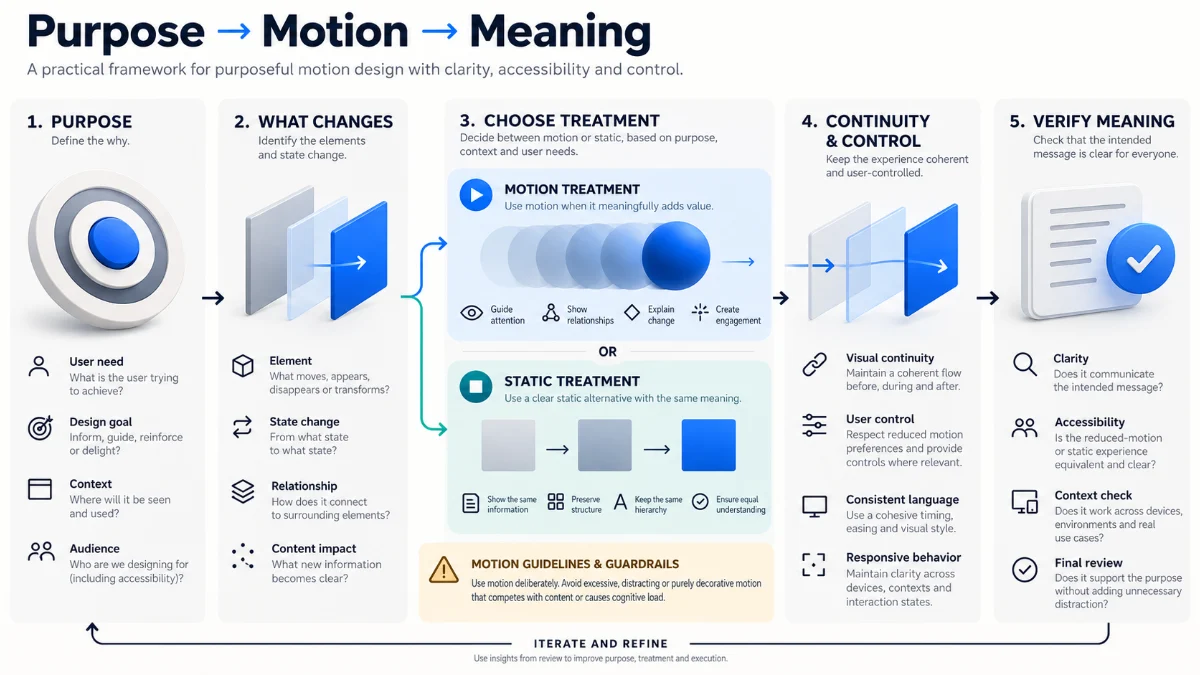
A Decision Matrix for Motion
| Review dimension | Decision question | Potential design response | Failure to watch for |
|---|---|---|---|
| Purpose | What fact or relationship needs explanation? | Write the learning or task objective before animating | A beautiful sequence without an explanatory claim |
| Change | What actually changes over time? | Move only the relevant state or object | Decorative motion mistaken for causality |
| Continuity | What must remain visible or recognizable? | Retain key labels, anchors, and identity cues | Viewers lose track of entities between states |
| Control | Can the viewer pause, replay, or reduce motion? | Provide appropriate controls and static equivalents | Information becomes inaccessible without animation |
| Verification | How will we tell whether the idea was understood? | Test interpretation and accessible alternatives | Judging success only by production polish |
The framework deliberately contains a path to no animation. If the meaning survives a still image and movement adds no important relationship, the simplest explanation may be the strongest. That is a design result, not a failure of creativity.
Write the Static Explanation First
Before making a motion concept, I would design a static sequence that a viewer could inspect in any order. It should identify the subject, the stages or states, and the important exception. If those cannot be explained clearly in still frames, movement may conceal rather than resolve the information problem.
Static-first design also establishes an accessibility fallback and a practical review artifact. A reviewer can inspect every state without scrubbing through video. Developers can verify that the intended information does not depend solely on CSS transforms or a moving camera. The storyboard becomes a specification of meaning, not simply a list of visual effects.
Choose Among Static, Transition, Guided Sequence, and Interactive Step-Through
A single static frame is suitable for simultaneous comparisons and stable structures. A transition is suitable for showing continuity from one state to another. A guided sequence is suitable when the audience needs an explanation of order. An interactive step-through is useful when viewers should control pacing, inspect conditions, or compare outcomes. These are alternatives with different information and production costs, not levels in a hierarchy of sophistication.
Motion design principles are most useful when they support that choice of format. An interactive step-through may require more implementation than a short video, but it can give users control over complex reasoning. A still table may be less dramatic than either one but better for frequent reference. The correct choice follows the audience’s job.
Worked Example: A Motion Design Storyboard for an Approval Workflow
To apply motion design principles to a concrete but hypothetical design problem, consider a fictional creative production system. An asset is drafted, assigned to a reviewer, approved for publication, or returned with feedback. The team wants to explain this to new contributors. A conventional explainer animation might fill the screen with moving icons and transitions while overlooking the most important condition: the asset cannot be published simply because it has entered review.
This example is a proposed motion design storyboard, not a recording of a real product or a measured usability study. I would begin with a simple state diagram and ask which part of the workflow benefits from temporal sequencing. The sequence should show assignment and review as distinct stages, preserve the identity of the same asset, and make the rejection path impossible to confuse with approval.
Six Frames With a Specific Explanatory Job
| Beat | What the viewer sees | What the motion explains | Static or reduced-motion equivalent |
|---|---|---|---|
| 1. Orient | Draft, In Review, Approved, and Needs Changes shown together | The system contains distinct states | Persistent labeled workflow map |
| 2. Assign | One identifiable asset enters the reviewer queue | Assignment changes responsibility, not approval status | Before-and-after state labels with an assignment arrow |
| 3. Inspect | The asset remains in review while feedback is considered | Review is a separate stage, not an automatic pass-through | In Review state highlighted with a short explanation |
| 4. Branch | Two clearly labeled potential outcomes appear | Approval and requested changes are different decisions | Static split-path diagram |
| 5. Resolve | The selected outcome is emphasized while the other remains visible | The reviewer decision controls the next state | Selected path displayed with explicit status text |
| 6. Summarize | The full workflow returns, with the chosen route marked | The completed path can be understood in the whole system | Full labeled workflow with highlighted route |
Notice that the sequence uses movement mainly to establish identity and order. The exception remains visible instead of being treated as an alternate ending that a viewer must watch in another video. If the production format cannot represent both branches without excessive complexity, I would use a static branching diagram alongside a shorter transition. A motion sequence should not hide the rule that makes the process meaningful.
Map Attention Before You Animate the Scene
For each beat, I would mark the intended focal object and ask whether anything else changes unexpectedly. During assignment, the asset might move to the reviewer queue while the state labels remain fixed. During the decision branch, only the paths and status labels need emphasis. A background camera pan could distract from the branching condition without adding anything the viewer needs to know.
This is where visual storytelling and visual hierarchy become engineering specifications. A reviewer should be able to ask why an element moves and receive a semantic answer. “Because the template uses that transition” is not enough when the movement implies a business rule.
Write a Timing Brief Instead of Guessing a Magic Duration
In the motion design storyboard, each beat should apply motion design principles through a narrative purpose, an entrance condition, a viewing hold, and an exit or persistence rule. I would specify whether the viewer needs to read a label, follow an object, compare alternatives, or confirm an outcome. Only then would I prototype actual durations for the target format and audience.
A narrated explainer can test different pacing against the voiceover. An interactive explanation can allow step-by-step control. The timing requirements of a mobile social clip may be different from an embedded educational lesson. Animation timing becomes justified when it is connected to the viewer’s information task rather than the creator’s preference for rapid edits.
What the Motion Design Storyboard Must Record
I would document each shot or interface state with its message, persistent information, moving elements, transition purpose, narration or accessible description, user controls, and the static equivalent. This is more useful than a storyboard containing only sketches and effect names. It allows an editor, illustrator, motion designer, developer, and accessibility reviewer to inspect the same intended meaning.
The format also exposes unnecessary production work. If three consecutive animations communicate only that the viewer should look at the same button, they may be collapsed. If the rejected path becomes unclear after a transition, it should be redrawn before the project is rendered. The storyboard is a decision document, not proof that the finished explanation has been understood.
Different Motion Rules for Interfaces, Explainers, and Creative Content
Motion design principles must adapt to the medium. An application is used repeatedly and often under time pressure. An educational video may be watched once, paused, and revisited. A creative campaign can tolerate more expressive motion as part of its identity, provided the important message remains accessible and clear. Copying one animation style across all three can preserve branding while harming the task.
Interface Motion: Feedback Without a Waiting Tax
In a functional interface, motion should usually clarify status, destination, hierarchy, or a change of state. A transition that blocks input every time a frequently used control is activated imposes a repeated cost. Apple recommends brevity, responsiveness, and avoiding unnecessary motion in frequently repeated interactions; I would extend that reasoning to administrative and production tools whose users may perform the same action dozens of times.
For interface motion, the test is whether someone understands the result and can continue working. A dramatic reveal that delays the next action may be appropriate for a rare celebratory event but inappropriate for routine navigation or form validation. Important states need semantic text or other accessible confirmation even when the animation does not play.
Explainer Animation: Make Time a Teaching Material
An explainer animation can use a sequence to control the order in which a complex idea becomes visible. This is most useful when the audience needs to understand causality, transformation, or dependencies. It can be less suitable for a comparison requiring prolonged inspection of multiple values. I would consider a hybrid: animate the relationship once, then finish on a stable diagram the viewer can study.
When voiceover accompanies the animation, I would avoid making the viewer read a long block of unrelated text at the same time. Narration, labels, and motion should serve one explanation; unnecessary duplication and simultaneous competing messages can raise cognitive load. The precise balance depends on the audience and requires review rather than a blanket prohibition on text.
Expressive Motion Still Needs a Coherent Visual Language
Brand and campaign motion can communicate tone through rhythm, transformation, typography, and recurring shapes. But creative identity should not dictate the same movement for every piece of information. The related article Visual Language Across Formats: A Flexible Design System examines how recognizable identity principles should adapt across static graphics, interfaces, and video. Here I would apply that distinction to time: keep a recognizable visual vocabulary while adapting motion intensity and structure to the intended explanation.
The wider Creative Strategy & Content Production resource also addresses the relationship between purpose, audience, narrative, and format. That connection matters because the strongest motion treatment is not always the most distinctive one. The creative direction should establish meaning before deciding how that meaning will move.
Motion Accessibility and Reduced Motion Are Design Requirements
An essential part of motion design principles is treating motion accessibility as a design concern, not a final optimization for people who dislike animation. Movement can be distracting, disorienting, or physically uncomfortable for some people, including users with vestibular sensitivities. It can also make information hard to follow for readers who need more time to process changing content. I would design the alternative presentation alongside the full-motion version, not after an adverse reaction is reported.
The W3C explanation of WCAG 2.2 Success Criterion 2.3.3, Animation from Interactions is particularly relevant. The criterion is Level AAA, not Level AA. It addresses nonessential motion animation triggered by interactions and the ability to disable it. That must not be confused with other WCAG requirements that apply to automatically moving content, flashing, or prerecorded media.
Do Not Conflate WCAG Motion Criteria
| Criterion | Level | Specific concern |
|---|---|---|
| 2.3.3 Animation from Interactions | AAA | Disabling nonessential motion animation triggered by interaction |
| 2.2.2 Pause, Stop, Hide | A | Control of qualifying automatically moving, blinking, scrolling, or auto-updating content |
| 2.3.1 Three Flashes or Below Threshold | A | Preventing content from exceeding specified flash thresholds |
| 1.2.2 Captions (Prerecorded) | A | Captions for applicable prerecorded synchronized media containing audio |
The Pause, Stop, Hide guidance includes conditions such as automatically initiated moving content lasting more than five seconds and presented alongside other content. This does not mean every five-second transition universally requires the same control. The flashing criterion addresses a separate safety issue; a motion-reduction toggle is not sufficient justification for content that violates flash thresholds.
Use Reduced-Motion Preferences, but Preserve Meaning
The CSS media feature prefers-reduced-motion communicates that a user has expressed a preference for reduced nonessential motion through supported device or browser settings. A design can respond by removing large movement, substituting a less motion-intensive transition, or presenting an immediate state change. It should not assume the user has accepted the loss of information.
A reduced motion presentation should still identify where the asset went, whether a state changed, and why a process stopped. If an animation is the only representation of the approval path, removing it also removes the explanation. The correct alternative may be a static state diagram, a step list, persistent labels, or controlled navigation through individual states.
For a conceptual web implementation, a rule such as @media (prefers-reduced-motion: reduce) can switch off decorative transforms and transitions. That is only one implementation technique, not proof that an entire interface complies with WCAG. Production code needs to consider interactions, semantics, announcement of state changes, and the user’s ability to understand the task without animation.
Autoplay, Replay, and Control Are Part of the Experience
In a time-based explanation, viewers may need to pause before a label disappears, replay one step, or skip the sequence entirely. A short animation that loops automatically can be more disruptive than a longer explanation the viewer starts deliberately. I would provide controls appropriate to the content and avoid forcing repeated animation before ordinary tasks can continue.
For prerecorded video with relevant audio, WCAG 1.2.2 addresses captions under its stated scope. Captions are not a substitute for describing essential visual events when the spoken track does not communicate them. A useful production brief should identify which information is carried by motion, which by sound, and which remains available in text or static form.
Evaluating Whether Motion Improves Understanding
I would evaluate motion design principles in practice against the communication goal, rather than judging a treatment by the smoothness of its rendering alone. A designer can admire a sequence while an intended viewer interprets the dependency incorrectly. Conversely, a visually simple sequence may communicate an important state relationship more effectively than an elaborate production. The review needs to ask what meaning the audience actually took away.
For an appropriate usability or educational study, the team could show the intended audience a static explanation, a full-motion explanation, and a reduced-motion equivalent under comparable conditions. Relevant tasks might include describing the permitted workflow, identifying the rejected branch, or predicting what happens after a reviewer requests changes. Such a study would require defined recruitment, tasks, measures, and ethical handling; none has been conducted for this article.
A Practical Motion Review Checklist
| Question | What to inspect | Possible corrective action |
|---|---|---|
| Does every motion have a purpose? | Can a reviewer name the relationship revealed? | Remove or simplify decorative movement |
| Is attention directed correctly? | Does unrelated movement compete with key information? | Reduce simultaneous animation and improve emphasis |
| Can viewers track the same entity? | Do identity and position changes remain understandable? | Retain labels and stable visual anchors |
| Is information visible long enough? | Can relevant labels and outcomes be inspected? | Add holds, pauses, or step controls |
| Is the reduced version complete? | Does it preserve state, causality, and outcome? | Provide a static sequence or explicit state text |
| Can the viewer control time? | Are pause, replay, and bypass appropriate? | Add user controls for consequential explanations |
| Has the interpretation been checked? | Can target viewers explain the intended rule? | Revise the storyboard and test the new interpretation |
The important output is a reasoned revision, not a decorative compliance score. If viewers misunderstand which branch permits publication, the problem lies in information design even if the animation runs without dropped frames. If the static version is clear but the motion version confuses them, that is a reason to reconsider the choreography rather than add more effects.
Maintain a Production Trace From Storyboard to Export
A motion design storyboard can provide a trace between the intended explanation and the delivered animation. I would connect each beat to its source diagram, message, approved terminology, accessibility alternative, and export requirements. Reviews should confirm that later creative changes have not altered the meaning of arrows, labels, branches, or final states.
This becomes especially useful in distributed creative work. An editor may shorten a sequence, a designer may update a visual treatment, and a developer may replace a complex animation with a transition for performance reasons. A clear semantic brief allows the team to preserve the explanation even when the production technique changes.
Trade-Offs: Expression, Clarity, Performance, and Control
Motion design principles must acknowledge a legitimate creative tension between expressive motion and explanatory restraint. A campaign identity may need rhythm and energy to communicate personality. A technical lesson may need a slow, inspectable sequence. A production interface may need minimal transitions that confirm an action without imposing a waiting cost. The mistake is not choosing one approach over another; it is applying an expressive convention where the information task calls for something different.
Performance is another constraint. Complex motion, large video assets, and continuous visual effects can increase resource use and affect responsiveness on constrained devices. But performance choices should also be evaluated against meaning: replacing an important spatial transition with an instantaneous change may save resources while weakening orientation. Sometimes a simple fade and a clear label preserve the idea better than either extreme.
I would document these trade-offs as part of creative direction. Which movement is essential to the explanation? Which merely carries style? What does the user experience under reduced motion? What happens on a narrow screen? What remains readable when the animation is paused on an intermediate frame? Those questions connect design judgment to accessibility, implementation, and the actual publishing environment.
Evidence, Methodology, and Limitations
This analysis synthesizes Apple’s motion design guidance, W3C accessibility criteria, MDN documentation for reduced motion, and published research about cognitive load, signaling, and segmentation in multimedia learning. These sources support the argument that motion should be purposeful, time-based information can create processing demands, and nonessential movement needs appropriate alternatives and controls. They do not validate a universal animation duration or prove that my proposed framework outperforms another design process.
The approval workflow, storyboard beats, decision matrix, and suggested tests are constructed examples. No original participant research, retention study, benchmark, or accessibility conformance audit was performed for this article. The Purpose–Motion–Meaning Framework is an editorial method for making design decisions more inspectable, not a certification, a published empirical scale, or a guarantee of comprehension.
Requirements also vary by medium. Web accessibility criteria have defined scopes, while native applications and non-web media may have additional platform obligations. The appropriate response is to evaluate the actual delivery format rather than applying one checklist mechanically to every animated artifact.
Frequently Asked Questions About Motion Design Principles
When does motion genuinely improve an explanation?
It is most useful when the viewer needs to understand how something changes, moves, depends on another event, or retains its identity across states. If the information is easier to inspect simultaneously, a static chart or diagram may be the better choice. The design should be justified by the specific explanation goal.
What is the ideal duration for an animation?
There is no universal duration for all animation types. Brief interface feedback, a narrated explainer, and a self-paced educational sequence have different timing needs. Start from the amount of information the audience must follow, prototype timing in context, and allow appropriate control when essential content is time-dependent.
Can motion increase cognitive load?
Yes. Changing information can disappear before the viewer has processed it, while simultaneous effects compete for attention. Signaling, segmentation, persistent labels, and controlled pacing can help, but the correct design depends on the subject and audience. Movement alone does not make material easier to learn.
Is WCAG 2.3.3 an AA requirement?
No. In WCAG 2.2, Success Criterion 2.3.3 Animation from Interactions is Level AAA. Other relevant criteria have different levels and conditions, including 2.2.2 Pause, Stop, Hide at Level A and 2.3.1 Three Flashes or Below Threshold at Level A. Compliance must be assessed against each applicable criterion.
Should reduced motion remove every animation?
Not necessarily. It should respect the user’s preference and avoid nonessential motion that can be problematic. Some information can remain understandable through an immediate state update, a restrained alternative transition, or a static sequence. The key requirement of the design is that meaning must not disappear when decorative movement is reduced.
What belongs in a professional motion design storyboard?
Beyond frames and effects, I would include the explanatory objective, state or object identity, intended focal point, causal relationships, persistent labels, transition purpose, viewer controls, and the static or reduced-motion equivalent. These details allow collaborators to check that the finished sequence still communicates the original idea.
Conclusion: Motion Should Leave the Idea Clearer Than It Found It
Motion design principles are most valuable when they give a creator permission to animate less. A transition may protect orientation. A sequence may explain causality. A pause may give the viewer time to understand a newly revealed relationship. An accessible static alternative may communicate the same essential information more effectively for someone who cannot or does not want to follow movement.
My preferred standard is simple: identify the explanation, preserve the meaning, and choose the least complicated motion treatment that helps the intended audience understand it. Creative energy still matters, but it should be directed toward a clear narrative and an experience that remains usable when its visual effects change. Explore related analysis in the Digital Creation Articles collection.
Connect and Explore My Work
I share ideas about creative direction, visual storytelling, UX, engineering, and digital production on LinkedIn, X, and Threads. You can explore my public technical work on GitHub and my design portfolio on Behance.