


UX Research Triangulation: When Findings Conflict

Motion Design Principles: Clarity Without Visual Noise
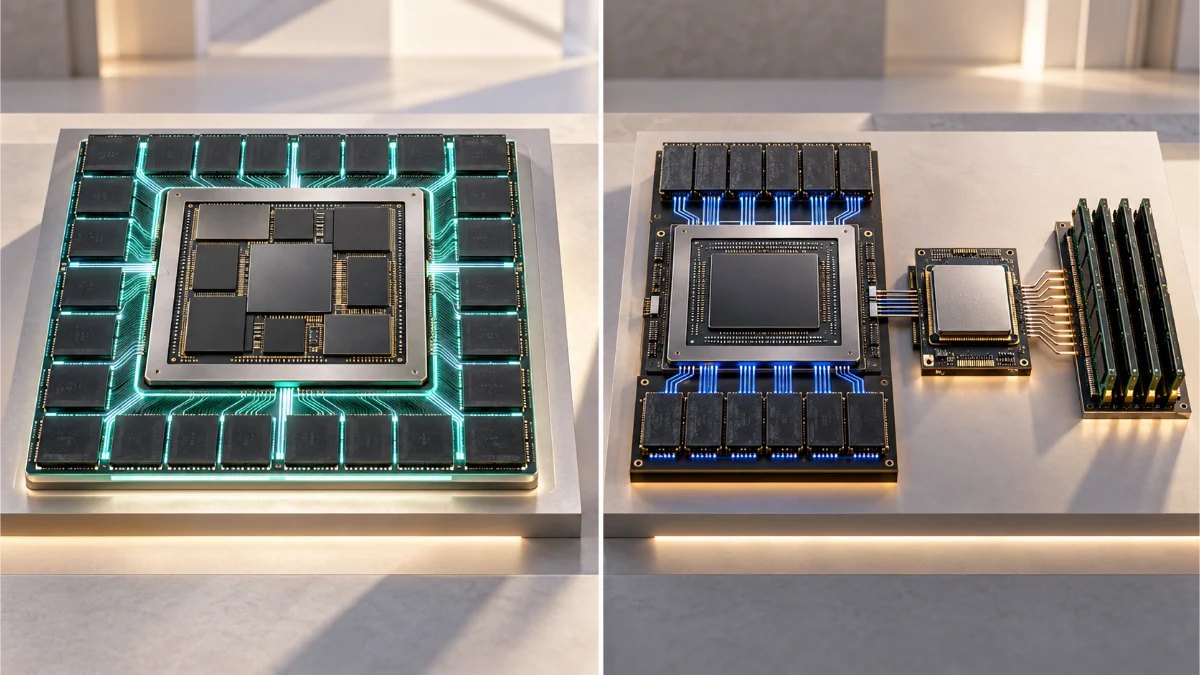
Unified memory vs VRAM is often presented as a contest between two numbers: the gigabytes advertised with a computer and the gigabytes printed on a graphics card. That comparison becomes misleading as soon as a real workload starts using the machine. An integrated GPU shares capacity with the operating system and applications. A discrete GPU has its own high-speed memory, but moving data between that memory and system RAM introduces separate constraints. Neither number tells us by itself whether a project can stay resident, whether several tools can run together, or whether performance will remain responsive under sustained load.
I would assess a workstation by the memory its tasks need at the same time, not by the largest capacity figure on a product page. Loading a local language model is different from keeping that model responsive while a virtual machine, browser, development environment, and video editor are running. A scene that fits in dedicated GPU memory may render efficiently; a larger scene might rely on slower transfer or fail, depending on the application and platform. A system with ample unified memory may fit more data into one physical pool while still being limited by GPU execution speed, bandwidth, application allocators, or memory pressure.
This article develops a workload memory budget for comparing those conditions. I use Apple’s M4 Pro with 48 GB of unified memory as a documented reference configuration, along with platform documentation from Apple, NVIDIA, PyTorch, VMware, and Adobe. The examples are planning exercises, not measurements from a controlled benchmark or claims that every software stack performs identically on a specific machine. The aim is to help AI developers, workstation buyers, and creative professionals identify which memory limit actually threatens their work.
Decision Brief: Capacity, Bandwidth, and Concurrency Are Separate Constraints
The decision: Select a memory architecture and capacity according to the peak concurrent working sets of the applications that matter, rather than treating system RAM and dedicated VRAM as directly interchangeable quantities.
The main distinction: Unified systems expose a shared physical memory pool to CPU and GPU workloads. Discrete systems generally use separate host RAM and dedicated GPU memory, with transfers and placement decisions between them.
The method: Account for operating-system demand, guest memory, model weights, inference caches, creative assets, GPU resource limits, and a safety margin. Then observe memory pressure and workload behavior on the intended platform.
The limitation: Memory capacity determines what may be feasible, not how fast a task will complete. Hardware specifications, allocator limits, software optimization, graphics features, and concurrency can change the result.
Unified Memory vs VRAM: What Is Actually Being Compared?
Unified memory architecture describes a hardware design in which CPU and GPU share access to a physical memory pool. On Apple Silicon, the operating system and applications can allocate from that same system capacity while the GPU accesses resources through Metal and other supported frameworks. Apple’s Metal resource storage documentation explicitly describes shared and private resource modes on Apple GPUs. The distinction is important: shared physical memory does not mean that every resource is accessible to every processor in the same way.
In a typical desktop workstation with a discrete graphics card, the host CPU uses system RAM while the GPU has dedicated GPU memory, commonly called VRAM. The GPU can access certain host-memory resources through supported pathways, but the data-placement and transfer characteristics differ from a single physical pool. Apple’s documentation for discrete memory models distinguishes system memory from video memory and explains how resource storage choices affect access.
In the unified memory vs VRAM comparison, the crucial question is not 48 GB versus 16 GB in isolation. A Mac with 48 GB unified memory has a shared total that must support the host and all relevant workloads. A workstation with 64 GB system RAM and 16 GB dedicated VRAM has separate pools with different responsibilities. Adding those capacities together and calling the result 80 GB of GPU memory would be wrong. Likewise, treating all 48 GB of the unified system as permanently available GPU capacity would be wrong.
The Memory Topology Changes the Bottleneck
| Property | Unified memory system | Discrete GPU system |
|---|---|---|
| Physical capacity | Shared among CPU, GPU, OS, and other uses | Host RAM and GPU VRAM are separate pools |
| Data movement | Some CPU–GPU workflows can avoid duplicative host-to-device copies | Data often needs explicit or managed placement across host and device memory |
| GPU availability | Constrained by other system demand, OS behavior, and GPU working-set guidance | Constrained first by free GPU memory, allocator behavior, and offloading capabilities |
| Overflow response | Memory compression, reclamation, and swap can affect system responsiveness | Application-specific allocation failure, out-of-core operation, or slower host-memory access may occur |
| Performance determinants | Bandwidth, GPU compute, software, thermal limits, contention | VRAM bandwidth, GPU compute, transfers, software, thermal limits |
| Typical planning mistake | Equating all installed RAM with free GPU memory | Adding host RAM to VRAM as if both were one fast GPU pool |
The comparison also exposes a terminology trap. NVIDIA’s CUDA Unified Memory is a managed-memory programming model whose migration and oversubscription behavior depends on the platform and GPU capabilities. It should not be equated with the physical unified memory architecture of Apple Silicon merely because both descriptions use the word unified.
GPU Working Set: The Number That Capacity Labels Hide
A GPU working set is the collection of resources an application needs available for useful GPU work during a relevant period. In graphics, it might involve textures, geometry, render targets, acceleration structures, and intermediate buffers. In machine learning, it can include model weights, activations, attention caches, and temporary computation buffers. A model file or project file on disk is not an exact measure of this active memory demand.
For Metal devices, Apple publishes recommendedMaxWorkingSetSize, an approximate limit intended to help applications allocate GPU resources without harming runtime performance. Apple also exposes currentAllocatedSize for resources allocated through a GPU device. Those values do not turn the computer’s total memory into a fixed partition marked VRAM; they offer relevant device-level guidance and observations.
This distinction matters in unified memory vs VRAM planning when someone claims that an application can use every gigabyte of a unified system for a model. Physical capacity, a recommended GPU working set, application allocator limits, and currently available headroom are separate constraints. The feasible GPU allocation depends on the active software stack and system state. No single universal percentage can safely substitute for checking those limits.
A Recommended Limit Is Not a Universal Hard Cap
The recommended working-set value is a performance-oriented guideline, not a promise that every smaller allocation will succeed or that every larger allocation must fail. PyTorch’s MPS API exposes this Metal value, while its allocation-limit controls explain that changing a process limit does not create additional physical memory. Some configurations can permit allocations beyond the recommended value, increasing the risk of heavy pressure or instability.
When sizing unified memory vs VRAM for a real purchase, I would treat the vendor’s installed-memory specification as one input, device allocation guidance as another, and the actual application’s peak observed footprint as the final feasibility test. A system that loads a project once with no other applications running has not demonstrated that it can sustain the intended daily workload.
Installed, Available, Allocated, and Resident Are Different
Installed capacity is the hardware configuration. Available memory is a changing operating-system assessment after accounting for reclaimable allocations. Allocated memory describes resources requested or reserved by software. Resident memory describes what is currently held in physical memory, which can differ from a process’s nominal virtual address space. The exact meaning of each metric depends on the platform and tool.
I would therefore be cautious about comparing an application’s displayed memory number with a GPU utility from another platform. A model loader, a system monitor, and a graphics API may report different categories of usage. They can all be correct while answering different questions.
GPU Memory Bandwidth Is Not the Same as Capacity
GPU memory bandwidth describes the maximum rate at which a memory subsystem can transfer data under specified conditions. Capacity describes how much data can be stored. A workload can fit comfortably in memory yet run slowly because compute throughput, memory access patterns, cache behavior, software kernels, or transfer overhead limit execution.
Apple’s M4 Pro MacBook Pro specifications list 273 GB/s of memory bandwidth, with 48 GB unified memory available as a configuration option. That 273 GB/s figure is a published hardware specification, not a measured sustained throughput for a local language model, a virtual machine, or a render job. CPU and GPU activity can also compete for shared memory-system resources.
In a unified memory vs VRAM comparison, a discrete GPU may provide a high-bandwidth local VRAM subsystem while using a separate interconnect to communicate with host RAM. Whether this is advantageous depends on how much of the task remains in VRAM, how frequently data must cross that boundary, and which kernels are supported. Raw bandwidth numbers from different devices cannot be used alone to predict application performance.
Data Locality Can Matter More Than the Marketing Number
A graphics or compute task that repeatedly accesses data already resident in dedicated VRAM can benefit from that memory subsystem without frequent host transfers. Another task that repeatedly moves large buffers between CPU and GPU can encounter a different bottleneck. On a unified system, some workflows can avoid additional copies because the processors access a common physical pool, as Apple’s MLX introduction explains.
That advantage is not equivalent to saying shared memory is always faster. The unified GPU still has finite execution resources and bandwidth, and an application can incur synchronization or data-format costs. Conversely, optimized discrete GPU pipelines can keep important resources local for long periods. The correct question is where the workload’s data moves and how often, not which memory label sounds more advanced.
CPU GPU Memory Sharing Creates Competition Too
CPU GPU memory sharing can reduce some copy overhead while increasing the importance of concurrency planning. A compiler, browser, background indexer, render process, and local inference engine can all place demand on the same physical pool. Their peak demands may not occur at exactly the same instant, but the system must accommodate the overlap that actually occurs during the user’s workflow.
This is one reason I would not compare an idle machine’s memory dashboard with a fully loaded workstation. A capacity decision should be based on the most demanding realistic overlap, including the operating system and applications the professional cannot simply close whenever a GPU task starts.
Local AI Model Memory: Weights Are Only the Starting Point
Local AI model memory is often estimated from a model’s parameter count and quantization format. That estimate is useful as a starting point, not a complete runtime requirement. The inference engine may also retain attention key-value caches, temporary activations, model metadata, tokenizer or preprocessing state, allocator reservations, and other buffers. Real demand changes with architecture, context length, batch size, and implementation.
For an illustrative calculation, a dense model with eight billion parameters stored at an idealized four bits per parameter would require four billion bytes for raw quantized weights. That arithmetic deliberately excludes scales, zero points, embeddings stored at different precision, caches, alignment, and runtime overhead. It is not a claim that any particular 8B model occupies exactly 4 GB in memory or can run within that amount.
When comparing unified memory vs VRAM for inference, I would separate the memory needed to load the model from the memory required to handle the actual prompt length and generation workload. A short single-user conversation may fit comfortably while a much longer context or several simultaneous requests exceed the same device’s feasible working set.
LLM Inference Memory Changes With Context and Concurrency
LLM inference memory can increase with the key-value cache retained for attention, particularly as context or concurrent sequences grow. The relationship depends on the model’s architecture and serving implementation. An inference engine may support quantized caches, sliding-window attention, prefix reuse, or bounded cache strategies that change the footprint and performance trade-off.
The open-source MLX LM server documentation describes key-value cache quantization and explicitly notes interactions with batching and processing settings. This is concrete evidence that fitting a model file does not settle the memory question for every serving configuration.
Before buying hardware, I would write down the specific model revision, quantization, engine, maximum context, number of concurrent sessions, and required latency. Without these constraints, questions such as “How much unified memory do I need for AI?” are too broad to yield a reliable hardware recommendation.
What Shared Capacity Can Offer Local Models
A unified architecture may make it practical to keep a larger model working set accessible to GPU-oriented software than would fit inside a smaller discrete GPU’s VRAM alone, depending on framework and device limits. This is a real capacity consideration for model exploration. It is not evidence that the model will generate tokens faster, or that every framework supports the same operation efficiently on Metal and CUDA.
A discrete GPU with sufficient dedicated VRAM can be attractive when an application benefits from optimized kernels, high local bandwidth, supported precision formats, and strong tooling. If weights or caches do not fit, some engines can offload portions of the workload to host memory or use other strategies, but the cost depends on data transfers and implementation. I would not assign a universal slowdown percentage to offloading without measuring the exact workload.
A Repeatable Fit Check for AI Development
First, identify the exact model and inference engine. Second, record weight format and expected runtime buffers. Third, define a representative input length, output length, and concurrency level. Fourth, check the engine’s memory usage while the actual task runs. Fifth, repeat with the other applications normally open. If the system becomes unstable or memory pressure rises sharply, a successful initial model load should not be treated as proof of sufficient capacity.
Where precise GPU or CPU allocation tools are available, I would preserve their readings together with system-level monitoring. The values can reveal why a run failed or slowed down, but they must be interpreted according to the allocator and platform rather than treated as interchangeable with one another.
Virtual Machine Memory Allocation on a Shared-Memory Mac
Virtual machine memory allocation adds a different kind of demand. A guest operating system needs memory for its own processes, caches, and virtual devices, while the host continues running macOS, the hypervisor, and other applications. Assigning a VM a certain amount of RAM defines a guest configuration; it does not create new physical capacity in the host.
With VMware Fusion on Apple Silicon, the supported guest operating system architecture is ARM64. Broadcom’s Fusion compatibility documentation makes that distinction explicit. A Windows 11 ARM guest may run supported x86 applications through Windows emulation, but this does not turn the guest into an x86 operating system or give it direct access to a discrete GPU with an arbitrary VRAM capacity.
I would keep memory planning separate from the broader questions of guest driver support, rendering APIs, and application compatibility. A VM may start successfully with ample guest RAM while a required graphics path remains unsupported. Conversely, a graphics-compatible application can become unresponsive if the combined host and guest workload exceeds practical memory capacity.
Guest RAM, Virtual Graphics Memory, and Host RAM Are Not Three Independent Pools
When configuring a guest, an amount displayed as VM RAM is not simply available as a second reserve that can be added to the Mac’s installed memory. The hypervisor must back guest activity with host resources according to its implementation. Virtual graphics allocations are also mediated by the virtualization stack, guest drivers, and the host GPU rather than representing a newly installed physical graphics card.
A VM configuration may expose a graphics memory number, but that number does not establish dedicated host GPU VRAM or full graphics feature parity. For the distinction between guest execution and graphics compatibility, see my related Windows 11 ARM in VMware Fusion compatibility article. This article remains focused on the resource budget rather than repeating that platform audit.
Why an Aggressive VM Allocation Can Hurt the Whole Desktop
Giving a guest more RAM than its actual tasks require can reduce flexibility for the host and other workloads. Giving it too little can trigger guest paging, application failures, or repeated memory reclamation. The exact behavior depends on Fusion, macOS, the guest operating system, and the active workload; there is no universally optimal fixed allocation.
When evaluating unified memory vs VRAM for a Mac that must run a guest alongside local AI, I would treat the VM as part of the concurrent system budget. I would monitor memory pressure on the host and memory demand inside the guest under the same scenario. Guest metrics alone cannot show what the host is sacrificing to keep the VM responsive.
Creative Application Memory Usage: Projects Are Not Static Files
Creative application memory usage depends on the composition of the project, not merely its file size. A video editor or motion-graphics application may cache decoded frames, previews, effects, color transformations, image buffers, and intermediate outputs. A 3D scene can require textures, geometry, acceleration structures, and rendering buffers whose aggregate working set differs substantially from the size of the project saved on disk.
Adobe’s After Effects memory and storage documentation describes how rendering requirements vary with resolution, color depth, source images, effects, and memory settings. It also documents shared memory behavior across selected Creative Cloud applications and the importance of reserving resources for other software. That supports a broader point: the peak active workload matters more than a quiet project’s footprint.
Previews, Render Caches, and GPU Resources Have Different Lifetimes
A timeline may play smoothly after frames are cached and struggle after a complex edit invalidates those caches. Exporting at a different resolution or with a different effect chain can demand resources that previewing did not. The apparent contradiction is often explained by memory lifetime, cache reuse, compute cost, or a change in the resource set that must be resident.
For unified memory vs VRAM, I would record the application version, project characteristics, preview settings, render settings, and which other apps remain open. Capacity planning based only on a screenshot of idle application memory will miss the peaks that decide whether the workflow is actually reliable.
Choosing Hardware for Mixed Design and Engineering Work
A professional who switches between UI design, video editing, code builds, a browser with many research tabs, and local inference needs to plan for overlap. Some tasks can be scheduled sequentially. Others, such as a background render, a VM-based test environment, and a communication tool, may need to run simultaneously. The distinction can affect whether additional shared RAM is more useful than upgrading to a different GPU class.
I would not promise that more unified memory fixes a slow render. If the active resource set already fits and the bottleneck is GPU arithmetic throughput or application optimization, increasing capacity may change little. Likewise, faster dedicated VRAM does not fix a CPU-heavy effect, a slow storage pipeline, or a software compatibility limitation.
Memory Pressure and Swap: What to Monitor Before Buying More RAM
Memory pressure belongs in any unified memory vs VRAM analysis because it is more informative than the simplistic idea that unused RAM is always desirable. macOS uses memory for applications and caches, and it can compress memory or use disk-backed swap when demand changes. Apple’s Activity Monitor documentation explains how memory pressure, compressed memory, cached files, and swap usage contribute to understanding system behavior.
A rising swap counter does not, by itself, diagnose a broken workstation. The important questions are whether swap activity is sustained during the critical task, whether memory pressure rises, whether latency worsens, and whether the system is repeatedly forced to reclaim resources. A small amount of historical swap usage and an actively stalled memory-bound workload are not equivalent findings.
SSD Swap Is Not a Replacement for Fast Working Memory
Swap allows an operating system to move eligible memory contents to storage under certain conditions. It is a valuable mechanism for system resilience, but SSD access has different latency and bandwidth characteristics from physical RAM and GPU-local memory. Software that repeatedly needs data moved out of physical memory can suffer under sustained pressure.
That distinction does not mean every swap event makes a workload unusable. Some cold pages may be moved without materially affecting the active task. What matters is whether the pages needed for the current computation remain accessible efficiently. When measuring memory pressure, I would combine system indicators with observed task completion time, responsiveness, and application-specific errors.
A Practical Monitoring Pass
Start from a reproducible idle state and note the operating system and background services. Open the normal project applications, load the intended model or scene, and start the realistic guest or render workload. Observe Activity Monitor’s Memory Pressure and Swap Used, then inspect relevant application-level memory readings. Repeat the same work with one heavy task paused to reveal how much concurrency drives the problem.
Do not infer a platform benchmark from one pass. Repeat under comparable conditions and record what changed. The goal is not to publish an impressive utilization percentage; it is to identify a real failure threshold or recurring performance constraint in the environment being evaluated.
The Workload Memory Budget: A Better Capacity Planning Method
I use the term Workload Memory Budget for an editorial planning framework that separates physical capacity, expected concurrent demands, GPU constraints, and operational headroom. It is not an official vendor model and does not imply that application memory can always be measured or summed with perfect accuracy. The point is to expose assumptions that marketing-style capacity comparisons hide.
For unified memory vs VRAM, the process begins by describing an actual workday rather than starting with a hardware catalog. What applications must stay open together? What constitutes successful performance? Which tasks are occasional? Which resources can be released between stages? Which parts of the workload must fit on the GPU, and which can operate adequately in system memory?
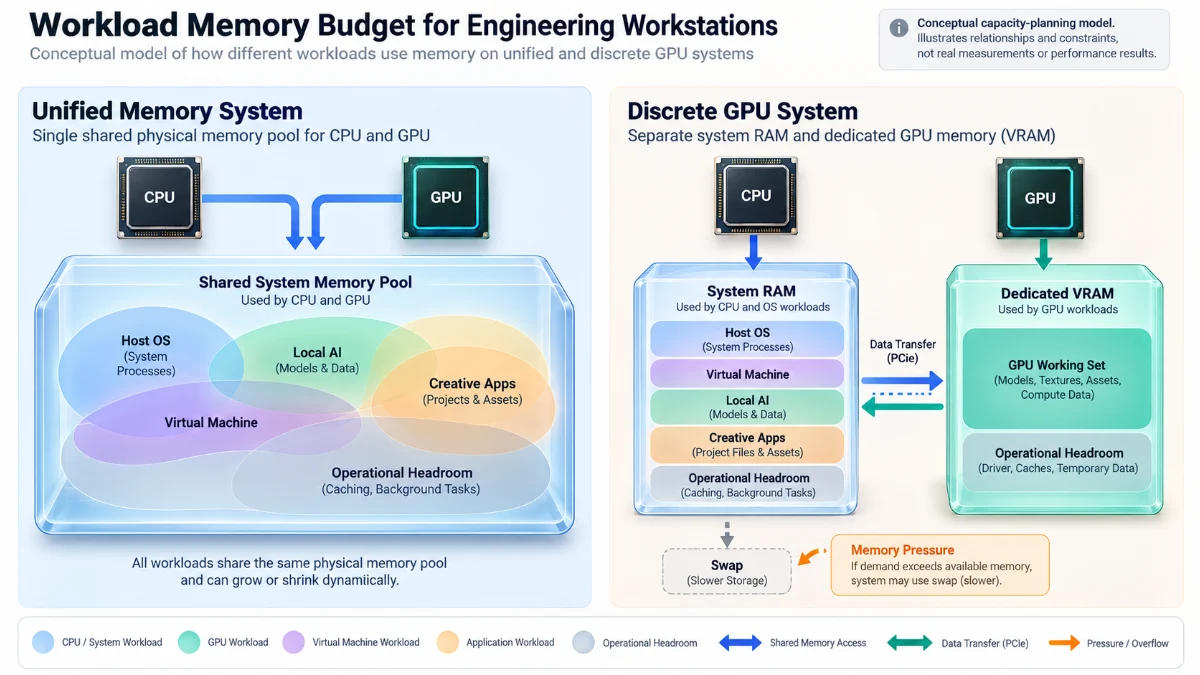
Record the Limits Before Allocating Numbers
| Budget field | What to record | Why it matters |
|---|---|---|
| Installed physical memory | Exact workstation specification | Shared pool or host memory baseline |
| Dedicated GPU memory | GPU model and VRAM capacity, if present | GPU-resident resource limit on a discrete card |
| GPU working-set guidance | Platform API limits and application usage | More relevant than treating all RAM as available VRAM |
| Host baseline | Operating system and essential background tools | Capacity that cannot be assumed free |
| Concurrent tasks | VMs, models, editors, builds, browsers | Peak overlap determines practical demand |
| Memory movement | CPU–GPU transfers, offload behavior, caches | Fit does not determine speed |
| Pressure indicators | Compression, swap activity, allocation failures | Signals when the envelope is exceeded |
| Headroom and recovery | Unexpected peaks, system responsiveness, restart costs | A barely fitting task may not be sustainable |
Illustrative 48 GB M4 Pro Planning Scenario
Use a documented M4 Pro configuration with 48 GB unified memory as the reference system. The following example deliberately assigns hypothetical planning allowances, not observed macOS allocations: 8 GB for host and essential tools, 12 GB of potential guest demand, 14 GB for the active model and inference-related buffers, 8 GB for creative work, and 6 GB uncommitted. The five numbers total 48 GB, but this arithmetic is not a validated physical-memory footprint or a safe allocation prescription.
| Hypothetical demand category | Planning allowance | Important caveat |
|---|---|---|
| macOS and essential tools | 8 GB | Actual OS and application demand varies |
| ARM virtual machine activity | 12 GB | Guest allocation is not identical to active host residency |
| Local inference workload | 14 GB | Weights, caches, and GPU allocations depend on the engine |
| Creative applications | 8 GB | Project and cache demand can spike |
| Uncommitted allowance | 6 GB | Not a guaranteed reserve or GPU entitlement |
| Arithmetic total | 48 GB | Illustrative sum only; not a test result |
The exercise is intentionally uncomfortable. Even if the estimates are plausible, their simple sum does not establish fit. The categories can overlap, allocations can be compressed or reclaimed, peak demand can exceed assumptions, and the GPU runtime can face its own resource guidance. A VM may use less than its nominal allocation at one instant and more pressure than expected at another. The purpose of the worksheet is to surface these risks, not to pronounce the configuration sufficient.
Why a Discrete GPU Needs a Separate Budget
Now consider a hypothetical workstation with 64 GB of host RAM and 16 GB of dedicated GPU memory. The host may have room for a sizeable VM and creative applications while the GPU cannot keep a required 20 GB resident resource set entirely in its 16 GB pool. Whether the application can offload, stream, or fail depends on its software and GPU capabilities. The additional host memory does not magically turn that GPU into a 20 GB VRAM device.
Conversely, if a workload requires only 10 GB of GPU-resident resources and depends heavily on optimized discrete GPU computation, the separate-memory system could be the better solution for that task. The example cannot rank the two machines without comparable compute and application measurements. Capacity planning tells us which configurations are worth testing; benchmarking tells us how they actually behave.
Keep a Decision Record Instead of a Single Winner
I would preserve the selected workload, assumed peaks, source of each estimate, required software, failure condition, and the evidence needed before purchase. A recommendation should identify whether its confidence comes from manufacturer specifications, application documentation, a reproducible local test, or a reasoned but unverified planning assumption.
That record is also useful when a workload evolves. A larger model, longer context window, different plugin, additional VM, or higher-resolution composition can invalidate a once-reasonable memory budget without changing the physical computer. Future suitability is conditional, not permanently certified by an initial success.
A Practical Buying Decision: Which Constraint Should Drive the Upgrade?
For someone selecting unified memory vs VRAM, I would first reject the assumption that a higher total memory number identifies the better computer. The correct recommendation depends on the dominant workloads and whether they must operate together. Hardware buyers should classify demands by GPU residency, CPU-side working set, memory movement, application compatibility, and whether the task fails or merely slows when resources run short.
If a local model’s GPU-resident footprint is the hard constraint and the intended Metal framework supports the model efficiently, a larger unified pool may be strategically useful. If CUDA-specific software, discrete GPU throughput, or specialized rendering features are mandatory, adequate dedicated VRAM and compatible accelerators may be the stronger requirement. If several VMs, large data tools, and a GPU workload must coexist, both host capacity and GPU capacity matter independently.
Match the Purchase to the Workload
| Primary workload | Capacity question | Other decisive constraint |
|---|---|---|
| Local LLM exploration | Do weights, cache, and runtime buffers fit during intended context length? | Inference engine, kernels, bandwidth, latency |
| GPU rendering and 3D | Do scene assets and active render buffers remain resident? | GPU features, renderer support, compute throughput |
| ARM virtual machines | Can host and guest stay responsive at the same time? | Guest architecture, drivers, virtualization limitations |
| Motion graphics and video | What is the peak project, preview, and cache footprint? | Effects, codec support, media engines, disk pipeline |
| Multitasking workstation | Which applications overlap and how much headroom is necessary? | Memory pressure, thermal behavior, scheduling |
I would also assess software support independently of memory. My Apple Silicon compatibility guide examines the operating-system and architecture layers that can affect real professional workflows. A perfectly sized memory system is not useful if a critical application requires an incompatible driver or unsupported runtime.
Evidence, Methodology, and Limits
This article uses current platform documentation to establish memory topology, device working-set guidance, manufacturer specifications, operating-system memory indicators, virtualization boundaries, and application-specific memory behavior. The 48 GB M4 Pro configuration and 273 GB/s bandwidth are Apple specifications, not values produced by my own hardware test. The conceptual budgets are hypothetical accounting exercises designed to expose competing demands.
No cross-platform GPU benchmark, token-generation measurement, rendering trial, VM stress test, or sustained swap experiment was conducted for this article. I cannot infer token throughput, render completion time, or exact maximum usable GPU allocation for a given application from the specification sheet alone. Vendor drivers, OS versions, allocation policies, and toolchains can change; real purchasing decisions need the exact application stack and a representative test.
The Workload Memory Budget is a qualitative decision framework. It does not model allocator fragmentation precisely, memory compression efficiency, page residency, cache eviction, thermal throttling, or the full data-transfer schedule of a GPU kernel. Those phenomena can become decisive at the boundary and require platform-specific profiling rather than a static spreadsheet.
For professionals comparing platforms, this limitation is a reason to measure the right task, not a reason to ignore the specifications. The specification narrows plausible choices. The runtime evidence decides whether the candidate can do the actual work.
Frequently Asked Questions About Unified Memory and VRAM
Does 48 GB unified memory mean 48 GB of VRAM?
No. On Apple Silicon, the GPU shares a physical memory pool with the CPU and the rest of the system. Installed unified memory is not the same as an exclusively reserved GPU memory capacity. Available headroom and Metal working-set guidance depend on the environment and workload.
Is dedicated VRAM always faster than shared memory?
No universal comparison is valid. A discrete GPU may have a fast local memory subsystem and optimized kernels, but overall results also depend on compute capabilities, data transfers, software, and the size of the active resource set. Unified designs can avoid some copies while sharing bandwidth and capacity with other tasks.
Can a model larger than dedicated VRAM still run?
Sometimes. Certain frameworks support CPU offloading, managed memory, model sharding, or other strategies, depending on hardware and software. The trade-off can involve substantial performance or functionality limits. Running at all does not prove that inference will be acceptably fast.
Does assigning more RAM to VMware Fusion improve graphics performance?
Not necessarily. Guest RAM capacity and virtual graphics capabilities are distinct. More guest memory can help a memory-constrained workload, but graphics performance also depends on guest drivers, virtual GPU support, rendering APIs, and host resources. An unsupported GPU feature cannot be added by increasing guest RAM.
Does swap usage prove I need more unified memory?
Not by itself. macOS uses memory reclamation, compression, caches, and swap as part of normal operation. Sustained high memory pressure, repeated swapping during critical tasks, degraded responsiveness, and allocation failures are more useful together than a single cumulative swap value.
Should I prioritize memory capacity or bandwidth?
First make sure the critical working set can be handled within the application’s supported memory arrangement. Then evaluate whether bandwidth, compute, data movement, or some other resource limits the workload. Capacity may enable a job to run, while bandwidth and compute influence its speed; neither alone predicts final performance.
Conclusion: Buy for the Working Set, Not the Headline Number
Unified memory vs VRAM is not a simple ranking of two memory technologies. Shared physical capacity can be valuable when a machine must support GPU work without a small separate VRAM ceiling, but the available GPU working set and whole-system pressure still matter. Dedicated GPU memory can support highly optimized workloads, but host RAM is not an automatic extension of equally fast device memory.
I would plan around what must remain active simultaneously, what must stay GPU-resident, what the applications and drivers actually support, and how the system behaves when it approaches its limit. For local AI, that includes caches and context; for virtual machines, host and guest competition; for creative tools, project peaks and transient render buffers. These are different demands, and their constraints deserve separate treatment.
The most defensible hardware decision starts with a workload memory budget and ends with evidence from the real task. Capacity specifications tell us where to look. Controlled observation tells us whether that configuration will support professional work without unacceptable compromises. Explore related platform and performance analysis in the Technology & Hardware Articles collection.
Connect and Explore My Work
I share analysis on hardware decisions, software architecture, artificial intelligence, and digital products through LinkedIn, X, and Threads. You can explore public technical work on GitHub and creative and design projects on Behance.