

Small UX Research Samples: What They Can and Cannot Tell You

C2PA Content Credentials: What They Can and Cannot Prove
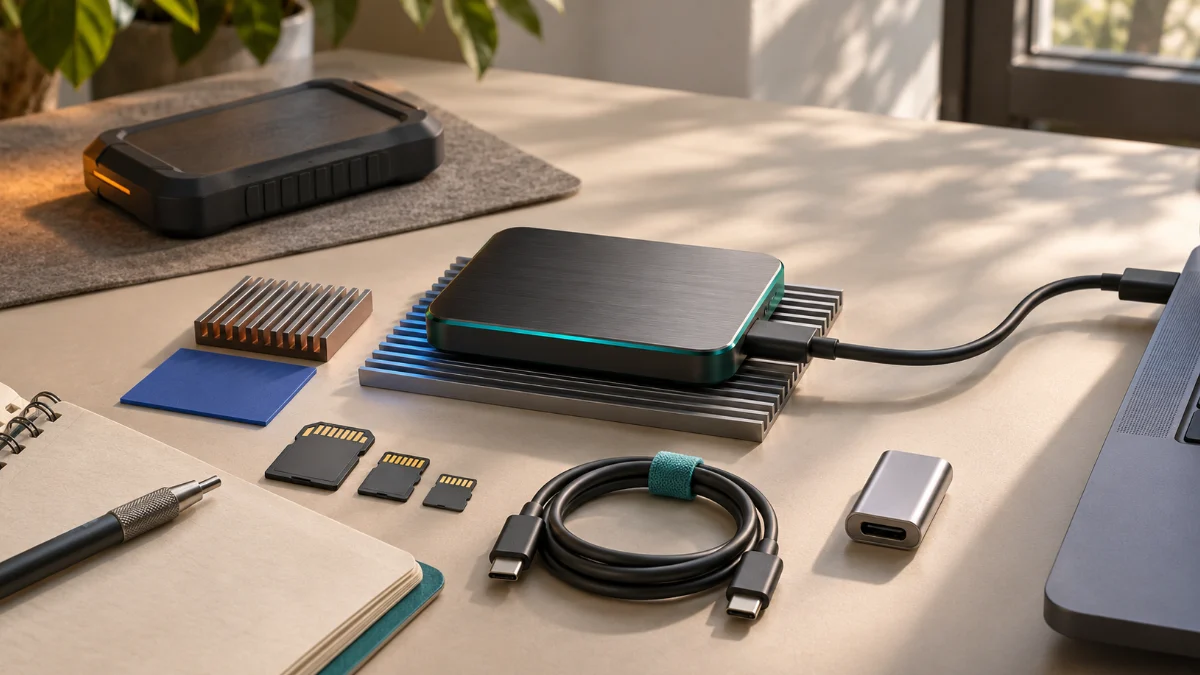
An external SSD can look like the simplest workstation upgrade. One small enclosure adds space, moves with a laptop, and promises transfer rates that sound close to internal storage. For media archives or occasional file exchange, that may be sufficient. For a working drive that hosts a virtual machine, an active project, a source-code repository, or a long-running export, the decision is more complicated. The storage device becomes part of the operating environment rather than a convenient destination.
I approach an external SSD as a system of dependencies: host port, cable, enclosure controller, storage device, filesystem, workload, power, and recovery path. If one dependency is inappropriate, a fast specification can coexist with frustrating pauses or an unacceptable failure mode. A useful decision is therefore not “Is this drive fast?” but “Under which conditions can I safely depend on this drive to finish the work?”
This is a research-based operational assessment, not a new hardware benchmark. My published Windows 11 ARM compatibility audit recorded a virtual machine hosted on external storage, while explicitly noting that external-drive throughput and latency were not measured. That is a meaningful distinction: a functioning guest proves that one tested configuration worked for its sampled tasks, not that its storage would survive every workload or interruption.
If You Only Read One Thing
Choose an external SSD for active work only after separating peak interface bandwidth from sustained workload behavior and recoverability. A quick copy test is not a substitute for a long export, frequent small-file updates, cold-start testing, or a validated backup restore. Good performance on one task does not establish safety for every task.
An external SSD passes my working-drive threshold when its actual host connection is known, its filesystem fits the operating environment, ordinary heat and free-space conditions remain acceptable, disconnects are manageable, and an independent recoverable copy exists. If any of those facts is unknown, I would keep the external SSD decision provisional rather than infer reliability from product packaging.
Decision Brief: When an External SSD Fits
An external SSD is not inherently inferior to internal storage. It can be a sensible choice when expansion flexibility matters, the workflow is portable, the host offers a suitable connection, and interruption would not destroy the only available copy of important work. The weak decision is to choose an external SSD enclosure first and ask about the workload later.
In practice, I separate media transport, daily project workspace, and stateful system storage. Media transport often tolerates orderly copying and verification. A project workspace adds frequent reads, metadata updates, application caches, and autosaves. Stateful system storage, including virtual machine disks or local databases, is more sensitive to unplanned disconnection and write ordering. These categories overlap, but they should not be treated as the same operational risk.
| Workload | Dominant concern | Required evidence | Initial disposition |
|---|---|---|---|
| Occasional media transfer | File integrity after copy | Verified destination and readable source | Usually reasonable after basic checks |
| Daily design or development workspace | Small-file latency and app behavior | Representative open, build, export, and reopen tasks | Evaluate under normal working conditions |
| Active virtual machine | Write consistency, snapshots, and disconnect risk | Shutdown, cold boot, workload, and restore tests | Conditional, not automatically approved |
| Database or critical single-copy data | Durability and recoverability | Application-specific storage requirements and restoration exercise | Do not approve without stronger controls |
The table is my decision rubric, not a measured comparison of commercial drives. It asks what evidence could change the decision before time or money is committed. An external SSD might be the best answer for one row and the wrong answer for another, even when the same enclosure is used.
A USB-C Connector Is Not a Throughput Promise
The physical connector is only the beginning. The USB Implementers Forum describes USB4 as an architecture that can share high-speed links among multiple protocols, and its published material distinguishes 20, 40, and 80 Gbps performance classes. The connection operates at the best mutually supported capability of the host, device, and cable. A USB-C-shaped plug alone tells me none of those facts. USB-IF’s USB4 overview is a useful starting point.
Those advertised rates are link-level capabilities, not guaranteed application file-transfer speeds. Protocol overhead, the actual USB or PCIe storage path, bridge controller behavior, filesystem activity, and concurrent devices all affect application throughput. I would never convert a Gbps number directly into an observed MB/s result without a defined workload and measurement. The same caution applies to a Thunderbolt badge: compatibility and effective negotiated mode still need verification.
The End-to-End Chain
When an external SSD disappoints, the external SSD is not always the culprit. A dock may expose a different downstream mode from the host’s direct port. A cable may support charging but not the expected high-speed data rate. An enclosure controller may present the underlying NVMe device through a different transport than the buyer assumes. The external SSD itself may slow during sustained writes. Troubleshooting therefore starts with observing the actual connection, not repeating a marketing claim.
I record the host model, port, cable identification, whether a hub is in the chain, enclosure model, controller or firmware details when available, and the operating system’s reported link. If the platform cannot expose a needed value, I mark it unverified. An external SSD is a composite system; claiming that its result belongs to a single component without isolation would be weak engineering.
Shared Bandwidth and Concurrent Work
A port that performs well in isolation can behave differently while a display, network adapter, or other storage device is active through the same hub. USB4 can dynamically allocate bandwidth across supported traffic classes, so “dedicated” and “shared” are operationally meaningful distinctions. Testing an external SSD through the exact dock used every day is more useful than relying only on a direct-port test that the real setup never uses.
Burst Speed Is Not Working Speed
A brief copy to an external SSD can fit inside a drive’s fast write-cache behavior, finish before a thermal limit is reached, or be influenced by host caching. It may say little about an hour of rendering, a large media ingest, or a virtual machine accumulating disk writes. The useful questions are whether the workload finishes, whether its completion time is predictable, and whether the device remains available to applications throughout the operation.
Sequential transfer rate matters for large files, but small-file operations and metadata-heavy activity behave differently. A codebase can contain many small files, while a VM may mix random reads and writes with host memory pressure and snapshot changes. Application startup, indexing, repository checkout, build caching, package installation, and project reopen time can reveal bottlenecks that an attractive sequential number hides.
Measure the Task, Not Just the Disk
For an external SSD used as a working drive, I favor a repeatable task ledger over one headline score: time to open a known project, import a fixed set of files, run a standard build, complete a controlled export, close the application cleanly, and reopen the result. Record the input and output locations; otherwise a task may be testing the internal disk or memory cache instead of the external SSD. Do not mix results from cold and warm caches without labeling them.
If a synthetic benchmark is used, it is supplementary. It should report tool, settings, dataset size, elapsed time, connection path, free space, and the state of the drive. A single high result is not proof of stable behavior. I would also look for sudden throughput collapse, long pauses, dropped mounts, unexpected write errors, and abnormal application logs before celebrating a maximum.
Heat: The Performance Curve You Cannot Read From a Box
An external SSD generates heat during demanding workloads. Samsung’s technical FAQ explains that its Dynamic Thermal Guard can reduce performance when temperatures rise beyond operating thresholds. That documentation concerns identified products, not a benchmark of every portable SSD. The general design lesson is that the same storage system can deliver different short- and long-duration performance under different thermal conditions.
External SSD enclosures vary in material, thermal interface, ventilation, and placement. A drive used on an open desk is not exposed to the same conditions as one placed under a laptop, enclosed in a bag, or resting against a warm dock. I would not assume that a metal casing guarantees adequate internal cooling or that a surface temperature alone reveals controller temperature. Manufacturer limits and device telemetry, where supported, matter more than touch.
A Defensible Thermal Test
Before testing an external SSD, make a verified backup and choose a workload that will not endanger production data. Measure a representative sustained operation more than once; record ambient conditions and the connection path. Observe whether transfer behavior changes over time, whether the enclosure remains connected, and whether the host logs errors. When telemetry is unavailable, say that temperature was not directly measured. Throughput variation alone does not prove thermal throttling because cache exhaustion, contention, and background work can resemble it.
For an external SSD, there is no universal “acceptable temperature” or sustained-write speed I can prescribe without the device specifications and context. The correct test is whether the system remains within documented operating conditions and continues to meet the task’s actual requirements. If not, changing placement, enclosure, cable, or workload staging may be more rational than simply buying a faster underlying SSD.
The Filesystem Is an Operational Contract
Filesystem selection should follow the operating system and application requirements, not only the need to move files between computers. Apple’s Disk Utility documentation describes APFS features including encryption, snapshots, case-sensitive variants, and space sharing, and identifies exFAT as a Windows-compatible option. Those are real design differences; neither name guarantees performance, durability, or compatibility with every tool.
For a Mac-only external SSD workspace, APFS often offers a more natural feature and metadata model than a cross-platform interchange format. For external SSD exchange between Mac and Windows, exFAT may be appropriate when the files and applications tolerate its feature set. On Windows-centric working storage, NTFS may fit application and permission expectations. I would treat these as choices to validate against software requirements, not universal rules that every machine must follow.
| Format | Typical consideration | Important boundary | Before committing |
|---|---|---|---|
| APFS | Native Mac-oriented SSD use, snapshots, encryption options | Cross-platform access is not automatic | Confirm application behavior, case sensitivity, and backup method |
| exFAT | Convenient file exchange among supported systems | Do not assume APFS/NTFS-specific semantics | Test metadata, permissions, unexpected removal, and application support |
| NTFS | Windows-oriented workflows and filesystem features | Native read/write support differs across operating systems | Verify host drivers, permissions, and access before migrating |
Case Sensitivity, Paths, and Permissions
Developers should care about what happens to two filenames that differ only by capitalization, symbolic links, file permissions, extended attributes, and case assumptions in build tools. Creative applications may care about media relinking, hard-coded paths, sidecar files, and cache location. When moving a working project onto an external SSD, I would test open, save, export, archive, move to another host, and reopen before assuming the migration is complete.
Reformatting a drive can erase data. Before changing a filesystem or partition map, preserve a separately verified copy, document the present configuration, and confirm whether the target platform really needs the change. A format choice should not become an improvised troubleshooting step on the only copy of a working project.
Virtual Machines Turn External Storage Into a Stateful Dependency
Virtual machine storage on an external SSD is not merely a collection of large files. It has an actively changing virtual disk, configuration metadata, possibly snapshots, and an operating system that expects storage operations to complete consistently. Putting a VM bundle on an external SSD means that a loose cable, a full volume, an unclean host sleep transition, or a badly managed snapshot can affect the whole guest. Storage latency can also make a capable CPU and ample memory feel slow.
Broadcom’s Fusion documentation describes a virtual machine bundle as containing disks and settings and recommends copying that bundle to a safe location before altering its files. Its separate disk I/O troubleshooting guidance treats storage contention and device performance as causes of degraded VM behavior. These materials justify caution, but they do not establish a benchmark for any particular modern enclosure.
A Working VM Is Not a Passed Storage Benchmark
In my previously published Windows 11 ARM audit, the guest ran from external SSD storage. The tested boot and selected workflows worked, but the record explicitly excluded external-drive throughput and latency measurement. I would not recycle that observation as evidence that the storage was as fast as an internal drive, or that extended write load and disconnect recovery had been validated. The difference between a successful configuration check and a sustained storage test matters.
If I moved another VM to an external SSD, I would first shut the guest down, make a consistent backup, and confirm that the new location is supported by the hypervisor and host filesystem. I would then test a clean start, ordinary application tasks, a controlled restart, shutdown, and a deliberate restore from an independent copy. I would examine snapshot growth and available space separately. A suspended or running guest should not be treated as a collection of inert files that can be unplugged at will.
Two Different Ways to Use External Storage
There is a meaningful distinction between storing the VM’s own bundle on an external volume mounted by the host and passing an external USB disk into the guest as a removable device. The guest, hypervisor, filesystem, and host may see different paths in each configuration. Broadcom documents guest USB-device connection separately; that procedure does not mean every Thunderbolt or host-mounted storage mode behaves identically. I would record which architecture is actually in use before diagnosing a failure.
Active VM storage is a strong case for choosing the simplest reliable physical path. Avoid a loose adapter stack, preserve adequate free space for snapshots and temporary files, and do not assume that the operating system can gracefully recover from an abruptly lost virtual disk. If the external SSD contains a development environment that cannot be rebuilt quickly, restoration time deserves as much attention as transfer speed.
Creative Workloads: Throughput, Caches, and Project Identity
A video editor reading large media streams, a 3D application loading many assets, and a design tool generating cache files can stress an external SSD differently. For some workflows, keeping media on external storage and caches on a known internal volume is reasonable; for others, moving the cache changes performance or portability. There is no single universal placement rule. A suitable external SSD layout requires understanding where source files, previews, autosaves, proxies, and final outputs actually reside.
A project that opens quickly but later produces missing-media alerts is not a successful migration. Folder references, relative paths, filename capitalization, drive labels, and application-specific catalog databases can matter. After copying, I would open representative projects, check linked assets, trigger a non-destructive export, close the software, and reopen on the intended host. For portable use, I would test the destination machine rather than assume the two systems share compatible codecs, fonts, plugins, and permissions.
Where an external SSD contains licensed or sensitive client work, encryption and physical handling become additional constraints. A lost portable drive is not merely a performance incident. Document where recovery keys are stored and whether backup encryption is independent of the working volume. Availability and confidentiality need distinct controls; neither can be inferred from the term “portable.”
Failure Modes That Speed Tests Usually Ignore
The most serious external SSD problem may be rare rather than slow. An intermittent cable can interrupt a project save without producing an obvious performance trend. A full external SSD can stop a VM snapshot or render cache mid-operation. An unexpected dismount can leave the application needing repair even when the physical SSD is intact. These are failure pathways to anticipate, not claims that every external SSD will fail this way.
| Failure pathway | Early sign | Immediate safe response | Long-term control |
|---|---|---|---|
| Cable or port instability | Unexpected remounts, I/O errors | Stop active writes and protect a good copy | Test direct port and known compatible cable |
| Thermal or cache slowdown | Performance changes during sustained work | Pause or complete the job safely; record conditions | Verify limits and repeat controlled workload |
| Insufficient free space | Failed exports or growing VM snapshots | Stop creating new writes until space is addressed | Capacity alerts and reserve planning |
| Filesystem or metadata mismatch | Permissions, relinking, or case-related errors | Preserve source and investigate application requirements | Choose and validate format before migration |
| Sudden removal during stateful work | App crash, unclean volume, guest failure | Do not overwrite evidence; recover from known-good copy | Stable connection, controlled shutdown, tested restore |
| Backup unavailable or corrupt | Restore fails or missing project versions | Preserve all remaining copies | Independent, versioned, tested backups |
This matrix is an operational guide, not an estimate of failure probability. It deliberately separates the event, its observable evidence, and the corrective decision. If a drive disconnects under normal use, the appropriate question is not how to coax a higher benchmark number from it. It is whether production data should remain dependent on that hardware path.
The Link–Heat–Filesystem–Recovery Contract
My external SSD decision framework uses six domains rather than one synthetic score. The first three ask whether the external SSD can sustain the workload. The remaining three ask whether failure is understandable, containable, and recoverable. An external SSD can perform well in five domains and still be unfit for a critical job if the sixth contains an unacceptable recovery gap.
| Domain | Decision question | Evidence required | When to hold |
|---|---|---|---|
| LINK | What host-to-drive mode is actually negotiated? | Recorded port, cable, bridge, and storage path | Connection identity or stability unknown |
| WORKLOAD | Does real work finish predictably? | Repeatable representative open, write, close, reopen task | Task failures or unexplained stalls |
| HEAT | Does sustained behavior remain within supported limits? | Time-series observation and applicable device guidance | Unexplained sustained collapse or disconnect |
| FILESYSTEM | Are metadata and application semantics supported? | Verified host and application compatibility | Corruption, permission, or portability uncertainties |
| INTERRUPTION | What happens if access disappears? | Shutdown and recovery procedure, not destructive live testing | Uncontrolled stateful failure path |
| RECOVERY | Can the work be restored independently? | Successful restore from a separate backup | No verified independent recovery path |
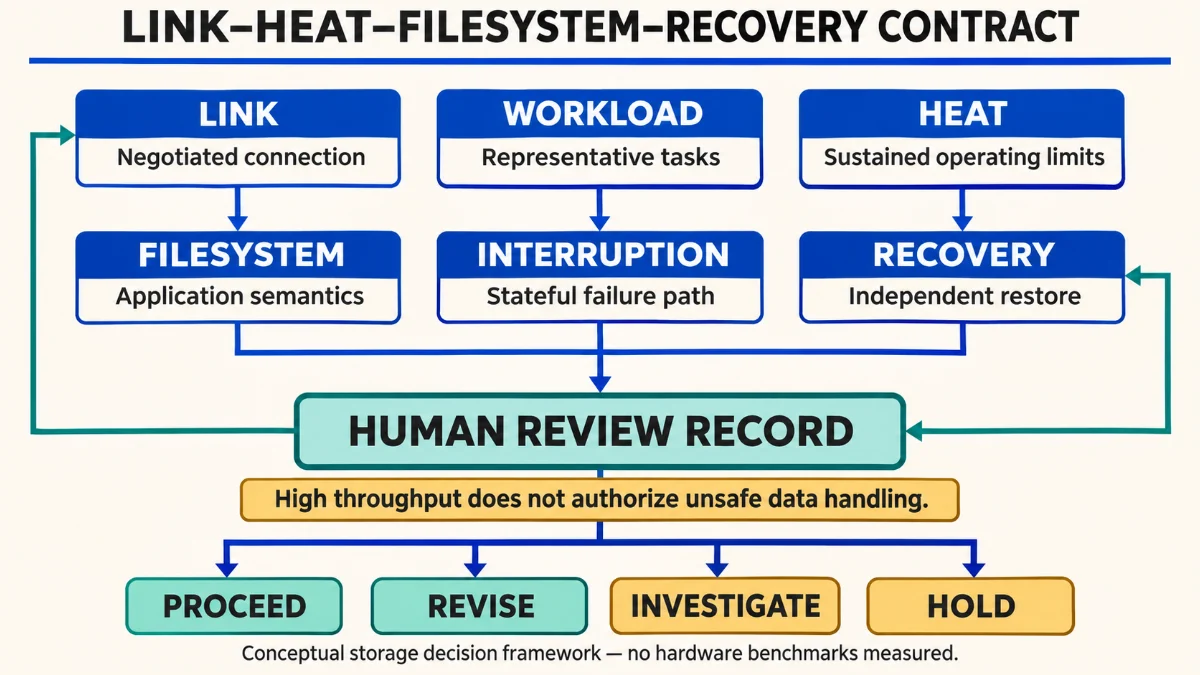
The contract should be used before moving a critical project and again when the workload, enclosure, port, operating system, or backup arrangement changes. It does not authorize a risky action because a fast connection passed. Each failure mode has to be managed on its own terms. An external SSD working drive is approved for a specific use case, not granted a permanent universal certification.
There are four legitimate outcomes. PROCEED when relevant evidence and recovery controls are adequate. REVISE by changing the cable, filesystem plan, workload placement, or backup architecture. INVESTIGATE when a measurement cannot distinguish cache, temperature, and link effects. HOLD when data integrity or recoverability is unacceptable. This is a conceptual engineering judgment framework, not a formally validated prediction model.
A Reproducible Measurement Plan Without Invented Benchmarks
For a new external SSD, I would record the actual hardware, firmware where available, host, filesystem, occupied space, power path, thermal conditions, and application versions. Establish a safe baseline using duplicate test data, not the only copy of a client project. If an operation could exhaust the disk, overwrite files, or intentionally cut power, it belongs in a dedicated test environment with explicit protections—not in a casual productivity trial.
| Test | Method | Observation | Inference limit |
|---|---|---|---|
| Link inventory | Identify negotiated host and device path | Connection class and topology | Not measured application throughput |
| Representative transfer | Copy a known duplicate dataset and verify the destination | Completion and data match | One dataset is not all workloads |
| Sustained operation | Repeat non-destructive long write or export | Timing, stalls, availability, applicable telemetry | Throttling cause may remain unconfirmed |
| Application task | Open, modify, save, close, and reopen safe project copy | User-visible task success | Does not establish universal compatibility |
| Backup restore | Restore an independent copy into a separate location | Integrity and recovery completion | Does not predict every future disaster |
Repeat measurements with consistent inputs and document variation rather than hiding it in one average. If results differ substantially, investigate whether the drive was warmer, nearly full, connected through a dock, writing different data, or affected by host background work. Do not announce a precise thermal, latency, or throughput figure unless it was actually measured under those recorded conditions.
Three Hypothetical Decisions
Scenario A: A Portable Media Workspace
Imagine a creator who moves project media between two supported computers, keeps verified source copies elsewhere, and mostly reads large files. An external SSD could be appropriate after tests confirm linked-media behavior, format support, sustained transfers, and backup restoration. The decision would be different if the project depended on proprietary plugins or cache paths that failed when the drive was mounted on the second machine. No measured export time is implied by this scenario.
Scenario B: A Development VM
Imagine a developer running a virtual machine from an external SSD to conserve internal capacity. The system boots and interactive work feels responsive, but snapshots accumulate and the physical connection passes through a frequently moved hub. I would provisionally reject that setup as a single-copy production environment until link stability, free-space growth, clean shutdown, and independent backup recovery are demonstrated. A successful boot is useful evidence but does not close those risk questions.
Scenario C: An Active Database
Imagine a local database serving a development tool while the underlying drive may be disconnected at any moment. Even if nominal transfer speed looks high, the combination of stateful writes and poor interruption tolerance can make the setup unsuitable. I would first examine database-specific durability requirements, transaction and recovery behavior, stable power, the host storage path, and verified restoration. The alternative might be internal storage for active state and an external SSD for consistent, separate backups.
These are design scenarios, not customer case studies. Their purpose is to show why an external SSD can be approved for one workload, conditionally approved for another, and held for a third without pretending to know actual product benchmark outcomes.
Your Working Copy Is Not Its Own Backup
If a project runs from an external SSD, the volume is the active source of truth for that project—not a backup merely because it is removable. A second folder on the same physical device does not protect against device failure. An APFS snapshot can help recover some local state, but a snapshot residing on the same lost device cannot substitute for an independent recoverable copy. Apple’s Time Machine guidance similarly distinguishes local snapshots from backups stored elsewhere.
The Dutch National Cyber Security Centre’s backup guidance describes a 3-2-1 approach and specifically emphasizes restoration testing. I treat that as a practical starting point, not a guarantee. An independent backup strategy should define retention, encryption, access controls, immutability where appropriate, and recovery time should reflect the value of the project. A backup that has never been restored is an unproven recovery assumption.
Safe Ejection and Recovery Keys
When the work is done, close applications that still hold files open and eject the drive through the operating system rather than unplugging it during active writes. Apple’s external storage instructions describe normal ejection and note that busy files can prevent it. For VMs, ensure the guest is fully shut down or in a supported state before the host volume is removed. A drive that cannot eject is a reason to investigate active use, not to assume cached writes have safely completed.
For encrypted external SSD working storage, recovery credentials must be available without depending on the lost volume. The backup must remain usable even if the original enclosure fails. I would add a periodic restore exercise to the same maintenance checklist used for software updates and system recovery.
The True Cost Is Not Just Price per Terabyte
External SSD decisions should include the enclosure, certified cable where relevant, power or dock needs, usable capacity after reserves, repeated migration effort, backup capacity, and downtime when the device cannot mount. The cheapest external SSD may be economical for an archive yet expensive as a critical working drive if its failure requires rebuilding a full development environment. Conversely, an expensive interface may buy little value when the workflow is constrained by a slow application stage or network transfer.
I would ask whether the next investment should be a faster drive, more internal capacity, better backup separation, a more stable physical connection, or simply an improved workflow. The answer depends on the failure or delay actually observed. The same workload-first reasoning also informs my local AI GPU upgrade decision framework. External SSD purchasing should follow evidence rather than being used to compensate for an unexamined process.
Practical Preflight Checklist
- Define the working task and the cost of losing access mid-session.
- Record the exact host port, cable, dock, enclosure, and negotiated connection.
- Choose the filesystem for the actual host and application semantics.
- Preserve an independent verified copy before migration or formatting.
- Move a duplicate project first, then open, save, close, and reopen it.
- Observe representative sustained work instead of only a short copy.
- Record free-space and snapshot growth for any active virtual machine.
- Confirm how the system shuts down, ejects, and resumes after normal interruptions.
- Restore a backup to another location and verify the recovered project.
- Document the decision and its review trigger when the environment changes.
I would keep the decision provisional if one of these steps reveals an unresolved material risk. An external SSD should earn its role through the task it needs to support, not through a single attractive specification.
Frequently Asked Questions
Can an external SSD replace an internal SSD for daily work?
For some projects, yes. The meaningful question is whether the external SSD meets application performance, connection stability, filesystem, and recovery requirements. A portable drive is not a universal substitute for internal storage, especially when the active workload cannot tolerate a sudden disconnection.
Is a USB4 external SSD automatically faster than USB 3.2?
No universal outcome follows from the interface name alone. The real negotiated path, controller, drive, workload, protocol overhead, and thermal state influence results. USB4 supports higher bandwidth classes, but any speed claim needs a measured workload.
Does Thunderbolt guarantee full speed on every USB-C port?
No. Connector shape does not prove identical protocol capabilities. Confirm the host, peripheral, cable, and any intermediate dock support the intended mode, then verify behavior with the actual task.
Should I use APFS or exFAT for a Mac working drive?
APFS is a natural option when the workflow is Mac-focused and benefits from its native capabilities. exFAT can help with file exchange across compatible systems. Select based on application requirements, metadata expectations, backups, and cross-platform needs instead of assuming that one format is universally best.
Can I run a virtual machine from an external SSD?
An external SSD can work for a VM, and storage location support depends on the hypervisor and host. Treat the VM as stateful data: verify consistent backups, shutdown, snapshots, free space, filesystem compatibility, and restore procedures. Successful booting does not prove sustained I/O performance.
How can I tell whether my SSD is thermal throttling?
Look for an applicable vendor-supported temperature or controller signal and repeat controlled work under documented conditions. Slower speed alone is not enough to identify thermal throttling, because cache behavior, capacity, cables, and background activity can also affect throughput.
Is a second folder on the same drive a backup?
It is a duplicate, not an independent recovery path against physical drive failure or theft. Use separate protected copies and test restoration. Snapshots on the same device cannot replace physically or logically independent backups.
What benchmark should I run before moving a project?
Start with the actual project workflow on duplicated data: transfer, open, edit, save, export, close, and reopen. A synthetic disk benchmark may add context but should never override failed application or recovery tests.
Evidence, Methodology, and Limits
This article synthesizes public specifications and operational documentation as of November 5, 2026. It does not report a newly measured SSD, transfer-speed comparison, thermographic observation, enclosure stress test, or recovery drill. The tables and scenarios are proposed decision instruments. A reader should validate vendor-specific limits and software support for their own hardware and applications before acting.
- USB Implementers Forum — USB4 overview: architecture, backwards compatibility, and negotiated capability limits.
- Apple — Disk Utility filesystem formats: APFS and exFAT capabilities and uses.
- Samsung Semiconductor — SSD product FAQ: a manufacturer example of dynamic thermal management.
- Broadcom — Locating a Fusion virtual machine bundle: structure and precautions for VM files.
- Broadcom — Troubleshooting Fusion disk I/O issues: disk performance and contention considerations.
- Apple — Time Machine backup guidance: independent backups and local snapshot limitations.
- NCSC-NL — All about good backups: backup separation and restoration practice.
- Apple — Connecting and ejecting storage: normal removal and busy-file considerations.
For relevant published field context, see Windows 11 ARM in VMware Fusion: Compatibility Lab. The public audit documents a selected external-drive VM setup but explicitly does not benchmark the external SSD. I keep that limitation rather than turning an observed boot into a speed claim.
Author’s Note
My view is that storage engineering becomes most useful when the purchase decision is postponed until the failure consequences are visible. An external SSD that is modestly slower but predictable, compatible, and recoverable may be a better working tool than one with a spectacular burst number and an unknown interruption path. I would rather defend that operational decision than promote a device I have not measured.